

A paralegal closes a demanding week of medical-record review and opens the billing system, only to rebuild each workday from memory. The records are already organized, the matter is moving, and the time still has to be reconstructed and retyped. That isn't just an inconvenience. It's a data-quality problem that can leave a personal-injury firm unsure which work was done, which matter it belonged to, and whether the billing record reflects it accurately.
A sound time tracking integration connects work activity to matter and billing records without making staff enter the same information twice. The hard part isn't getting two systems to exchange data. It's making sure each record is complete, attributable, and trustworthy when it arrives.
What Time Tracking Integrations Do and Why They Matter
A timer can record duration. An integration connects that duration to the work it describes. When a paralegal reviews a batch of medical records, for example, the system should associate the entry with the right client, matter, timekeeper, activity code, and billing status, then send it to the appropriate practice-management or billing workflow.
That chain has several moving parts. A matter ID identifies the case consistently across systems. An activity code classifies the work, such as record review or demand drafting. Billing status shows whether an entry is a draft, approved, or otherwise ready for billing. Synchronization is the transfer of the record between systems, along with a way to identify whether that transfer succeeded.
These terms matter because a timer operating on its own doesn't solve the problem of disconnected records. If staff still have to copy an entry into the matter file and then re-enter it in billing, the firm has digitized the timer but kept the manual workflow.
A 2021 survey of more than 2,000 legal-industry respondents found that 61% of lawyers considered capturing billable time a challenge, while more than 80% reported using legal time-management software to streamline time entry (survey findings on legal time-management software). Software adoption alone doesn't guarantee dependable data. The integration has to carry the right fields into the right destination and make exceptions visible when it can't.
Practical rule: Treat every time entry as a matter record with a lifecycle, not as a number of minutes that happens to appear in a billing tool.
That's why integration is a workflow decision, not a checkbox on a software comparison. The firm needs to decide which system is authoritative, who may correct an entry, and what happens when a matter ID or approval status doesn't match. The central question is whether the firm can capture useful, matter-level time at the point of activity without creating another round of manual work.
How Integration Improves Accuracy, Billing, and Productivity
Accurate time starts close to the work. A paralegal who records medical-record review while doing it can identify the activity and matter while those details are clear. A later reconstruction is more likely to blur separate tasks, omit work, or produce a vague description that doesn't help the attorney or billing staff understand what happened.
Billing benefits when approved entries flow into the appropriate matter and invoice process without retyping. Manual transfer creates opportunities for transcription errors, duplicates, and entries that never make it into the billing record. An integration can reduce those failure points, but only if it validates the matter, timekeeper, activity, and billing status before an entry moves downstream.
Productivity gains follow from reducing system switching and reconciliation. Staff should spend their time reviewing records, preparing demands, and supporting litigation, not comparing separate spreadsheets to determine whether an entry made it into billing. Connected data also gives firm leaders a clearer view of where effort is going across intake, case development, and litigation work.
The American Bar Association Journal reported that 81% of surveyed law firms used time-tracking software. Among those firms, 9% recovered more than 15 hours per month (ABA Journal survey results on law-firm technology). That benchmark is a reason to examine time capture and reconciliation, not a promise that any particular integration will recover the same amount.
What to look for after launch
A useful implementation should produce observable operational changes:
- Fewer missing entries: Staff can see whether work activity became a saved record.
- Cleaner billing handoffs: Approved entries reach the intended matter and billing workflow.
- Less manual reconciliation: Teams spend less time comparing separate systems to resolve discrepancies.
- Better effort visibility: Managers can review work by matter and activity when considering capacity and case economics.
Read those signals together. A rising number of entries doesn't prove success if corrections and unmatched records rise alongside it. The test is whether the firm gets more complete, usable time data while reducing the work required to verify it.
Comparing API Sync, Middleware, Browser Extensions, and Auto-Capture
There isn't one integration pattern that suits every firm. The right choice depends on how many systems need to exchange records, what level of control the firm needs, and whether staff can work comfortably within the capture process.
| Pattern | How data moves | Where it fits | Main trade-off |
|---|---|---|---|
| API sync | One system sends structured records directly to another through an application interface. | Firms with supported systems and a clear destination for approved entries. | Direct exchange is easier to trace, but field mismatches or API failures still need monitoring. |
| Middleware | A central integration layer routes and transforms data among several applications. | Firms connecting multiple tools or applying shared validation rules. | It centralizes control, but adds another component to configure and maintain. |
| Browser extension | A tool captures activity or time while staff work inside browser-based applications. | Teams that spend much of their day in web-based case or document systems. | It can reduce context switching, but may depend on browser behavior and permissions. |
| Auto-capture | System events trigger draft entries that a user can review. | Firms that want entries created close to actions such as reviewing a record batch. | It reduces reliance on memory, but an event alone may not explain whether the work is billable or how it should be described. |
An API sync is often a straightforward choice when the firm has a reliable source system and a well-defined destination. Middleware becomes more useful when the workflow spans several applications and needs common validation. Browser extensions can keep capture near the task, though teams should check how updates and browser restrictions affect reliability. Auto-capture can prompt timely records, but it shouldn't turn every click into a billable entry.
The American Bar Association advises firms to evaluate whether standalone billing tools or tools integrated with practice-management platforms fit their workflow, and emphasizes contemporaneous timekeeping for accurate legal billing (ABA guidance on tracking time). The decision should reflect how work moves through the firm, not just which integration option sounds most automated. For a broader framework for assessing connections between legal applications, see these software integration strategies for law firms.
Whatever pattern the firm chooses, define the data contract before enabling synchronization. Every event should map to a client, matter, responsible timekeeper, activity code, and billing status. If any of those values is missing or ambiguous, hold the record for review rather than passing uncertainty into billing.
Security and HIPAA Considerations for Case Data
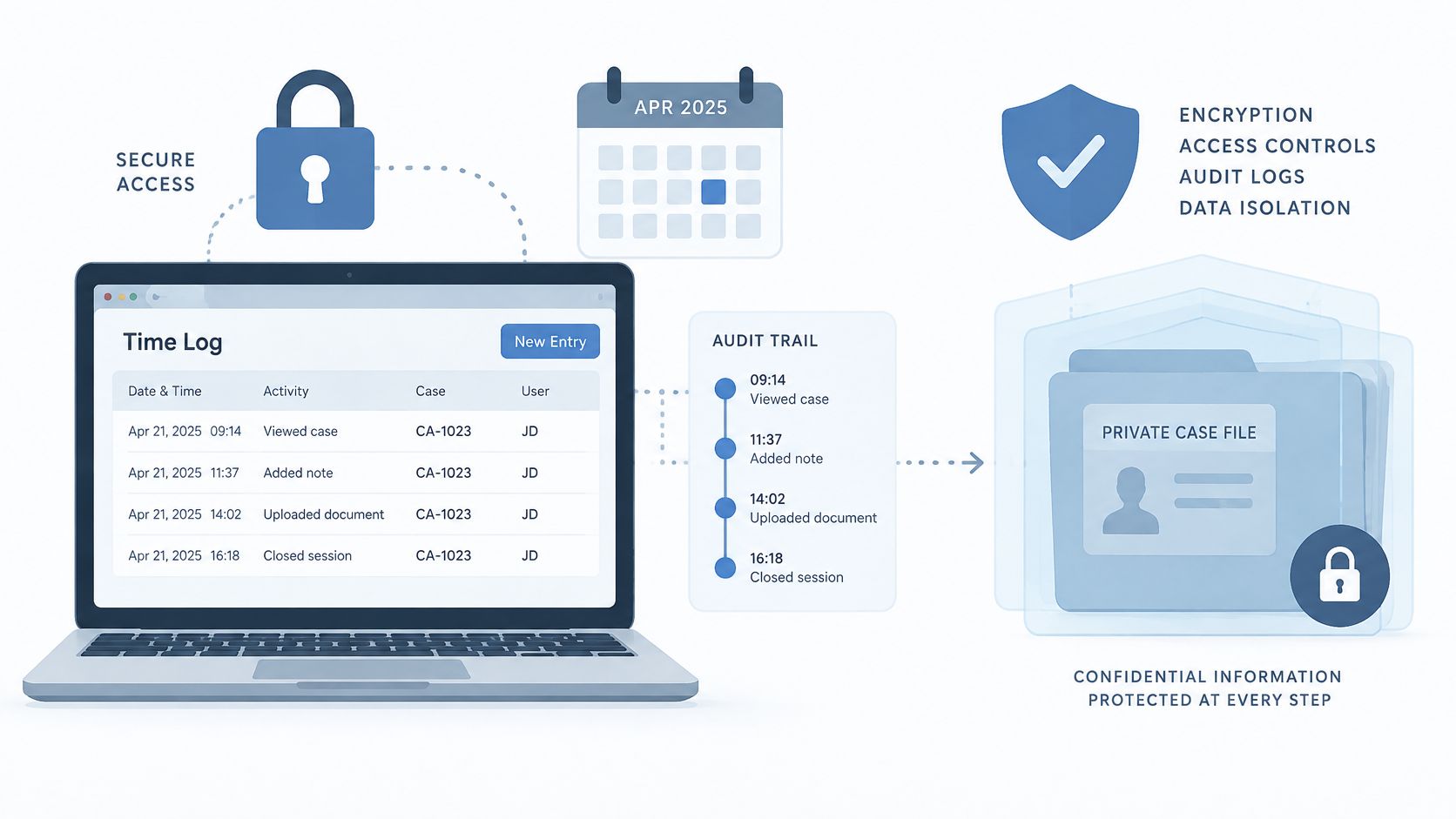
Time metadata can expose sensitive information even when the entry doesn't contain a medical record. A matter name, activity description, or timestamp may reveal that confidential work is underway. The integration therefore needs controls for the data it transmits and the records it creates.
NIST guidance for cloud-native API protection identifies timestamp, client identifier, request and response status, and endpoint identifier as minimum useful fields for API audit records. It also warns that inconsistent clocks can produce inaccurate timestamps and undermine log analysis (NIST guidance on cloud-native API protection). For a law firm, synchronized time sources and consistent UTC timestamps help investigators understand when a record was created, transmitted, rejected, or changed.
Controls that make the record defensible
A practical API audit record should identify the source and destination, the operation, its result, the affected record, and a correlation ID that ties related events together. Use idempotency keys so a retry after a timeout doesn't create a second time entry. Route records that fail validation to a dead-letter queue for review instead of dropping them or repeatedly sending them without resolution.
Access should match the task. A connector that creates draft time entries generally doesn't need permission to delete approved invoices. Logs should record enough to diagnose a transfer without copying unnecessary protected health information into the time platform.
Keep narratives focused on billing-relevant work. “Reviewed medical records and updated chronology” may explain the task without reproducing diagnoses or other case details. The firm should also confirm how each vendor handles access controls, data retention, and applicable agreements, including with counsel where needed. For related considerations, review this guide to HIPAA compliance for law firms.
Implementation Checklist and Phased Rollout Plan
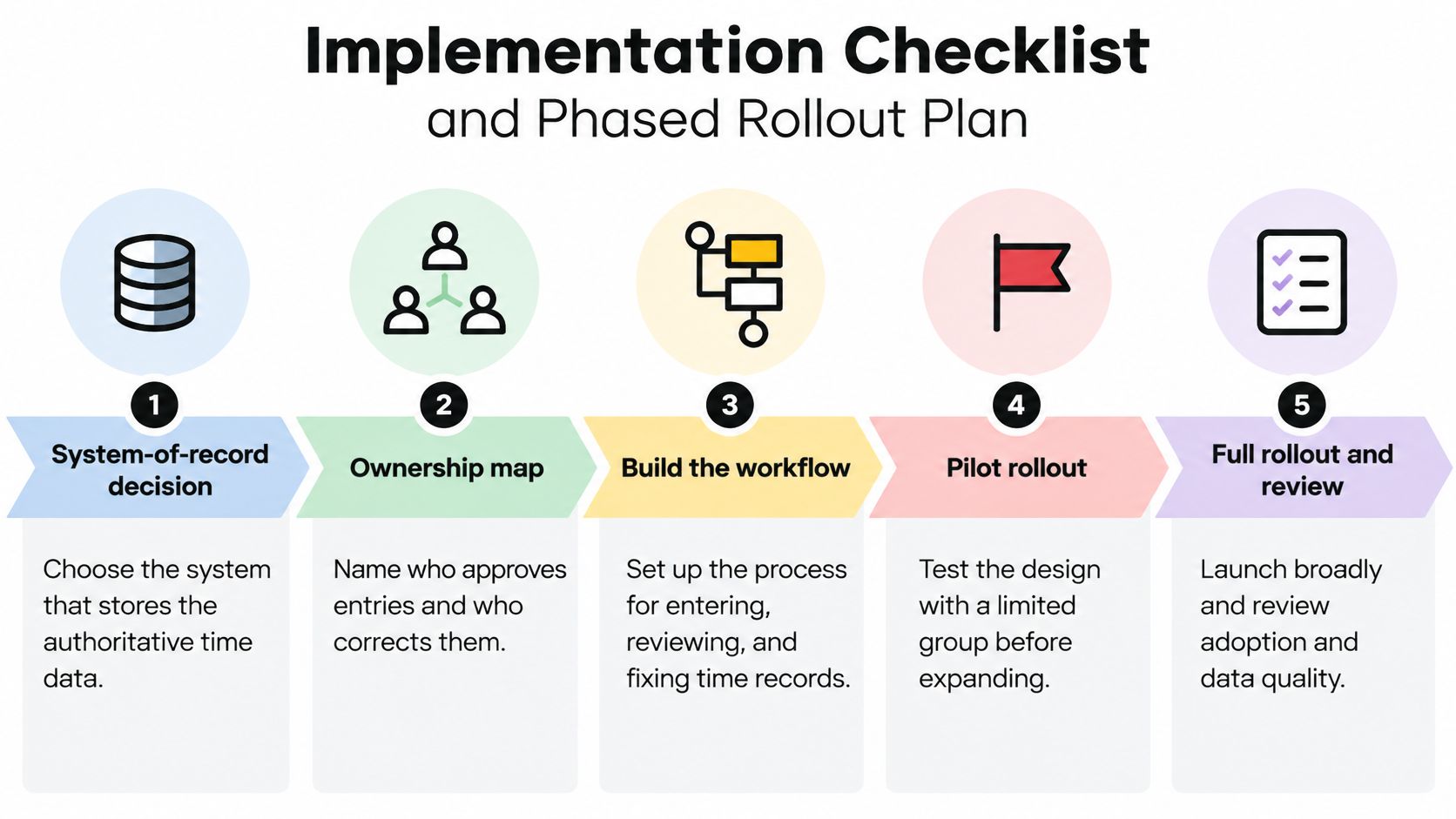
A rollout goes better when the firm settles ownership and record rules before connecting systems. Start with the operating decisions, then test the workflow with real matter records before expanding access.
Phase one, decide where truth lives
Name the system of record for time entries. Decide whether the authoritative record sits in the time platform, practice-management system, or billing application. Then map ownership: who approves entries, who corrects them, and who investigates failed synchronization.
Phase two, define the fields and permissions
Confirm the firm's matter ID standard and decide how the integration handles alternate or legacy IDs. Approve configurable activity and task codes, then document the fields that must travel with each record: original start and stop timestamps, duration, user identity, matter ID, and edited billing narrative.
Build a permissions matrix before granting credentials. Specify which users and integration accounts can create, edit, approve, or reject entries. Keep connector permissions limited to the actions required for its job.
Phase three, test exceptions in a limited pilot
Choose a practice group or workflow with representative work, such as medical-record review and demand preparation. Compare sample integrated entries with the firm's existing manual records. Confirm that the correct matter, timekeeper, activity, duration, and billing status arrive together.
Test the failure paths deliberately. The pilot should show what happens when a matter ID is unmatched, an API write fails, or an entry lacks approval. Check that retries don't create duplicates and that staff know who owns each exception.
A pilot is useful only if it tests what happens when the integration fails, not just when everything works.
Phase four, train and expand in stages
Train staff on the actual workflow: how draft entries appear, how to correct an error, and where to report a missing record. Expand only after the pilot team can complete those tasks reliably. Give each new group clear ownership and a route for questions.
Phase five, review the record after launch
Use exception reports to monitor unmatched matters, failed writes, and entries awaiting approval. Review the field mapping when patterns emerge, rather than asking staff to keep repairing the same issue by hand. The accompanying walkthrough can help teams visualize a staged rollout:
KPIs to Measure Integration ROI
Set a baseline before the integration goes live. Without one, a firm can't distinguish a real operational change from a different reporting view. Track the same measures before and after launch, and review them by workflow or practice group when the data allows.
A 2025 survey of 264 professionals at U.S. midsized firms found that entering data into multiple systems was the leading non-billable time drain, cited by 40% of respondents. It also found that 99.6% saw value in a unified platform (2025 survey coverage on interconnected legal technology). For a personal-injury firm, that makes duplicate entry and confidence in matter data practical measures to watch, rather than abstract technology concerns.
| KPI | What It Measures | Why It Matters |
|---|---|---|
| Unmatched entries | Records that arrive without a valid matter or required association. | Shows whether matter IDs and field mapping work across systems. |
| Corrected entries | Records staff have to change after synchronization. | Helps separate successful capture from accurate capture. |
| Time to approved record | Elapsed time between the activity and approval for billing or case-cost recording. | Reveals delays in the handoff and review process. |
| Capture rate | Work events that become usable time records, compared with the events the firm expects to capture. | Indicates whether staff and automated workflows are recording relevant work. |
| Invoice preparation time | Staff effort required to assemble and check time entries for billing. | Shows whether connected records reduce administrative preparation. |
| Manual reconciliation hours | Time spent comparing systems and resolving discrepancies. | Tracks the work the integration is meant to remove. |
Interpret the measures together. If capture rises while corrections also rise, the firm may be recording more activity but mapping it poorly. If unmatched entries fall but invoice preparation doesn't change, the remaining delay may sit in approvals or billing review rather than synchronization. A structured automation ROI calculation can help teams express those operational changes in terms leadership can assess.
Troubleshooting Sync Failures and Driving Team Adoption
Go-live doesn't create adoption. Staff use an integration when it fits the work, behaves predictably, and gives them a clear way to fix errors. If the system feels like surveillance or produces bad records, people will return to manual entry, sometimes without telling the project team.
Start troubleshooting with evidence, not assumptions. Find the affected record and its correlation ID, then check the audit log for the source, destination, operation, timestamp, and result. If the system rejected the record, inspect the dead-letter queue and validation message. Only then review field mapping and permissions, so the team fixes the cause rather than manually patching one symptom.
Follow the failure from record to cause
- Duplicate entry: Check whether a retry repeated a successful write. Confirm idempotency behavior before deleting any record.
- Wrong or missing matter: Compare the source matter ID with the destination's accepted identifier and correction rules.
- Failed synchronization: Review the status and error details, then verify that the connector still has the permission required for the operation.
- Incomplete narrative: Check whether the source event supplied a billing-relevant description and whether a later transformation shortened or replaced it.
- Unexpected timestamps: Compare the systems' time sources and confirm that timestamps use a consistent standard.
Staff involvement matters just as much as the diagnostic sequence. Bring paralegals and case managers into workflow design because they know where records originate and where handoffs break. Name the people who own corrections, explain what managers can and cannot infer from time data, and share regular exception reports with the team.
Adoption improves when staff can see how an error gets fixed and who is responsible for fixing it.
Attorneys who prefer manual entry may be concerned about losing control over descriptions or approvals. Show them a draft-to-approval workflow: the integration creates a proposed record, the timekeeper reviews it, and the firm preserves the approved result. That's a different proposition from submitting every activity as billable time.
During the early rollout, review recurring errors with the people who encounter them. If staff repeatedly correct the same activity code or matter mapping, update the rule and communicate the change. The objective isn't to make everyone adapt to a flawed connector. It's to make the connector reflect how the firm handles work, with clear accountability when a record needs attention.
Pairing Integrated Time Data with Ares and Your Next Step
Time data shows who worked on a matter, what activity they recorded, and how long it took. It doesn't, by itself, describe what the work produced. For personal-injury teams, that distinction matters during medical-record review and demand preparation, where the work product and the effort behind it are both relevant to case operations.
Ares is an AI-powered platform for personal-injury firms that automates medical-record review and demand letter drafting. Teams can upload case files and use the platform to organize information such as dates, diagnoses, treatments, providers, and symptom chronology into summaries and exportable demand drafts. Its role is different from a time system: the time platform records the work, while document review and drafting tools help organize the case material being worked on.
Used alongside a well-designed time tracking integration, those records can give operations teams a clearer view of both effort and output. A firm can define a medical-record review event and a demand-drafting event, then assess whether the time entries reach the right matter and whether the resulting work product is ready for attorney review. That connection shouldn't be treated as proof of case value or a substitute for legal judgment. It's a way to make the workflow easier to inspect and improve.
Ares is described as HIPAA compliant and designed with enterprise-grade privacy and security controls. Firms report eliminating 10+ hours of manual review and drafting per case, according to the publisher's product information. Treat that as a vendor-reported claim to evaluate in your own workflow, not a guaranteed result for every matter.
Choose one pilot matter and define the events you want to capture for medical-record review and demand drafting. Decide which system owns the time record, who approves it, and how you'll measure unmatched entries and correction work. Then request a walkthrough to see how Ares fits your document workflow alongside the firm's time and billing systems.
Ares helps personal-injury firms organize medical records and prepare demand drafts, giving teams case-ready summaries to pair with trustworthy time data. Visit Ares to request a walkthrough and plan a focused pilot around medical-record review and demand drafting.