

A case can have clear liability, cooperative witnesses, and a strong damages theory, yet remain impossible to value confidently because one provider's records are missing. The file keeps moving in every visible way, but the demand cannot go out, the expert review stays provisional, and the attorney keeps asking the case manager the same question: What are we still waiting for?
That's the operational problem effective record retrieval should solve. The objective isn't merely to send requests faster. It's to identify every relevant custodian, obtain a complete evidentiary record, verify what's missing, and move the file into demand preparation or expert review without avoidable rework.
Why Streamlined Record Retrieval Changes Case Outcomes
A six-figure demand can stall for months because one imaging CD never arrives. The attorney may be ready to depose the defendant, yet the missing study prevents the team from confirming the injury timeline, evaluating permanency, and presenting a complete damages narrative. The retrieval gap becomes the case constraint.
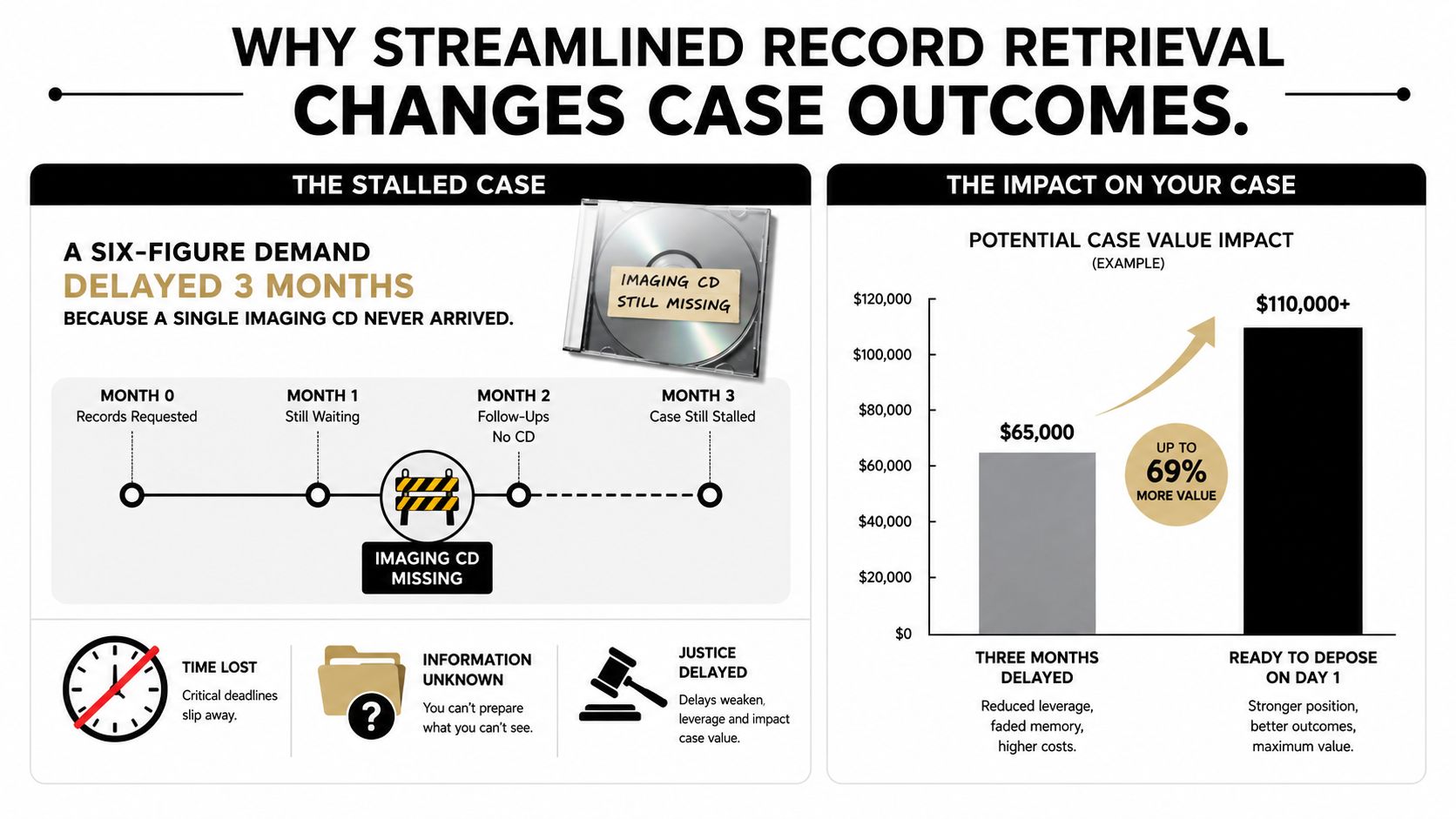
Retrieval functions as an evidence-completeness problem in a personal injury practice. A file may contain hundreds of pages while omitting the radiology report, operative note, billing item, or follow-up visit that connects causation to damages. Document volume creates confidence only after the team tests the record for gaps and assigns the next action.
The three downstream costs
First, incomplete retrieval creates cycle-time drag. Manual medical-record workflows can take 60 to 90 days, while faster digital workflows are reported at 10 to 12 days, a difference of roughly 5 to 8 times in turnaround, according to industry reporting on medical-record retrieval in personal injury cases. In practice, that delay affects evaluation, demand preparation, and settlement timing.
Second, piecemeal production weakens negotiation credibility. A claims professional who receives one batch of records and then another must reassess whether the damages presentation is complete. Favorable liability facts do not eliminate questions about the injury's scope, duration, or medical cause when supporting evidence arrives in fragments.
Third, retrieval consumes attorney and staff capacity that ordinary dashboards often miss. A paralegal who spends the morning calling custodians, checking portals, and reconciling duplicate PDFs is not preparing a chronology or organizing expert materials. The firm pays for that work through labor and delayed case progression.
Operational rule: A record is not “retrieved” when a file reaches the case folder. It is retrieved when the team knows what it contains, what remains missing, and what action follows.
Market data reflects the operational choice involved. 47.40% of law firms rely on external vendors for medical-record retrieval, 26.46% use vendors for most cases, and 14.08% work exclusively with a single vendor, according to the same industry source. Those figures show why retrieval design matters for high-volume PI firms. Turnaround affects scheduling, but evidence completeness determines whether the file can support a credible demand and produce settlement advantage.
Planning the Retrieval Workflow Before You Send a Single Request
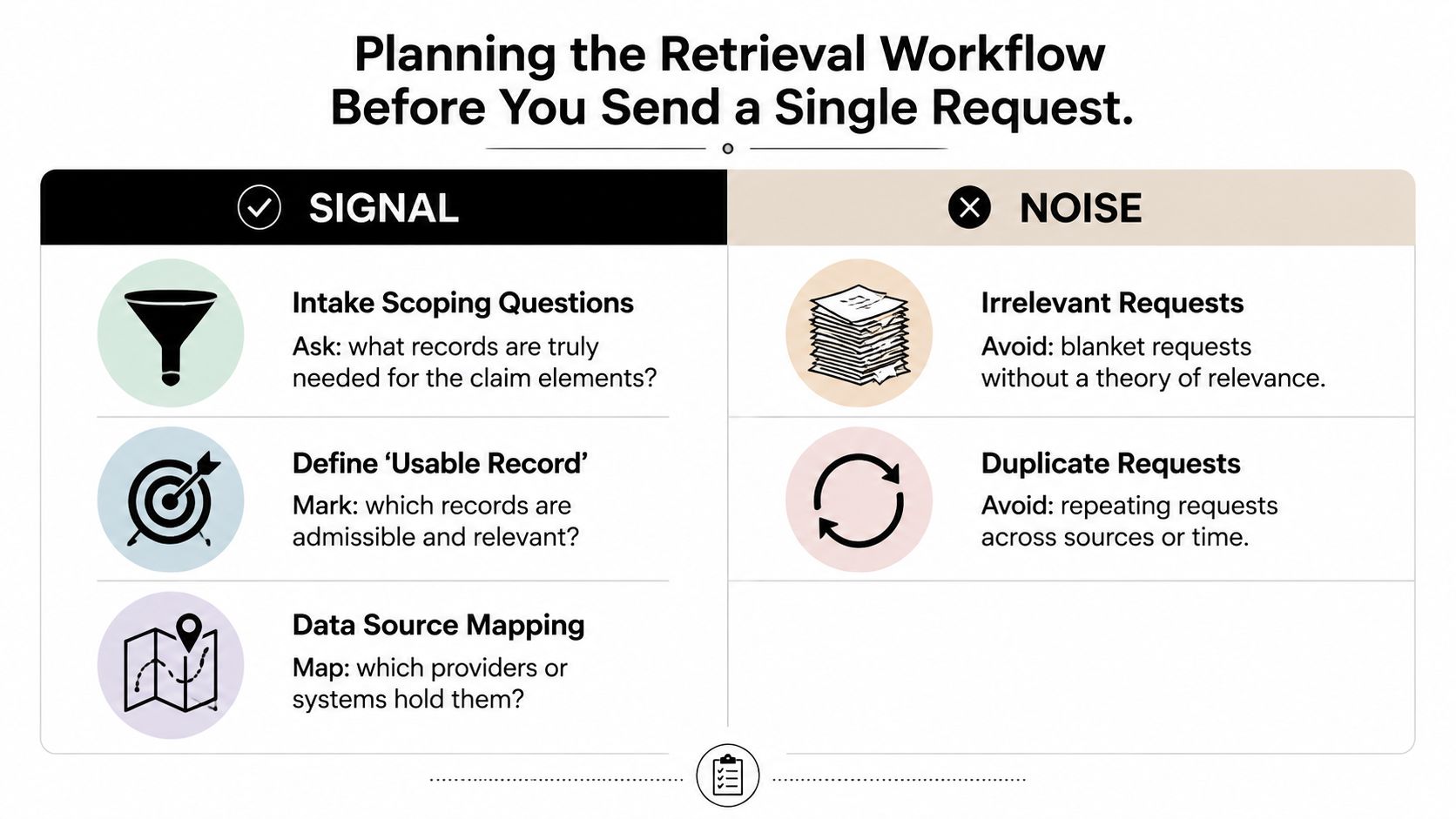
The strongest retrieval pipelines begin before anyone sends a request. Intake should produce a working map of the evidence, not just a list of addresses and treatment dates.
Start with the claim theory. Ask which records prove the mechanism of injury, establish baseline condition, document treatment, support future care, and show functional impact. Then distinguish records that will be used for legal analysis from records that merely provide background. A blanket request may feel thorough, but it often creates review burden without improving the case.
Build the custodian map
A custodian map should include more than hospitals and treating physicians. Depending on the claim, relevant evidence may sit with:
- Medical providers: Emergency departments, primary-care offices, specialists, therapists, imaging centers, pharmacies, and surgical facilities.
- Emergency responders: Ambulance services and emergency medical service organizations may hold dispatch, transport, and treatment documentation.
- Employers: Payroll, job-duty, incident, accommodation, and leave records can support lost-wage and functional-impact analysis.
- Insurers and administrators: Claim files, prior medical authorizations, and correspondence may identify additional providers or treatment periods.
- Outside sources: Prior counsel, government facilities, and third-party record custodians may hold material not identified during intake.
Create a hierarchy for each custodian. Record the preferred electronic channel, the fallback portal, the fax or mail path, the person responsible for follow-up, and the authorization needed. The retrieval channel affects performance sharply. Independent workflow guidance reports electronic EHR retrieval at 90% or higher success, portal retrieval at 70% to 85%, fax at 50% to 70%, and mail at 40% to 60%. The source also identifies retrieval rate, time to retrieval, chase cycles, and cost per record as useful operating metrics in its medical-record retrieval guidance.
Sequence authorization and deadlines
Authorization is a gating dependency. Sending a request before the authorization chain is complete creates rejection, resubmission, and unnecessary follow-up. The process should flag missing signatures, outdated forms, unclear date ranges, minors, decedents, and provider-specific requirements before submission.
Map every request against the statute of limitations, treatment milestones, scheduled depositions, expert deadlines, and the intended demand date. HIPAA's Privacy Rule gives individuals the right to inspect, review, and receive copies of records held by covered plans and providers, and providers generally must respond within 30 calendar days, with a possible 30-day extension after written notice, as explained in HHS guidance on medical-record access rights.
Use this checklist before submission:
- Intake trigger: What event starts retrieval?
- Record category: Medical, billing, imaging, employment, or claim material?
- Custodian hierarchy: Who holds the source, and what's the fallback?
- Authorization gate: Is the correct authorization complete and accepted?
- Deadline map: What date makes this request urgent?
Teams that need a structured way to collect privacy-request information can also review this GDPR form generator online, then adapt the underlying intake discipline to their jurisdiction and legal workflow.
For additional operational context on obtaining medical files, firms can consult this guide to getting medical records.
Building Request Templates and Authorization Packets That Get Fulfilled Faster
A request packet should make the custodian's job obvious. The first page needs a plain-language explanation of who is requesting the records, whose records are sought, the relevant date range, and the exact record categories required. Don't force a records department to infer whether “complete medical file” includes billing, radiology images, therapy notes, or correspondence.
The packet should identify the patient with enough detail to prevent a search failure. Include the full legal name, former names when relevant, date of birth, contact information if required by the custodian, claim or account identifiers, and the incident date. Use a date range tied to the claim theory rather than an unexplained demand for every record ever created.
Separate the request types
Record departments process different materials through different channels. Label the request clearly:
- Clinical records: Progress notes, consultations, operative reports, discharge summaries, therapy notes, and medication documentation.
- Billing records: Itemized charges, diagnosis codes, payment history, and account statements.
- Imaging: Reports, images, studies, and the preferred delivery format.
- Administrative material: Referrals, scheduling records, authorizations, and correspondence when relevant.
Specify whether the firm needs a complete chart or itemized categories. Ask for native or searchable electronic files where available, and state whether imaging should be delivered through a secure portal, electronic media, or another approved method. A surprise stack of paper or an unreadable scan can create a second retrieval project.
Make authorization review easy
The authorization should match the request. It should identify the patient, the covered records, the recipient, the purpose, the expiration or revocation terms, and the signature requirements applicable to the person signing. Separate handling may be needed for minors, decedents, guardians, and records subject to additional restrictions.
A practical packet structure looks like this:
- Cover letter with the request purpose and custodian instructions.
- Patient-identification sheet.
- Signed authorization and any supporting authority documents.
- Itemized record schedule with date ranges.
- Delivery instructions and secure contact details.
- Internal tracking sheet with submission date, channel, expected response, and escalation owner.
Pre-populated custodian blocks reduce inconsistent names and addresses, but they shouldn't become permanent assumptions. Verify each provider's current process before sending. A template saves time only when the firm updates it after rejections, format problems, and incomplete productions.
The most useful template measure is not how quickly staff can generate a packet. It's whether the custodian fulfills the right request on the first pass. That requires clarity about what evidence is needed, why it matters, and how the provider can deliver it securely.
Choosing Between In-House, Vendors, and AI-Assisted Retrieval
The staffing decision should follow the firm's caseload shape, not a software demonstration. A small practice with irregular intake may value control and familiarity, while a high-volume PI operation may need external capacity during demand-letter surges. The right question is whether the model produces complete, usable evidence at a sustainable fully loaded cost.
| Dimension | In-House Team | Traditional Vendor | AI-Assisted Platform |
|---|---|---|---|
| Completeness | Strong institutional knowledge, but dependent on staff discipline and provider follow-up | Broad retrieval capacity, with quality varying by custodian and escalation process | Can identify patterns, duplicates, and apparent gaps, but requires human validation |
| Turnaround | Direct control over priorities, limited by staffing capacity | Scales outreach and exception handling across matters | Accelerates organization and analysis after records are available, with some systems supporting retrieval workflows |
| Fully loaded cost | Includes salary, benefits, training, supervision, and chase labor | Usually easier to budget, but fee structures and add-ons require review | Subscription or usage costs may sit alongside internal review and quality-control labor |
| Surge capacity | Vulnerable when many cases reach demand preparation together | Better suited to volume spikes | Useful for sorting and chronology preparation across a large file set |
| Auditability | Usually aligned with the firm's case-management controls | May rely on a separate portal and vendor reporting | Depends on exportable logs, source citations, permissions, and retention settings |
| Concentration risk | Knowledge stays inside the firm, but turnover creates continuity risk | A single provider can become a critical dependency | Platform outages, model changes, and vendor subcontractors create additional diligence needs |
What each model does well
An in-house team understands the firm's terminology, claim theories, and escalation preferences. That advantage matters when a missing record requires judgment rather than another automated chase. The trade-off is that internal staff can become the bottleneck, particularly when every request, exception, and quality review depends on the same people.
Traditional vendors add retrieval labor and provider familiarity. They're useful when the firm doesn't want case staff spending their day on fax, portal, phone, and mail follow-up. Review the fee model carefully. Per-page charges can discourage thorough requests, proprietary portals can fragment audit trails, and a vendor may optimize for delivered volume rather than evidentiary completeness.
AI-assisted platforms are strongest after the firm has defined the evidence standard. They can sort document types, remove duplicates, organize provider records, and prepare chronology material. They don't eliminate the need to confirm that every custodian was identified or that a summary accurately reflects the source.
A hybrid model often assigns authorization control and quality assurance to the firm, retrieval volume to a vendor, and document organization to an AI layer. Firms comparing outside providers can use this overview of medical-record retrieval companies as a starting point, then test providers against their own completeness and audit requirements.
For a practical decision, score each model on complete records per matter, time to first usable evidence, chase ownership, exception aging, cost per complete record, and resilience during intake surges. Choose the model that protects case readiness, not the one that produces the most attractive activity report.
Where AI Actually Helps and Where It Can Mislead You
AI quality can't be reduced to one accuracy number. Retrieval is a pipeline that includes query formulation, candidate selection, semantic relevance, and downstream evidence extraction. The CliniQ benchmark illustrates why semantic matching matters: exact-string matching can miss clinically equivalent evidence, so its retrieval research supports evaluating each stage rather than relying on a single file-found score.
Where the leverage is real
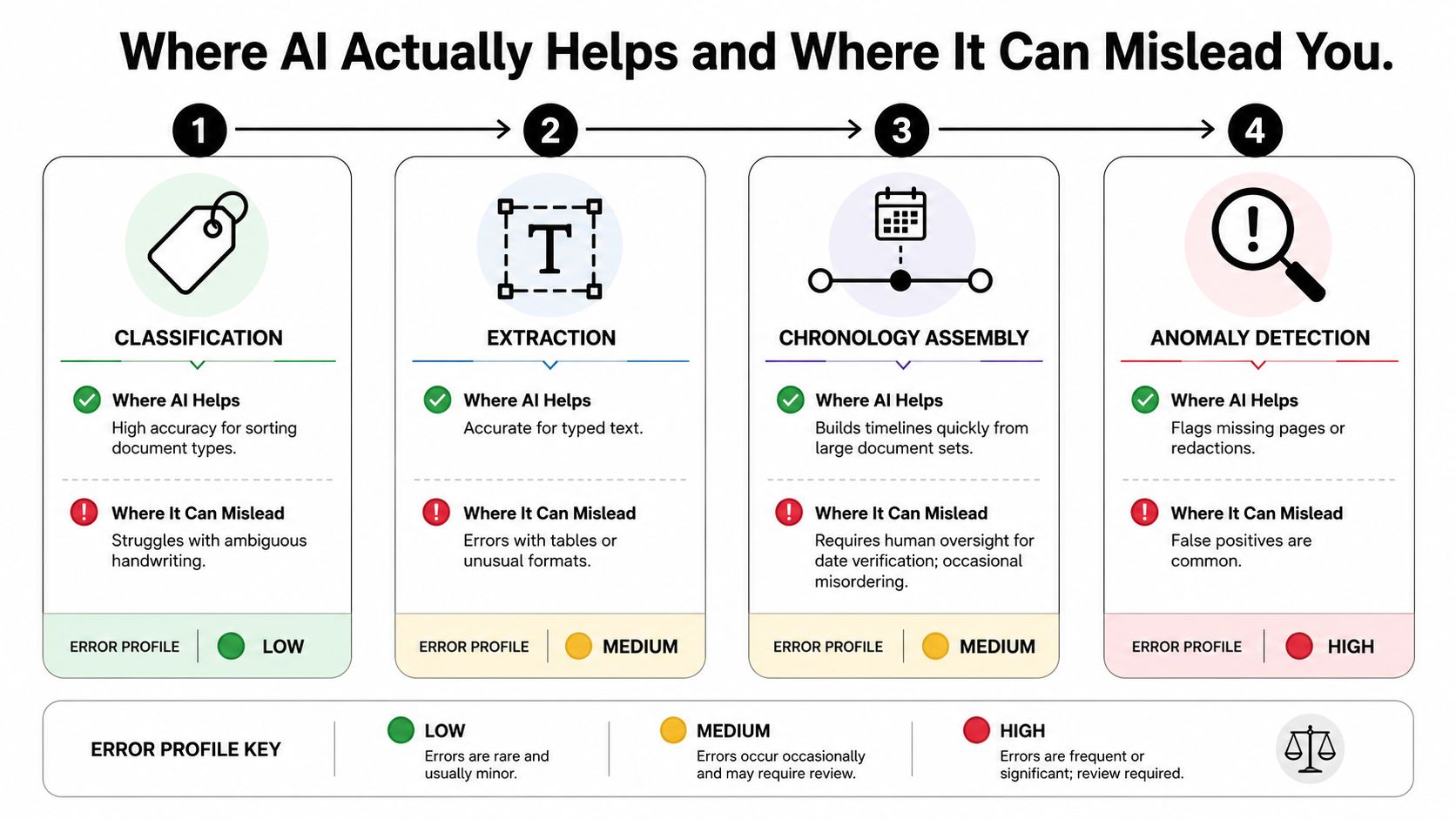
Classification is a natural first use. A system can separate emergency records, therapy notes, bills, imaging reports, and correspondence so staff aren't opening every document manually. It can also tag providers and flag duplicate productions from overlapping facilities.
Extraction helps turn scattered pages into working facts. Dates, diagnoses, procedures, medications, providers, and symptoms can be pulled into a draft chronology. Anomaly detection can surface missing page ranges, unusual date gaps, redactions, or a treatment sequence that deserves human attention.
Chronology assembly is valuable because it changes the starting point for attorney review. A lawyer can begin with the organized narrative, then inspect the source material where the case turns on causation, permanency, prior condition, or future care.
Where the system can mislead
Typed text is easier to process than handwritten notes, tables, unusual forms, and poor scans. An AI system may confidently misread an imaging report, merge events from different providers, assign the wrong date, or cite a page that doesn't support the sentence. A polished summary can therefore hide a serious evidentiary error.
Use a guardrail stack:
- Confidence routing: Send low-confidence extractions to a human reviewer instead of allowing them into the final chronology.
- Source-page pinning: Require every material summary statement to point to the underlying page or file.
- Sampling audits: Review a fixed portion of outputs consistently, including matters that appear straightforward.
- Human sign-off: No AI-derived statement should leave the firm without review by a qualified team member.
- Exception logging: Track recurring errors by document type, provider, and file quality.
The practical standard is not replacement. It's controlled use. AI should reduce sorting and drafting effort while preserving a direct path from each conclusion back to the source document.
HIPAA, Audit Trails, and Security Controls You Cannot Skip
HIPAA compliance is an operating discipline, not a checkbox on a vendor page. The Privacy Rule sets an access framework for medical records, while the firm must show who requested information, why it was needed, where it went, and who reviewed it. Those records protect the file when a missing category delays a demand or a disputed production reaches negotiation.
Apply the minimum necessary principle to every request. Specify the categories and date ranges tied to the claim, record the business purpose, and avoid sending broad patient histories without a documented reason. A clear request is easier for the custodian to fulfill and easier for the firm to defend later.
Build a defensible audit trail
The retrieval log should capture:
- Requester identity and role.
- Authorization version used.
- Custodian and channel accessed.
- Date and time of submission, access, production, and download.
- Records produced, including missing categories.
- Onward transfers to counsel, experts, co-counsel, or vendors.
- Corrections, re-requests, and escalation decisions.
Electronic health record audit trails record who accessed data, when, and what they viewed or changed, creating a chronological history that supports compliance. Your retrieval system should preserve comparable traceability around files received and shared by the team. Teams building a defensible process can also review these audit trail requirements for legal workflows.
Control transmission, storage, and AI exposure
Use encrypted portals or approved encrypted email. Keep protected health information out of unencrypted attachments, personal drives, and unmanaged desktop folders. Role-based access should restrict records to assigned matter teams, and off-boarding procedures should remove access promptly when staff, contractors, or vendors leave.
Every vendor or AI platform handling PHI should sign a Business Associate Agreement. Firms reviewing the practical work of implementing BAAs for document sharing should ask how each provider handles subcontractors, incidents, access logs, and data deletion. Confirm the agreement covers the service being used, not merely the vendor's general platform.
For AI tools, determine whether customer data trains models, how long outputs remain available, and whether zero-retention settings exist. Vendor diligence should cover the BAA, SOC 2 Type II report where available, breach history, subprocessors, retention policy, access controls, and incident-notification process. These controls do more than reduce exposure. They preserve a reliable evidence chain, so incomplete files can be corrected before they slow settlement analysis or consume attorney review time.
KPIs, Common Pitfalls, and a 90-Day Rollout Plan
A request count is an activity metric. It doesn't tell a managing partner whether cases are becoming settlement-ready. Measure the distance between case acceptance and usable evidence, then connect that evidence to demand, expert, and negotiation milestones.
Track these measures consistently:
- Time to first usable record: Median and 90th-percentile time from acceptance to the first record that supports case analysis.
- First-pass completion: The share of records received without follow-up or correction.
- Missing-item rate: Unresolved gaps by custodian, record type, and treatment period.
- Provider performance: Retrieval success and exception patterns by channel and provider type.
- Cost per complete record: Include vendor charges, staff review, chase labor, and rework.
- Exception aging: How long incomplete or rejected requests remain unresolved.
- Staff touches: Manual actions per matter, including duplicate review and re-filing.
- Case readiness: The percentage of matters ready for demand or expert review by the internal target date.
- Quality controls: Authorization rejection, duplicate-record, misfiled-record, and sampled completeness rates.
Pitfalls that create attractive but useless dashboards
A firm can buy technology before mapping custodians and automate confusion. It can celebrate a fast download even though the production omits imaging, billing, or later treatment. It can also mistake a generated summary for a source document, then let an unverified narrative enter a demand package.
Measure the complete case file, not the number of requests, pages, or downloads.
Watch for incentives that reward page count rather than useful evidence. A vendor may deliver a large file quickly while leaving provider discovery, chronology gaps, and missing records unresolved. The firm should define “complete” before it negotiates service levels.
A practical 90-day rollout
Days 1 to 30, map and baseline. Document the intake trigger, custodian workflow, authorization path, owners, escalation rules, and current KPIs. Standardize the request packet and define what counts as a usable record.
Days 31 to 60, pilot and test. Run the process on a limited case cohort. Test electronic, portal, fax, and mail exception paths. Review rejected authorizations, incomplete productions, duplicate records, and staff touches. Train case managers on escalation ownership.
Days 61 to 90, refine and expand. Review KPI movement and exception patterns. Update templates, document provider-specific instructions, and set stop conditions. For example, records older than 20 business days can trigger escalation under the firm's internal policy, while statutory deadlines remain governed by the applicable jurisdiction and request context.
One useful operating pattern is automatic authorization follow-up paired with routing incomplete packets to a legal assistant. The result to watch isn't faster downloading. It's fewer delayed reviews, earlier demand preparation, and more attorney time available for valuation and negotiation.
Review the dashboard monthly. If retrieval is faster but completeness, case readiness, or staff utilization hasn't improved, the firm has optimized the wrong outcome.
Ares helps PI firms turn retrieved medical files into organized chronologies and demand-ready materials by extracting dates, diagnoses, treatments, providers, and symptom progression for human review. If your team wants to connect efficient record retrieval with earlier case analysis, visit Ares and evaluate how it fits into your intake-to-demand workflow.