

Monday morning starts the same way it usually does in a PI shop. A paralegal opens a fresh intake, and instead of a neat summary, she's staring at a 1,200-page PDF dump, a few scanned pages from a records vendor, a disk image from imaging, and two follow-up emails with addenda buried in the thread. The attorney wants a clean chronology by noon, the adjuster wants gaps explained, and nobody has time to read every page twice.
That's the job of how to handle unstructured data in personal injury work. It's not a buzzword problem, it's a bottleneck problem, and it turns into a settlement-risk problem the moment a missed date, missed diagnosis, or undocumented treatment gap slips into a demand. The firms that get this right stop treating raw records like a pile of PDFs and start treating them like an evidentiary pipeline, where provenance, chronology, and QA matter as much as extraction.
Why PI Firms Are Drowning in Unstructured Data
The Monday intake pile is a good snapshot of the broader problem. The file doesn't arrive as a clean spreadsheet. It arrives as a jumble of documents, emails, images, audio, video, and logs that don't fit neatly into rows and columns, which is exactly why manual review breaks down at scale. Industry summaries put 80% to 90% of enterprise data in the unstructured bucket, and IDC-based estimates in those same reports say it is growing at roughly 55% to 65% annually. A 2026 Komprise report also says 74% of organizations store more than 5 PB of unstructured data, up 57% versus 2024. That's why the problem feels bigger every year, even when the case mix doesn't change much. Source: unstructured data scale and growth markers
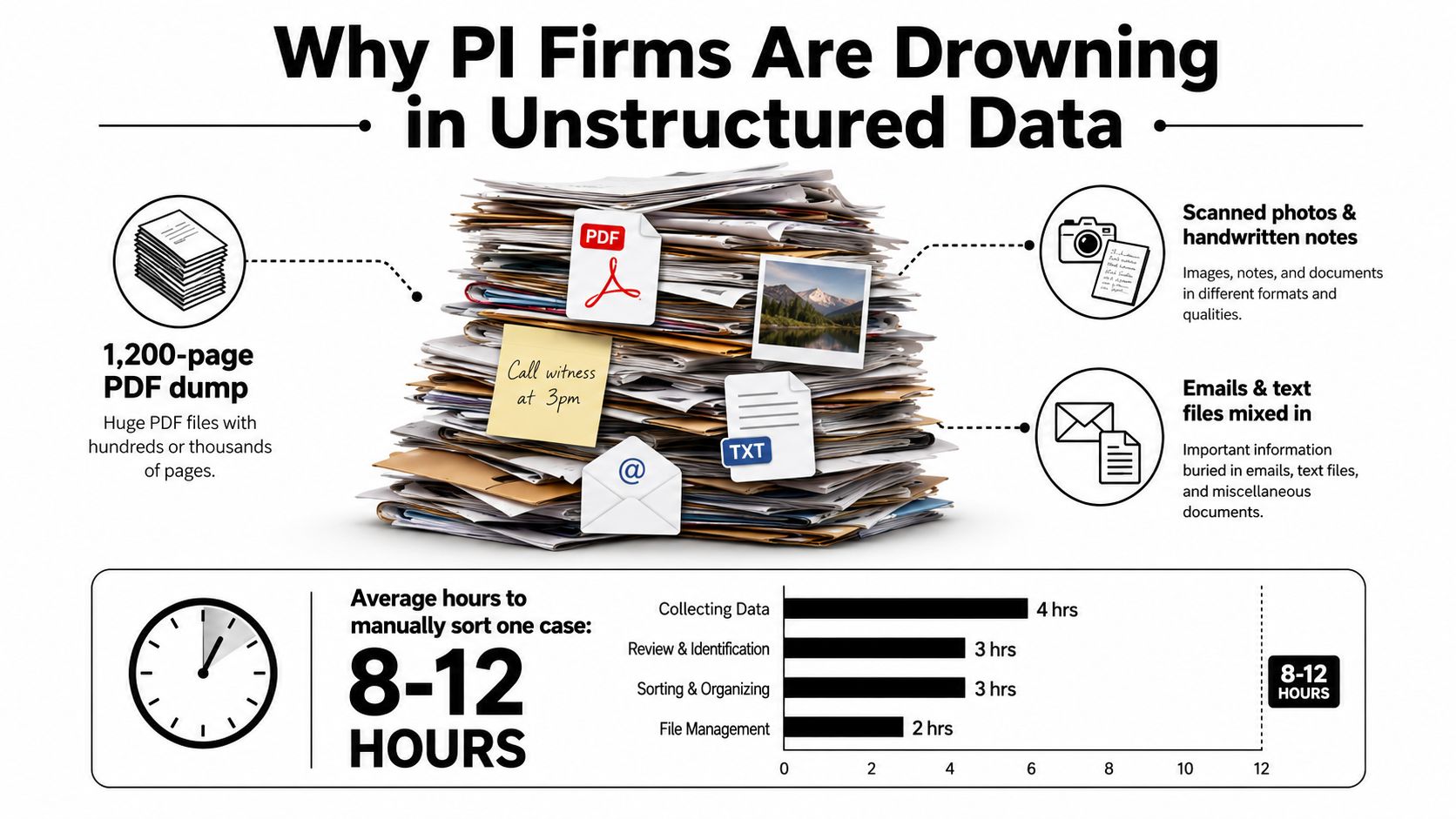
A file like that punishes any team that relies on memory and repeated scanning. The paralegal loses time just deciding what the records are, what's duplicated, what's a fax cover sheet, and what's new. The attorney loses confidence because a clean fact pattern only matters if it can be defended later with source pages and dates.
Practical rule: if your team can't identify the source page for a critical fact in under a minute, the workflow isn't ready for demand drafting.
That's why tools matter only after the process is clear. If you need a secure way to move from intake to verified output, a platform such as Passflow authentication platform is useful context because the authentication layer affects who can touch the file before analysis even begins. The rest of the pipeline only works if the front door is controlled.
Setting Up Intake and OCR the Right Way
The intake stage decides whether the rest of the file is usable. If a records vendor sends a flat PDF, imaging CD exports, and a batch of email attachments in one folder, the first move is not OCR. The first move is to separate source types, name them consistently, and capture chain-of-custody timestamps before anyone edits or merges anything.
That means a few hard rules in practice. Keep the original package intact, create a case-level intake log, deduplicate obvious repeats, and tag anything that came from imaging, fax, portal upload, or email addendum. If your team can't tell where a page came from, you've already damaged provenance.
A clean intake standard also needs an OCR threshold. I don't trust a page that's full of garbled medication names, half-read dates, or mangled provider names. Pages that fail readability checks should be flagged for re-scan or human transcription, not forced downstream into extraction. Handwritten progress notes are the worst offender, so I treat them as a separate lane, not as ordinary OCR input.
Here's a practical intake playbook.
| Format | Common source | Recommended handling |
|---|---|---|
| Native PDF | Records vendor, portal download | OCR only if text layer is missing, then validate page order |
| Scanned PDF | Fax, paper chart, imaging packet | Run OCR, flag low-quality pages for re-scan |
| Images | Photos, CDs, screenshots | Normalize resolution, index by source, then OCR if text exists |
| Handwritten notes | Nurse notes, provider scrawls | Human review first, OCR second, never auto-accept |
| Email attachments | Addenda, follow-up records | Save the original thread, extract attachments separately |
The point of intake isn't speed by itself. It's text fidelity plus traceability. A messy file can still be processed, but only if the file structure stays intact and the team knows which pages need human eyes.
For firms looking at actionable intelligence from raw data as a design principle, the useful lesson is simple. Raw intake isn't waste to be discarded, it's evidence to be preserved and normalized in a controlled way.
If you're comparing intake options, the key question is not which tool OCRs fastest. It's which tool keeps source order, page identity, and auditability intact when records arrive in mixed formats.
The legal intake solutions overview is useful if your firm is trying to map intake from first contact through case file creation without improvising every step.
Extracting the Facts That Actually Win Cases
Extraction only works when it's tied to the facts that matter in a PI file. Generic named-entity recognition can find names and dates, but that's not enough to build a useful chronology. A PI-ready extraction workflow needs provider names, dates of service, diagnoses, treatment modalities, work-status notes, and symptom progression, because those are the details attorneys use in demand letters and deposition prep.
What should be structured first
The essential items are those that alter a demand narrative or reveal a defense gap. That starts with provider names, dates of service, diagnoses, and treatment types. It also includes work restrictions, return-to-work notes, referrals, imaging results, and any note showing a symptom worsened, improved, or plateaued.
A good extractor preserves more than labels. It should carry the underlying quote or source snippet with each field so the attorney can verify it before relying on it. That matters because a clean summary without source grounding is just a convenient draft, not evidence.
How to deal with conflicting records
Conflicts happen constantly. One provider writes a return-to-work date in a follow-up note, another note suggests a different date, and the chart history doesn't fully reconcile. The right answer is not to average the dates or hide the inconsistency. It's to surface the conflict, preserve both source pages, and mark the issue for attorney review.
A chronology is only as good as its weakest citation.
That's also where PI-specific extraction differs from broad document AI. The system should rank facts by case relevance, not just by frequency. A missing MRI, a changed diagnosis, or a delayed referral can matter more than a long list of routine visits. If the pipeline can't distinguish those, it's producing noise.
For teams comparing output formats, the medical records summarization workflow is a useful reference point because the summary has to stay anchored to page-level evidence, not just a narrative blob. That principle matters more than the model brand.
What belongs in the output
Keep the output lean and usable.
- Case chronology: date, provider, event, and source page.
- Treatment sequence: physical therapy, imaging, surgery consults, medication changes.
- Work-impact events: missed work, duty restrictions, return-to-work statements.
- Quote-backed flags: contradictions, gaps, unusual delays, or missing records.
Anything outside that list can be nice to have, but it shouldn't slow the core line from raw page to verified fact. In production, the best systems keep extraction conservative and let attorneys ask for more detail later.
Running QA Like a Litigator, Not a Data Team
The wrong QA model is treating output like a software test suite. PI files need litigation-grade verification, which means every extracted fact must be traceable to a page, a bates number, or a preserved source image. If a paralegal can't open the source and confirm the fact in context, the output isn't ready.
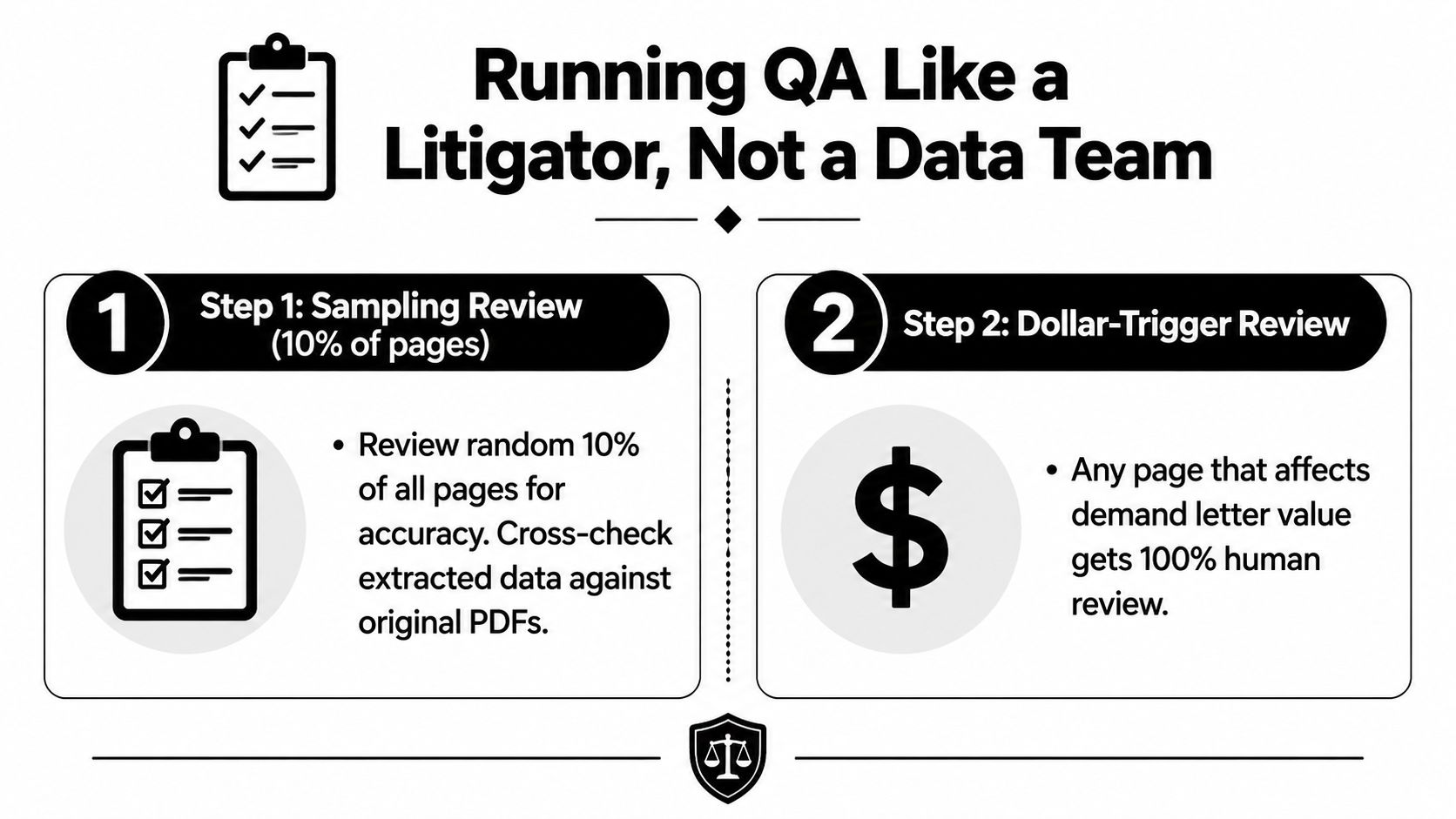
A two-layer QA pass
The first layer is sampling. Review 10% of pages as a baseline spot-check, and bump to full review for any page that feeds a demand number, a causation argument, or a damages narrative. The second layer is citation traceability. Every fact in the chronology should point back to one source page, and every page should retain a visible path to the original file.
That setup catches the failure modes. It catches OCR drift, page-order mistakes, and summaries that pulled the right fact from the wrong context. It also forces the team to stop relying on confidence scores alone, which are not a substitute for a human reading.
A practical QA SOP can be copied into the file workflow:
QA SOP: Review a random 10% sample of pages and all pages tied to demand values or disputed facts. Confirm each extracted fact against the original page image, verify source page and bates references, and escalate any contradiction, missing citation, or unreadable source page before release.
If your team wants a transcript-style layout that makes review easier, the sample interview transcript layout shows a clear way to separate speakers and timestamps. That same logic helps when a chronology needs source-by-source clarity.
The standard is simple. If the reviewer can't defend the output in front of opposing counsel, it doesn't pass QA.
Locking Down PHI, Privilege, and Chain of Custody
Security isn't a final checkbox. It's part of the pipeline, because the moment PHI enters a workflow, access control, logging, and retention all affect whether the output is usable in a real case. Minimum-necessary access should be enforced from day one, not retrofitted after the team has already shared a file too widely.
The controls that matter in practice
At minimum, require encryption in transit and at rest, audit logs on every document view, role-based access, and vendor BAAs where PHI is involved. Keep the retention policy aligned with the firm's record obligations and make sure the system can show who touched what, when, and why. That's not just compliance theater, it's how you preserve chain of custody when records move from intake to draft.
The HIPAA-compliant document management guidance is a good reminder that privacy controls need to be operational, not abstract. Discovery across on-prem and cloud repositories, real-time scanning, and redaction workflows all matter when sensitive material keeps spreading across systems.
What I'd reject in a vendor review
I'd pass on any platform that can't answer these questions cleanly.
- Who can access raw uploads, and how is that restricted?
- Are document views logged and reviewable later?
- Can the team export redacted and unredacted versions separately?
- Does the vendor support a BAA and clear retention settings?
The reason is simple. PI teams don't just need private storage. They need a workflow that keeps PHI discoverable, searchable, and defensible without making the file harder to audit. If the security design forces chaos, it's the wrong design.
Plugging Structured Outputs Into Your Case Stack
Structured output only matters if it lands where lawyers already work. A chronology sitting in a separate system is better than a stack of PDFs, but it still creates friction if the paralegal has to retype the same facts into a case management note, a demand draft, and an internal task list. The handoff should be one export, then reuse.
What a clean handoff looks like
A useful output package usually has three layers. First is the chronology export, sorted by date with source references. Second is the summary view, which gives the attorney the narrative at a glance. Third is the gap list, which flags missing imaging, contradictory work notes, or unexplained breaks in treatment.
That gap list is where production value shows up fast. If the system flags a missing MRI or a provider note that doesn't line up with the rest of the chart, the team can fix the record set before the demand letter goes out. That saves the back-and-forth that usually happens after opposing counsel starts poking holes.
Aes? In practice, tools like Ares can fit into that handoff when a firm wants AI extraction of medical records into a structured chronology and demand draft workflow, but the important part is the export pattern, not the logo. The output should be easy to paste into a draft, easy to review against source pages, and easy to send back for correction when the file set changes.
A short worked example
A 900-page record set can be collapsed into a 14-event treatment chronology with date, provider, event type, and source page. From there, the demand draft can pull a paragraph like this:
The client presented after the crash, followed up with ongoing treatment, imaging, and specialist review, and the record shows a consistent progression of symptoms with documented work limitations and repeated care visits. Source pages remain attached to each event, so the attorney can verify the chronology before using it in the final demand.
That's the point of the pipeline. The structured output isn't the end product, it's the evidence layer that makes drafting faster and safer.
KPIs, Sample SOP, and a 30-Day Rollout Plan
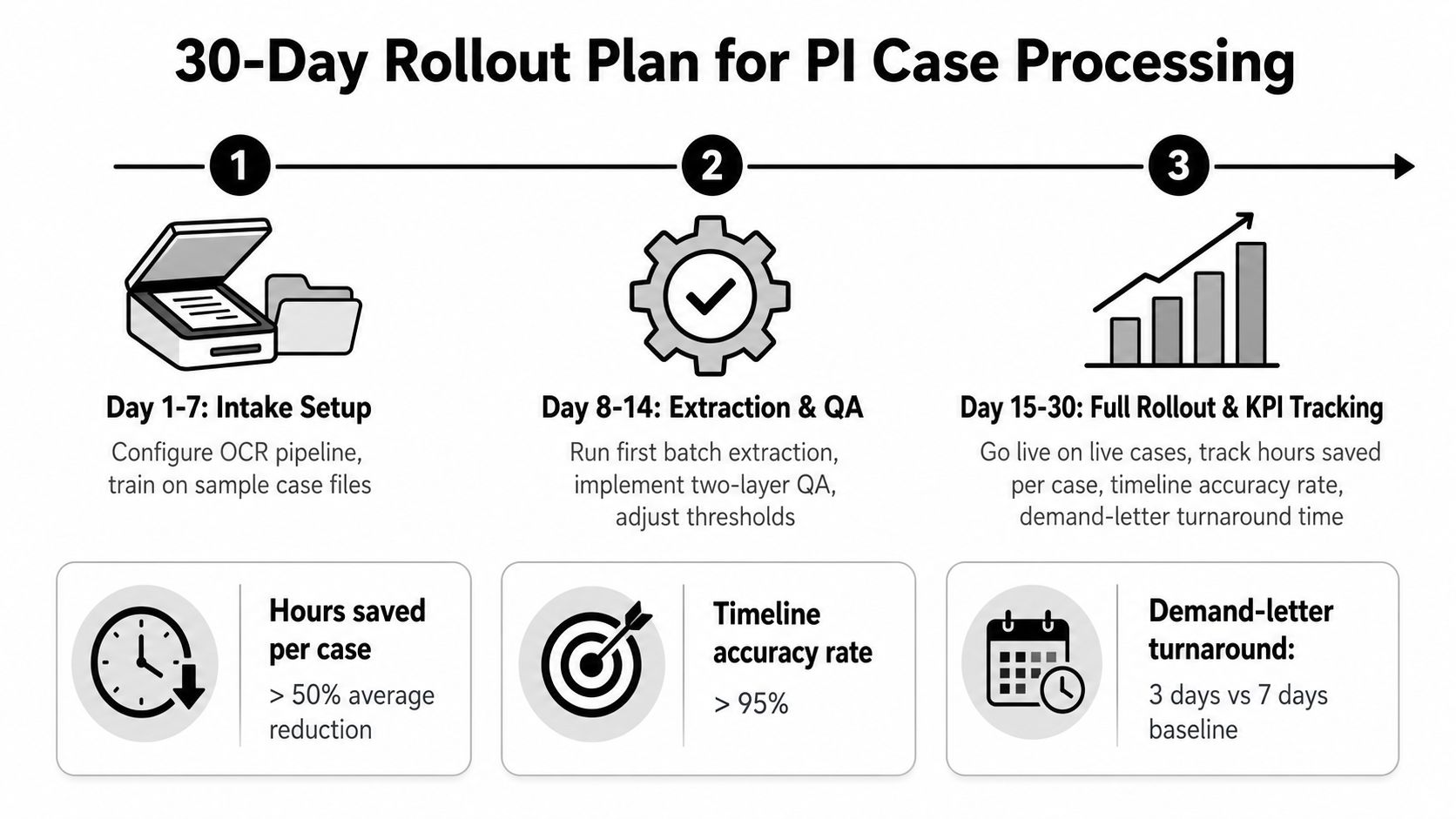
A PI ops lead needs a dashboard, not a slogan. The three KPIs that matter most are hours saved per case, timeline accuracy rate, and demand-letter turnaround time. Those are the numbers that tell you whether the workflow is helping the firm or just shifting work into a different queue.
What to measure
Use a simple scorecard.
| KPI | What it tells you | How to read it |
|---|---|---|
| Hours saved per case | Whether the pipeline reduces manual review | Better if paralegal time drops consistently |
| Timeline accuracy rate | Whether the chronology can be trusted | Better if review finds few source mismatches |
| Demand-letter turnaround time | Whether structured output speeds drafting | Better if attorneys move from file intake to draft faster |
A realistic rollout starts with three pilot cases, not the whole docket. Week one is intake setup and OCR tuning. Week two is extraction plus QA. Weeks three and four are live use, correction tracking, and SOP cleanup. The point is to learn where your file types break, then harden the workflow before you scale.
Here's a copy-paste SOP skeleton.
Intake: receive file, log source, preserve original package, separate source types.
OCR: process scanned material, flag unreadable pages, route handwriting for human review.
Extraction: pull chronology, provider list, diagnoses, treatment events, and work notes.
QA: sample review, source citation check, contradiction flagging, attorney escalation.
Delivery: export chronology, summary, and gap list into the case stack.
If the pilot still depends on heroics, the workflow isn't ready.
The 30-day goal isn't perfection. It's a repeatable process that keeps provenance intact, makes chronology reviewable, and gives the firm a way to move faster without losing defensibility.
If your team is still buried in records and rebuilding chronologies by hand, Ares can be a practical place to start because it turns medical records into structured case output with chronology, summaries, and drafting support. Visit Ares to see how that kind of workflow can fit into a PI intake and demand process without losing source-level traceability.