
You already know the feeling. A new paralegal starts, a senior attorney shifts from intake to litigation, a vendor portal gets shared in a hurry, and three months later someone discovers that a former matter team can still open medical records that should've been locked down at closing. In a PI firm, user permission management isn't a settings screen, it's the operating system behind hiring, role changes, offboarding, and every place PHI can leak if access stays broader than it should.
The firms that treat access as a one-time setup usually end up cleaning up after the fact. The firms that treat it as a governed process build least privilege, role-based access control, and routine review into day-to-day operations, the same way they handle conflict checks and file closing. If you want a practical starting point for the identity layer that sits under those controls, power platform identity controls is a useful reference point for thinking about access as a managed discipline instead of a static admin task.
Why Permission Sprawl Is a Daily Risk in PI Firms
A PI firm's access problem rarely starts with a headline breach. It starts when someone's permissions stop matching the job they do, so they can still see, edit, export, or approve material from a matter they no longer touch. That gap is why permission sprawl belongs in daily operations, not in a quarterly clean-up queue. Access control guidance from Arms and Glean both point toward least privilege, RBAC, and regular review because roles shift, matters close, and old access tends to linger if nobody is assigned to remove it.
The pressure gets worse in PI firms because the work is fragmented across too many systems. Case management, shared drives, e-signature tools, document platforms, medical record portals, billing tools, vendor inboxes, and the SaaS app somebody added to solve one urgent problem all create separate places where access can drift. If those systems are managed by hand, one person can carry overlapping rights from multiple roles, a former employee can stay active in more than one tool, and no one can quickly show when a permission changed or who approved it.
Practical rule: if a user's access cannot be explained by their current role, assigned matters, and a recent approval trail, the firm is already carrying avoidable exposure.
The better answer is not another one-off admin grant. Access should follow a repeatable process tied to hiring, role changes, and offboarding, with recurring reviews that trim excess rights and shut off former employees before their accounts become orphaned. That is where the compliance pressure becomes concrete, because auditability and revocation speed are expected in controls frameworks such as SOC 2, GDPR, and ISO 27001. A PI firm that cannot show those controls in practice is relying on good intentions, not on a usable permission system.
One question exposes the difference fast. Can the firm explain who received access, what changed, and where the approval evidence lives, without asking around the office? If the answer depends on memory instead of a reusable role template and an audit trail, the firm is already behind. The firms that stay ahead treat access as a governed hiring-and-offboarding system that protects PHI before it ever has a chance to spread. That is also why power platform identity controls matter as a reference point for organizing access as a managed discipline rather than a pile of ad hoc admin tasks.
The Three Pillars of User Permission Management
A PI firm usually feels permission problems long before anyone names them as such. A paralegal gets broad access to move a deadline forward, a case manager inherits rights from a departed teammate, and an intake user can still see files that belong nowhere near their desk. That is not a settings issue. It is a hiring-and-offboarding problem that leaves PHI exposed longer than it should be.
Least privilege first
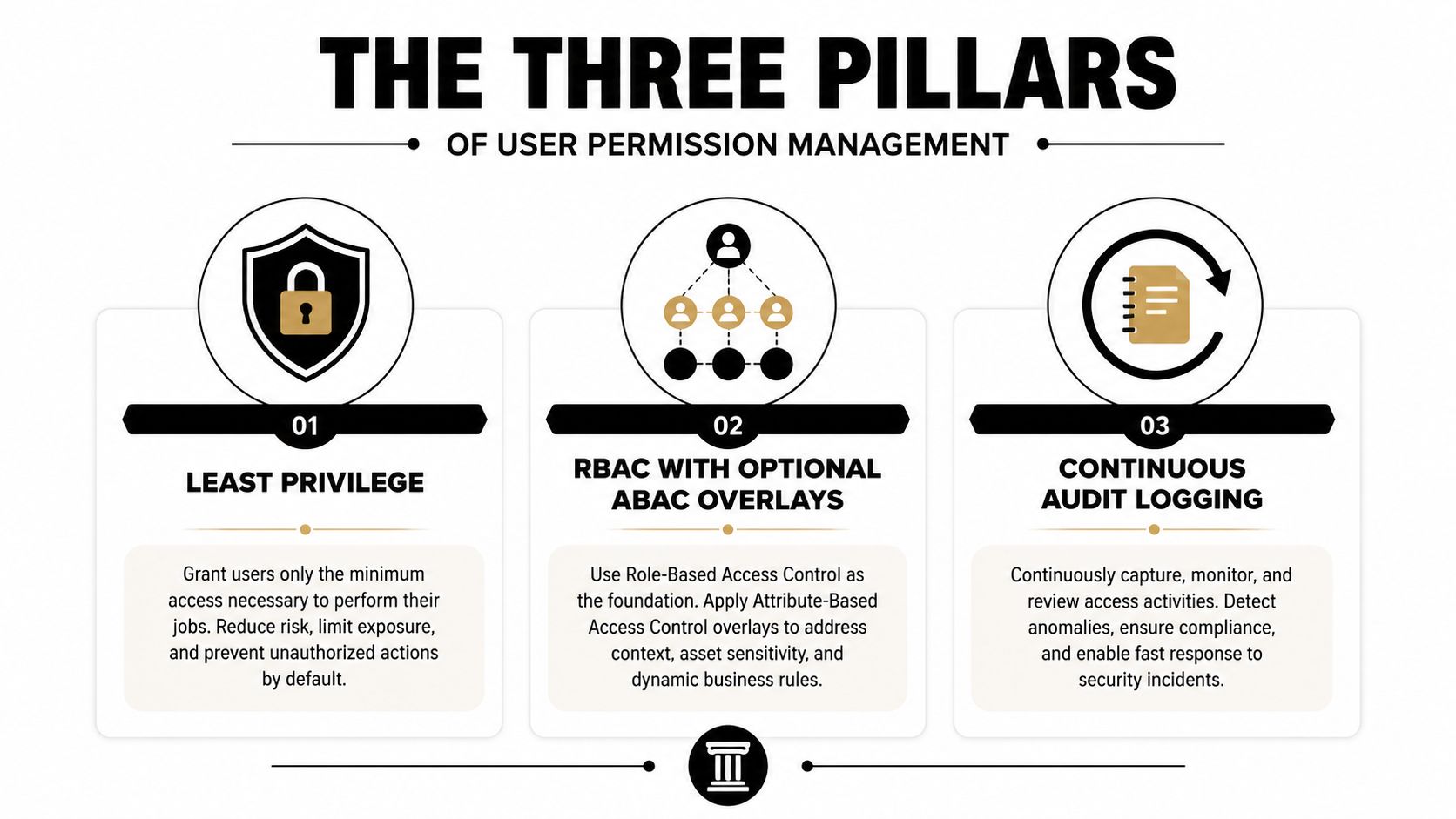
The first pillar is least privilege, which means a user gets only the access needed for the job they are doing now. In a PI firm, that usually means a paralegal can review medical records for assigned matters, but not browse the whole case archive, export every file in the workspace, or hold admin rights because they are “trusted.” The longest-running access mistakes I see are convenience mistakes, not malicious ones. Someone gets broad rights during a deadline, then nobody takes them back.
That is where role templates matter. If the firm has reusable permission sets for intake, case work, litigation support, and read-only review, it can stop granting access one user at a time and start assigning access based on actual work. For a broader view on securing assets, see asset management strategies from Reworx, because the same discipline applies when hardware, accounts, and data all need to be tracked together.
Roles handle the default, context handles the exception
The second pillar is RBAC, with ABAC only where the work needs context. RBAC gives you stable role templates, Intake Specialist, Paralegal, Case Manager, Litigation Attorney, and Read-Only Reviewer, so the firm is not inventing permissions from scratch every time someone changes seats. ABAC can sit on top when access should depend on matter assignment, office, case stage, or sensitivity of the data. Microsoft's guidance pushes this same direction with least privilege, incremental consent, and just-in-time permission requests at sign-in or first token use, which is a cleaner model than issuing broad rights up front (Microsoft authorization guidance).
The practical trade-off is simple. RBAC keeps reviews manageable because you can inspect a small number of role templates instead of a pile of one-off grants. ABAC keeps those templates from becoming too blunt, since a user may need access only to a specific matter, a defined time window, or a sensitive workflow that calls for tighter controls. That balance matters in PI work, where case assignments change faster than most permission reviews.
Audit logging closes the loop
The third pillar is continuous audit logging. Permit.io's governance framework is blunt about this point, authorization systems need a designated owner, higher-level controls like RBAC and ABAC, and audit logs across the entire system, not scattered records that only tell part of the story (Permit.io). In practice, that means every meaningful permission change should be reviewable, whether it came from onboarding, a role shift, or a temporary exception.
Logs only help if they answer the questions that matter. Who approved the access, what changed, when it changed, and whether the access still matches the person's current role all need to be visible without chasing people down after the fact. If the firm cannot reconstruct that trail quickly, the permission process is too fragile for a practice that handles medical records, demand drafts, and settlement data.
Why this matters: access management has matured from simple account administration into a formal governance discipline, and the milestone is not “we configured roles.” It is “we can prove who had access, when it changed, and how fast we removed what no longer belonged.”
For PI firms handling medical records, demand drafts, and settlement data, these three pillars are enough to defend in a partner meeting. They keep admin-level rights concentrated in a named security lead, they reduce privilege creep, and they create the evidence trail auditors want without turning every access change into a manual fire drill.
The other reason this model works is that it scales. You are not asking attorneys to become permission designers, and you are not asking IT to guess what case staff need by reading job titles. You are building one authorization pattern that matches how legal work moves, then using it across hiring, role changes, and offboarding so access stays tied to the work instead of to memory.
Defining Roles That Map to Real PI Work
A PI firm does not need twenty subtly different roles. It needs a small set of role templates that match actual work, then a rule for when a matter-specific exception is justified. Role design should also reflect how delegated permissions keep access tied to the signed-in user's scope, which makes later review and revocation much cleaner, as described in Microsoft authorization guidance.
Intake Specialist
An Intake Specialist should be able to capture lead data, update contact fields, and move the matter through early routing. They should not have broad medical records access, demand letter editing rights, or export permissions across the file store. In a busy intake team, over-scoping is tempting because the work feels urgent, but urgency is not a permission model. The cleaner approach is to pair the role with a standard onboarding path, then revisit edge access after training through the training and onboarding workflow the firm already uses.
Paralegal
A Paralegal usually needs assigned-case access to medical records, treatment summaries, and draft documents. They may need to prepare demand materials, but that does not mean they should approve outbound sends or export the entire matter set. Use incremental consent for the edge cases, the one provider portal, the one case, the one temporary review window, not a permanent firm-wide grant. That keeps access tied to the work and avoids leaving broad permissions behind after the task is done.
Case Manager and Litigation Attorney
A Case Manager often needs workflow-level visibility, scheduling support, and document coordination, but not administrative control. A Litigation Attorney needs edit rights on the matters they own, plus review permissions for drafts, but that still does not justify admin console access. Named admin rights should stay narrow, because broad rights spread across senior staff usually become the hardest thing to unwind later.
Read-Only Reviewer
A Read-Only Reviewer is useful for partners, auditors, quality control, and outside counsel. They should view what they need, but not edit records, send content, or export sensitive sets by default. That role lets a firm reduce exposure without slowing substantive work, and it gives leadership a clean option for oversight without granting operational control.
A reusable template set also keeps approvals sane. If someone moves from intake to trial, compare the new role against the old one, then remove what no longer fits and add only what the new work requires. Do not hand out a fresh pile of permissions because nobody wants to sort through diffs. That is how permission creep starts, and it is usually how PHI exposure grows inside firms that think they are being efficient.
One tool in this broader workflow is Ares, which supports medical record review and demand drafting for PI firms, so it fits best when you are designing access around case work rather than around generic document folders.
Provisioning and Deprovisioning Workflows That Actually Run
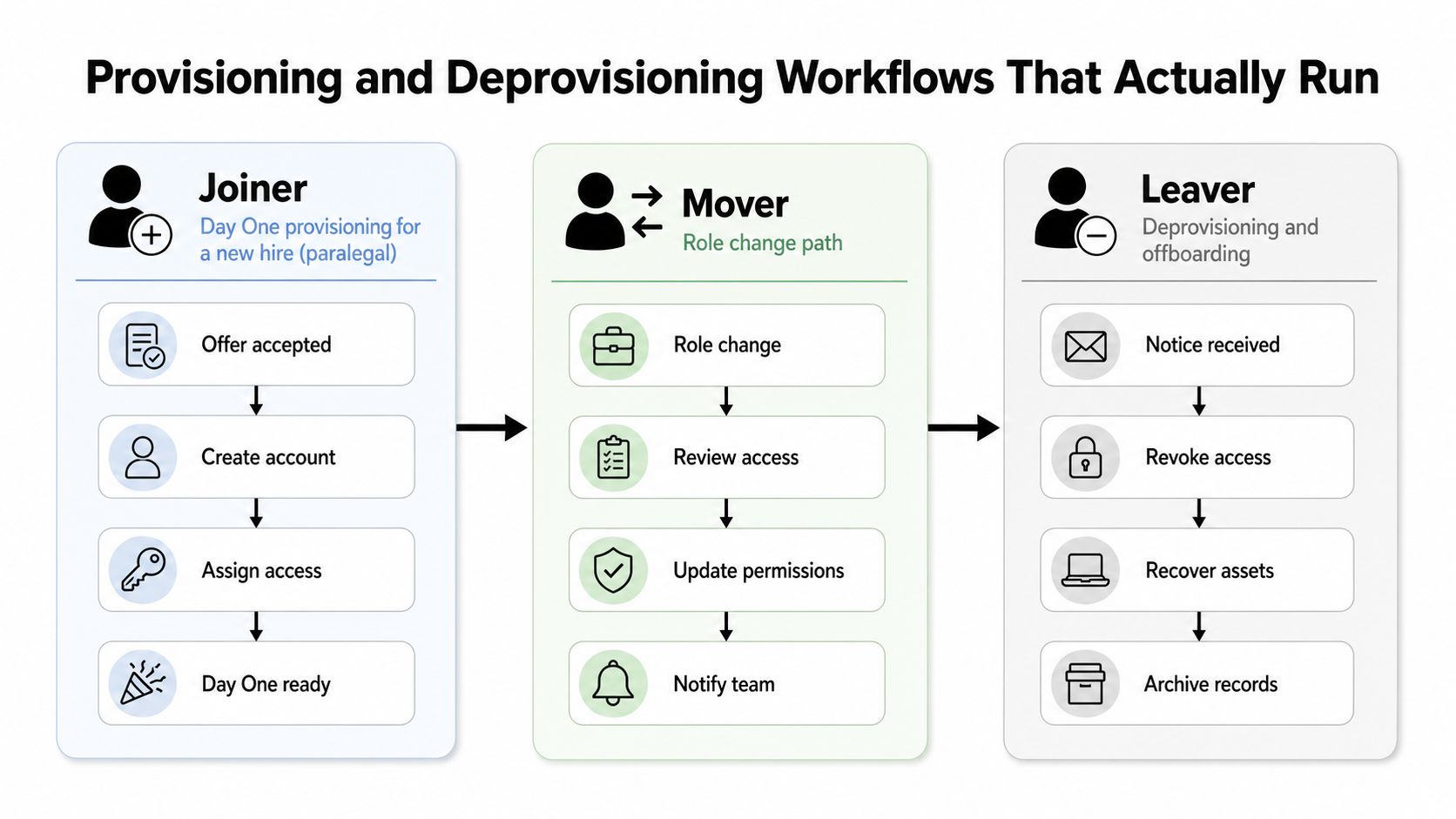
A PI firm does not fail on access control because nobody understands the policy. It fails because joiner, mover, and leaver steps turn into handoffs, side emails, and tribal knowledge. Once that happens, stale access sits around longer than it should, and PHI exposure becomes an operating problem, not a theoretical one. The better model is a hiring-and-offboarding system with role templates, approval rules, and audit trails that can survive staff turnover.
A new paralegal should not show up to a blank account with a broad bundle of rights. Day one access should be the minimum needed for the work assigned, then expanded only after training is finished and the supervisor has signed off. That is where onboarding and training workflow guidance belongs in the process, because access without training just gives someone faster reach into sensitive records. If the role template is built well, onboarding stays repeatable. If it is loose, onboarding turns into a standing exception list.
Movers are where sloppy permission design shows up fast. When a senior attorney moves from intake-heavy work to trial support, the system should remove the rights tied to intake functions and add the rights tied to the new role. The common mistake is to pile new access on top of old access because the person “still needs some of it.” That overlap is how firms end up normalizing excess privileges across teams that touch PHI in different ways.
Design for delegation up front. If admin rights are assigned late and one person has to improvise every exception, the firm creates a bottleneck that is hard to unwind and harder to audit.
Leavers are the true test of whether the workflow holds. If a case manager leaves, shared mailbox access, draft folders, vendor logins, and matter-specific credentials need to be reassigned or revoked right away. Orphaned accounts are not just an IT cleanup issue. They show the firm has lost control over who can still reach case materials after employment ends.
The audit trail should tell a clean story for every change. It should show who approved the role, who made the change, when access started, when it ended, and what got transferred. If those records do not line up, the firm ends up reconstructing access history from inboxes and memory, which is exactly the kind of work auditors dislike and compliance teams should not have to do.
The implementation path does not need to be fancy. It needs to be immediate, logged, and tied to named owners.
One useful reference point is the user access lifecycle workflow, because it keeps the firm focused on repeatable provisioning and deprovisioning steps instead of one-off grants that nobody can explain later.
A HIPAA-Aligned Access Control Checklist
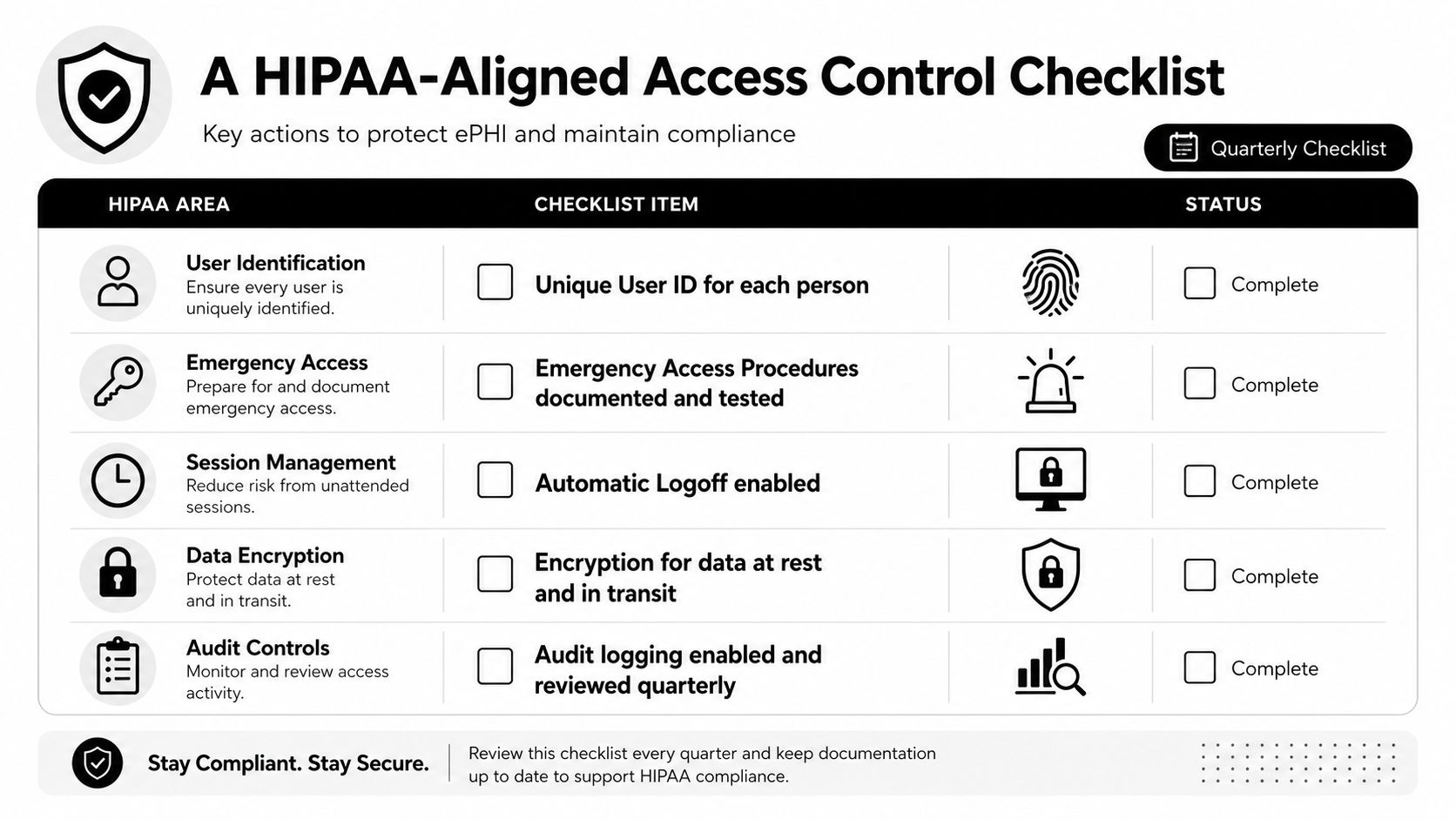
HIPAA-aligned access control isn't abstract. It's a quarterly checklist a managing partner or compliance lead can run without improvising. The rule is simple, if the firm can't produce evidence for the control, it doesn't really have the control.
Core items to verify
- Unique user IDs: Every person should have a named account. Shared logins make it impossible to tie actions to a real user, which is why they keep showing up as a recurring problem in PI environments.
- Emergency access procedures: Break-glass access needs to be documented, tested, and logged, not left as a vague promise that someone can get in if something goes wrong.
- Automatic logoff: Idle sessions should close on their own, especially on shared workstations and in busy intake areas where terminals stay open longer than they should.
- Encryption in transit and at rest: Access control is stronger when the data itself is protected, especially for medical records and settlement files moving between systems.
- Audit logging reviewed quarterly: Logs should show who approved access, when it was last reviewed, and when it was revoked.
The internal checklist at data access controls is a solid companion if you want to pair permission review with a broader PHI handling process.
Evidence to ask for on every review
You want proof, not assurances. That means screenshots or exports showing user IDs, approval records, revocation dates, and the current status of any vendor account that touches PHI. It also means checking whether default admin passwords were ever changed, whether vendor access is still active after the project ended, and whether break-glass use was logged and reviewed.
The items that most often fail in PI firms are usually the simplest ones. Shared credentials on medical records portals. Old vendor accounts nobody owns. Admin rights that were handed out to make a deadline easier. Those failures are operational, not technical, and they're fixable if someone is assigned to own the checklist every quarter.
Auditability and revocation speed sit at the center of modern compliance expectations, because if a firm can't show what changed and how fast it removed excess access, it can't demonstrate control.
Run the checklist quarterly, tie each line to an artifact, and keep the artifacts where a reviewer can find them without chasing three departments.
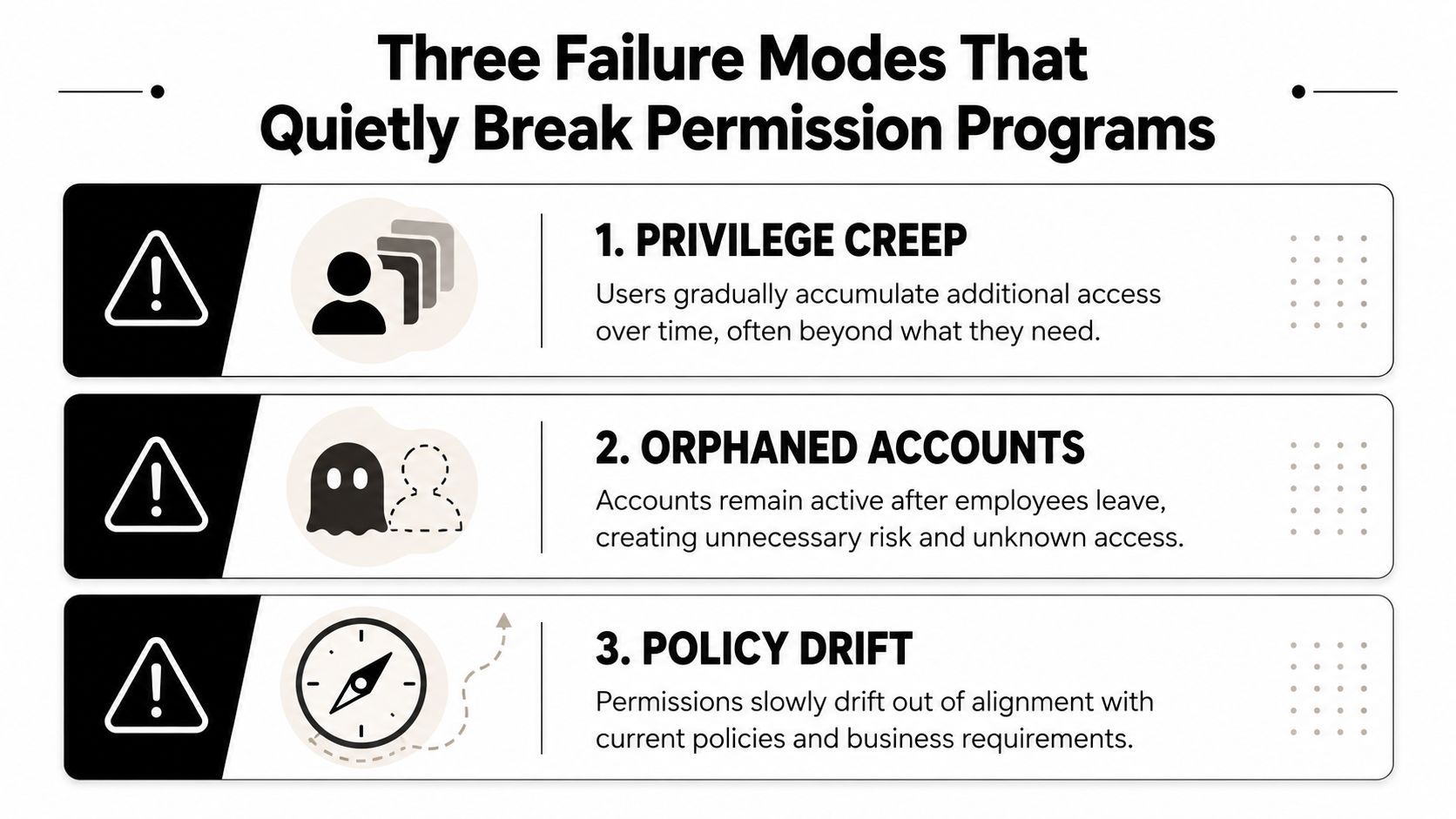
Three Failure Modes That Quietly Break Permission Programs
A permission program usually doesn't collapse because someone ignored every rule. It breaks because a few small patterns repeat long enough to become normal. The three I see most often are privilege creep, dormant accounts, and shared logins, and each one needs a different kind of detection.
Privilege creep
Privilege creep happens when users pick up rights across multiple role changes and nobody takes the old ones away. The fix is not “trust people to be careful.” The fix is a documented permission diff review every time a role changes, plus a real recertification process that makes the manager confirm what still belongs.
Dormant accounts
Dormant accounts are the quietest leak in the system. Contractors, former staff, and temporary vendors often keep access because no one owns the offboarding step all the way through. A 30-day inactivity flag is useful as a trigger, but the bigger control is a named owner for every external user, so someone is responsible when an account stops being active and should be removed.
Shared logins
Shared logins are still one of the fastest ways to lose control over PHI. If multiple people use the same medical portal credential, the audit log stops being an audit log and becomes a guess. Replace shared credentials with named accounts and require every meaningful event to tie back to a unique user ID.
Audit trail requirements matter here because a clean log is the only thing that turns access history into evidence instead of noise.
The contrarian point is that more roles is not always better. Overly fine-grained role design creates audit fatigue, overlap, and a control catalog nobody can maintain. A hybrid model works better, a few durable roles, context-aware exceptions where needed, and automated reviews that keep the model from drifting.
If you want to spot these failure modes in a week, look at who still has access after leaving a case, who can explain every vendor account owner, and which users have rights their current job no longer justifies.
Your 30-Day Rollout and What to Measure
Start with inventory. In week one, list every system that touches PHI and every active user in those systems. In week two, define the five role templates, assign a named owner to each one, and lock down who can approve exceptions. In week three, backfill the audit log where you can, run the first access review, and remove anything that doesn't map to a current role or active matter. In week four, automate joiner-mover-leaver triggers and schedule the next quarterly review before the first one gets buried by billables.
Measure a small set of things that prove the program is real.
- Mean time to revoke access after offboarding
- Percentage of users on named accounts
- Percentage of role changes with documented approval
- Count of admin-level accounts
If those numbers don't improve, the problem isn't policy language. It's execution. Permission management is a continuous process tied to hiring, role changes, and offboarding, and the firm has to treat it that way or it will drift back into one-off grants and cleanup mode.
A CTA for Ares. If your firm needs a tighter way to review medical records, structure demand drafts, and keep PHI access aligned with real case work, take a look at how Ares supports PI teams with repeatable document workflows and security-conscious handling of sensitive files.