
You're staring at a stack of medical records, three provider portals, and a demand deadline that's suddenly this week. One paralegal is chasing faxes, another is cleaning up intake notes, and the attorney wants a clean chronology yesterday. That's the exact kind of PI-firm mess where low code automation tools stop being a nice-to-have and start looking like the first sane way to buy back time.
The reason partners ask about automation now is simple, caseloads grow faster than headcount. The category itself has moved from niche tooling into a major software buy, with $26.9 billion cited for the global market in 2023, 31% year-over-year enterprise low-code spending growth in 2025, and projections ranging from $44.5 billion by 2026 to $187 billion by 2030 in longer-range forecasts, according to market tracking summarized by SearchLab's low-code and no-code statistics. In other words, this isn't experimentation anymore, it's infrastructure.
For PI firms, the shift is practical. Email chains and manual handoffs don't scale when your team is juggling records requests, lien follow-up, and settlement prep across multiple matters. Low-code fits because a paralegal can often own the workflow once it's codified, while the attorney stays focused on judgment calls. If you want a broader argument for why firms are being pushed in this direction, Ares Legal's automation overview makes that case from the practice-management side, and AISEOGrow's law firm SEO guide is a useful reminder that operational maturity and visibility usually rise together.
Practical rule: automate the seams of the case first, not the case itself. Intake routing, records chasing, reminders, approvals, and document assembly are the best early wins. Medical chronology, gap analysis, and persuasive narrative still need human review or specialized document AI.
Why Personal Injury Firms Are Adopting Low Code Automation
Monday morning at a PI shop usually starts the same way. Someone has 800 pages of medical records spread across three providers, a demand letter due soon, and a client who keeps adding “just one more” appointment to the timeline. That's exactly where partners begin asking whether there's a way to stop paying trained staff to do repetitive coordination work by hand.
The answer is yes, but only if you're honest about what low-code can do well. It's strong at routing tasks, moving data between systems, and making sure no one forgets the next step. It's not magical, and it doesn't replace legal judgment. The value is in replacing email-based handoffs with orchestrated workflows that a paralegal can run without becoming the human middleware for the firm.
What changes inside the firm
When a new matter is opened, a low-code flow can trigger a records request, set a follow-up cadence, alert the team when a packet arrives, and push the file into the right place. That takes a pile of repetitive coordination off the plate and turns it into a repeatable process. The same logic applies to lien tracking, deadline reminders, and demand assembly.
The market data matters because it shows the tool category is mature enough for serious spend, not side projects. Industry summaries report 70% of new enterprise applications are expected to be built with low-code or no-code technologies by 2025, rising to 75% by 2026, and adoption was already broad in earlier surveys cited in the source material. Those figures, plus the fact that 80% of low-code users are expected to come from outside formal IT by 2026, explain why operations leaders keep seeing these tools show up in the vendor queue. The practical payoff is speed, with low-code applications described as 56% faster to develop on average in the referenced research summary from BrowserCat's automation article.
For PI firms, that speed translates into capacity. A workflow that used to depend on one overloaded paralegal's memory becomes something the whole team can follow. That's not a cosmetic win. It reduces single-point-of-failure risk and makes turnover less dangerous.
What Low Code Automation Tools Actually Are
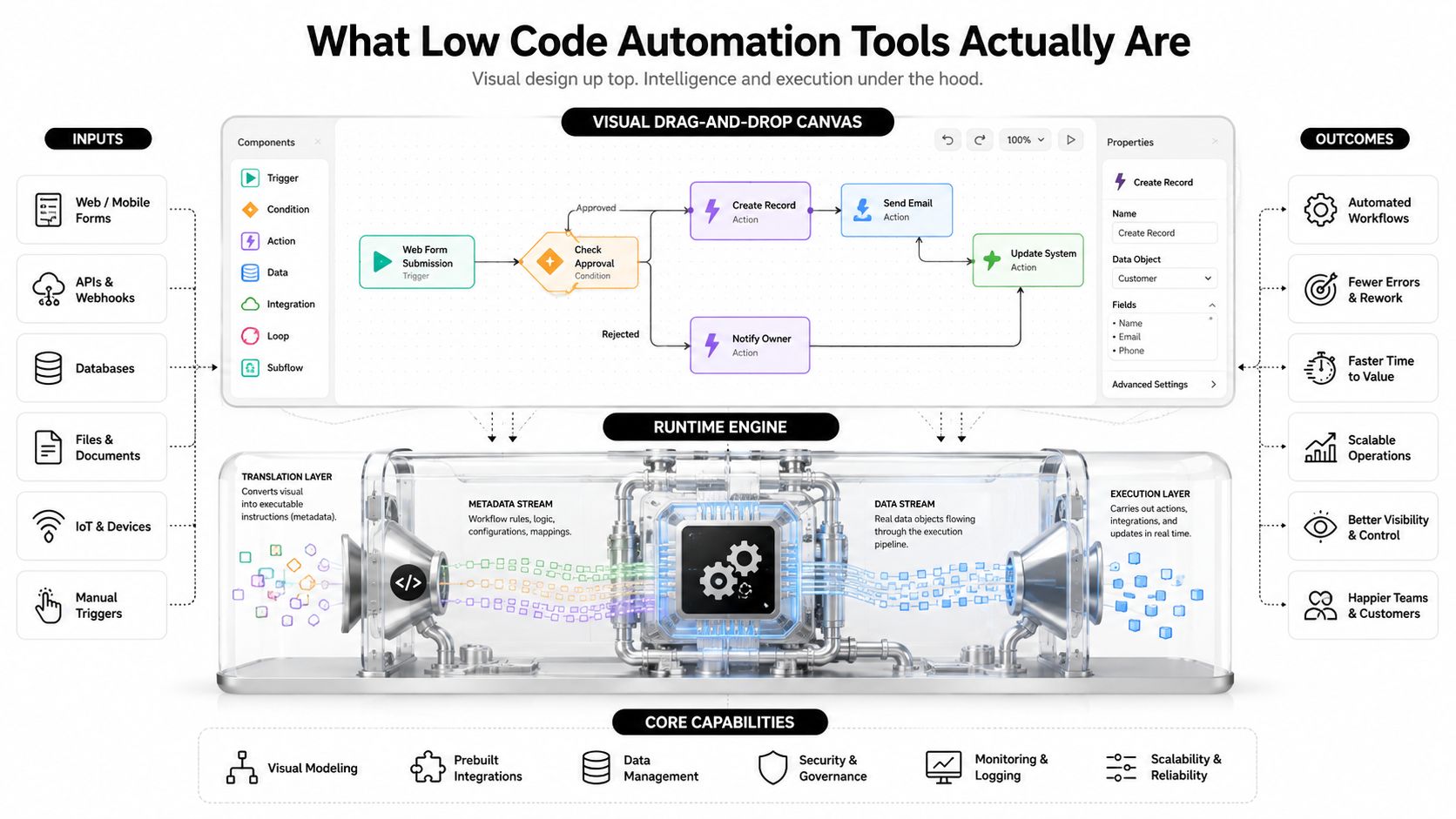
A PI firm opens a new matter, a staff member drags a trigger onto the canvas, connects it to a task, adds a decision branch, and maps the next step. The front end looks simple. Underneath, a runtime engine converts those visual steps into machine-readable instructions so the flow runs instead of serving as a diagram.
IBM describes these systems as built on pre-built connectors, reusable workflow templates, branching logic, scheduling, approval steps, automated retries, and webhook-triggered execution in its overview of low-code integration. That matters in a law firm because the value is not cosmetic. It standardizes routing, handles errors, and pushes the same process across matters without each paralegal improvising a workaround. For a related view of how firms organize these handoffs, see this legal workflow automation overview.
Where the category sits relative to other tools
Low-code and no-code overlap, but they do different jobs. Low-code usually still asks you to configure logic, integrations, and exception paths. No-code promises a more finished experience, but real complexity often pulls users back into settings, mapping, or technical support. The same source above from Magnitude Marketing's comparison of no-code automation tools helps separate the market tiers before a demo.
RPA, BPM, and iPaaS sit nearby, but they solve different problems. RPA clicks through interfaces. BPM models process. iPaaS moves data between apps. Modern enterprise low-code stacks blend all of them, plus AI and business rules, into one system, which is why Appian's summary of low-code automation capabilities matters for PI firms handling both structured steps and exception-heavy work. A records request is structured. A treatment history spanning multiple providers is not.
Low-code works like the conductor of the case workflow, while specialized tools handle interpretation of the file. That is the useful mental model.
Business Value for Personal Injury Practices
The business case is concrete. If your firm still has staff moving the same case data from intake to records to the demand package, you are paying for work that should be defined once and repeated the same way every time. Low-code earns its keep by cutting that handoff friction and making the process repeatable.
Time recovered on repetitive work
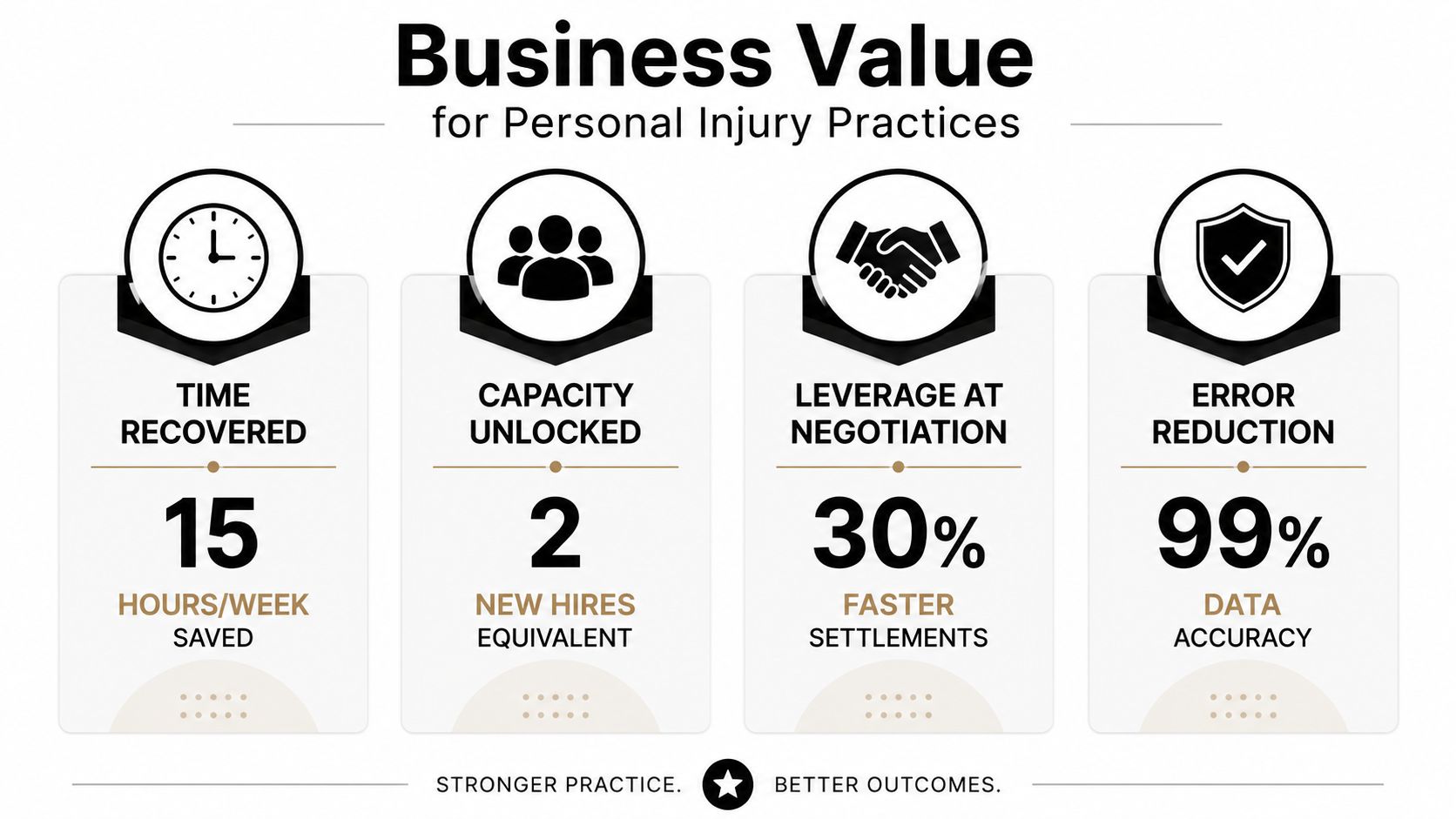
The first gain is easy to see. Records chasing, appointment reminders, deadline nudges, and file status updates consume time that does not create legal value. Low-code cuts that administrative drag by turning manual coordination into a workflow. If the firm already knows how many hours a paralegal loses to repetitive follow-up in a typical case, that number becomes the baseline for ROI.
Capacity added without new hires
The second gain is quieter but just as important. A codified workflow lets the same team carry more matters without immediately adding staff. That is why platform language around process automation matters more than flashy AI claims. Once intake, records requests, and routing are standardized, the firm gets more output from the same bench because the knowledge lives in the workflow, not in one person's head.
Stronger positioning at the negotiation table
The third gain shows up in demand prep. Faster demand letter assembly gives the attorney a cleaner package sooner, and that can strengthen negotiation posture because the file is organized earlier. Ares' article for PI lawyers on AI use is one example of how firms are approaching that document-to-demand pipeline, but the point applies broadly. Speed matters when opposing adjusters are waiting for you to get organized.
Risk reduction through consistency
The fourth gain is the one partners underappreciate until a turnover event hits. When workflows are codified, the firm depends less on a single paralegal's institutional memory for deadlines, lien tracking, or provider follow-up. That consistency reduces avoidable misses and makes compliance steps easier to repeat.
The payoff is stability, not novelty. A good workflow saves time today and keeps the firm from relearning the same process every time someone changes desks.
Evaluation Criteria for Law Firm Buyers
A vendor demo should start with risk, not features. If the platform can't answer your security and integration questions cleanly, the rest of the pitch doesn't matter. PI firms handle PHI, and that means the checklist has to be sharper than the average ops buyer's.
What to ask before you sign anything
| Criterion | What to Ask | Pass Mark |
|---|---|---|
| Compliance and PHI handling | Is PHI encrypted in transit and at rest, and what audit logs are retained? | Clear answers on encryption, logging, and access tracking |
| Business associate coverage | Will the vendor sign a BAA, and what does it cover? | BAA available without custom legal gymnastics |
| Data access controls | Can you enforce role-based permissions and SSO? | Firm-controlled access and identity controls |
| Data residency | Where is client data stored and processed? | Storage and processing location disclosed in writing |
| Breach response | What is the breach notification process? | Documented response procedure |
| Case management integration | Does it connect to your case system without brittle workarounds? | Native or reliable integration path |
| Document management | Can it move files into your DMS and keep naming clean? | Stable document handoff |
| Email and e-signature | Does it work with your email and signature stack? | No manual copying between systems |
| Governance | Can you separate dev, test, and production? | Environment separation exists |
| Reporting | Can you see who changed what and when? | Full activity history available |
The reason this matters is simple. An automation island is worse than no automation. If the flow can't touch your case management system, document store, email, and signature tools, someone on the team will end up retyping the same information anyway.
Build or buy
Use low-code when the process is repeatable, the data is structured, and the outputs are predictable. Use a specialized document AI product when the work depends on reading long medical records, extracting chronology, or synthesizing narrative from messy files. Gartner Peer Insights' enterprise reviews for low-code platforms repeatedly surface the same lessons, gather requirements, run proof-of-concepts, train the team, define governance standards, and implement iteratively. That's the rollout work.
Sample Workflows Personal Injury Teams Can Build
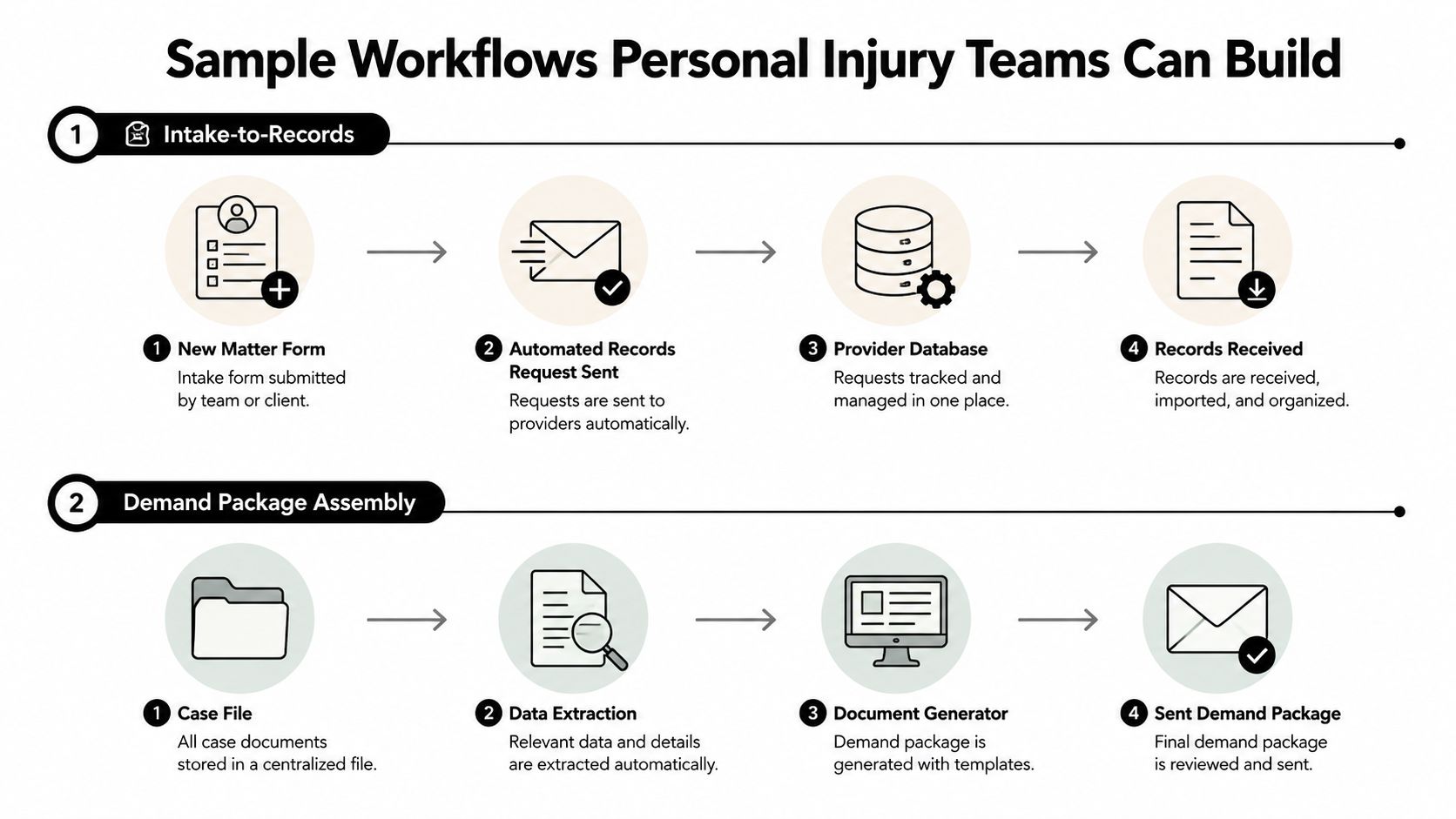
The most useful automations in a PI firm are boring in the best way. They move files, trigger reminders, assemble packets, and keep people from doing the same admin task twice. Here are two end-to-end flows a paralegal will recognize immediately.
Intake to medical records
A new matter is created in the case management system. That trigger sends a records request to the first provider, logs the request date, and schedules a follow-up cadence automatically. When records come back, the workflow can flag the packet as complete, alert the paralegal, and post a summary note into the case file.
The math is firm-specific, which is the right way to do it. If intake and records chasing currently consume several staff hours per matter, measure the baseline before you automate, then compare the after-state. Pre-built templates shorten the build from weeks to days in many platforms because the routing, reminders, and approval logic already exists. You're not inventing a process, you're wiring one you already use.
Demand letter assembly
The second flow starts when the matter status changes to treatment complete. The system gathers the medical summary, settlement worksheet, insurance declarations, and draft outline, then routes the package to the attorney for review. After approval, the signed demand goes out and the matter log updates itself.
That kind of packaging is where low-code shines because the steps are structured. It can pull the right artifacts, move them into the right order, and keep the attorney out of the busywork. For teams blending internal staff with remote support, the guide on blending AI and remote paralegals is a useful parallel read, because the operating principle is the same, let people do judgment work and let software handle assembly.
Where Low Code Automation Reaches Its Limits
Low-code is strong at routing, reminders, approvals, and structured data movement. It starts to wobble when the work turns into interpretation. That's the line PI firms need to respect, because crossing it is how teams buy the wrong platform for the wrong task.
What it handles well
If a workflow has clear rules, low-code is a good fit. Intake forms, status changes, deadline alerts, and document handoffs are straightforward. So are repeatable compliance steps, as long as the logic can be described in branches and conditions. The platform can move items through a process model even when people change.
Where it runs out of road
The problem starts with document-heavy case files. An 800-page PDF of medical records is not the same thing as a structured database row. Extracting diagnoses, treatments, chronology, and gaps between provider notes and client recollection requires language understanding, not just workflow design. So does building a persuasive demand narrative out of scattered records.
That's where specialized document-AI belongs. Low-code should orchestrate the case around the records, while document AI reads the records inside the case. That division keeps the firm from forcing a workflow tool to do comprehension work it wasn't designed for. The source summary from MakeItFuture's low-code and no-code platform review points in the same direction, low-code works best for structured, multi-app process steps, not unstructured judgment.
Rule of thumb: if the task is “move, route, notify, approve,” use low-code. If the task is “read, interpret, compare, and synthesize,” use document AI or a human-in-the-loop process.
That's also where a product like Ares fits naturally, alongside low-code rather than in place of it, because PI firms need both orchestration and interpretation.
A 30-60-90 Day Rollout Plan for Your Firm
Start with one workflow that hurts. Not five. Not the whole department. One. The fastest way to waste money is to build too much automation before you've proven the first flow works in real firm conditions.
Days 1 to 30
Pick a single painful workflow, usually records chasing or intake-to-file creation. Document the manual baseline, name the owner, and define success in plain terms, like fewer handoffs or faster packet completion. Run a proof of concept with one paralegal and one attorney sponsor.
Days 31 to 60
Refine the flow, then add governance. Lock down naming conventions, permissions, and environment separation so the automation doesn't become a free-for-all. Add a second workflow that uses the same connectors, then train two more team members on how to support it.
Days 61 to 90
Create an automation backlog, publish standards, and review whether the platform connects cleanly to your case management system. At this point, decide whether to scale the tool, replace it, or pair it with a specialized AI product for document-heavy work. The failure signal is easy to spot, the team keeps building flows fast, but no one can explain ownership, testing, or what happens when a workflow breaks.
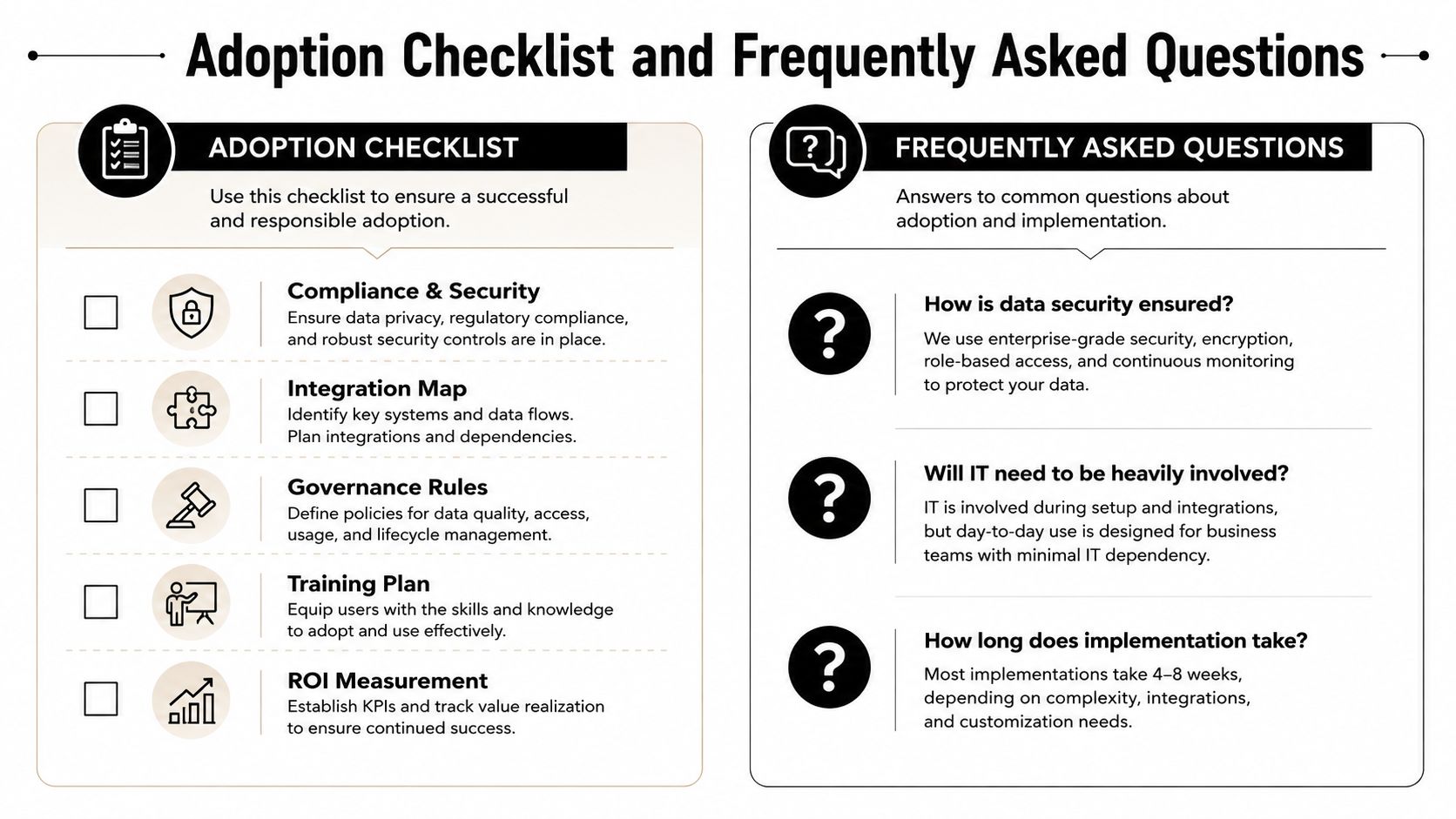
Adoption Checklist and Frequently Asked Questions
Print this before the next demo.
Adoption checklist
- Compliance and security: Confirm PHI handling, encryption, audit logs, and a signed BAA.
- Integration map: List every system the workflow must touch, then verify native connections.
- Governance rules: Set permissions, naming conventions, and production controls before launch.
- Training plan: Assign one owner, train the first users, and document support steps.
- ROI measurement: Compare baseline manual time against the new workflow after launch.
FAQ
How fast will ROI show up? Usually after the first workflow proves it can replace repetitive handoffs without creating more cleanup work.
Do paralegals need coding skills? No, but they do need process discipline and comfort with structured logic.
When should we move to specialized document AI? When the bottleneck is understanding records, not moving them around.
If you want a platform that turns medical records review and demand drafting into repeatable case work, visit Ares and see how it fits beside your workflow stack. It's built for PI firms that need structured case data, stronger demand prep, and a cleaner handoff between records, chronology, and drafting.