
The attorney has a mediation tomorrow morning. A 1,400-page medical stack sits on the desk, and someone needs to find the post-accident MRI showing a new disc herniation before opposing counsel turns every missing date into a causation argument. The records came from multiple providers, the filenames are inconsistent, and the only index is a collection of yellow notes that made sense to the person who created them.
That problem isn't solved by adding more folders. A personal injury case file is a medical chronology problem first and a document-storage problem second. The demand letter, discovery responses, deposition outline, mediation brief, and settlement evaluation all depend on the same underlying timeline. If the chronology is incomplete, every later work product inherits the weakness.
A durable system still needs folders, naming rules, permissions, and retention controls. But those components should serve one purpose: let a reviewer identify who treated the claimant, when treatment occurred, what the records show, what remains missing, and where the supporting document is stored.
The PI Case File Is a Chronology Problem First
A provider folder can tell you where a record lives. It can't, by itself, tell you what happened to the client between the emergency department visit and the first specialist appointment. A filename can identify an MRI report. It doesn't explain whether the scan confirms a new injury, documents a preexisting condition, or belongs to a different encounter.
That's why ad hoc folders and search-by-filename systems fail under pressure. Providers use different naming conventions, imaging centers separate reports from images, billing records arrive later, and duplicate PDFs often circulate through email. A chronology built from memory or sticky notes also obscures gaps. The missing emergency record and the unreported primary-care visit can look identical until someone checks the source trail.
Start with the questions the file must answer
Build the chronology around the questions a litigator asks:
- Who treated the claimant? Record every provider, facility, specialty, and referral.
- When did treatment occur? Use the date of service, not the upload date or the date printed in an email.
- What changed? Separate symptoms, objective findings, diagnoses, procedures, work restrictions, and recommendations.
- What remains unresolved? Mark missing records, unexplained treatment pauses, duplicate entries, and contradictions.
- What supports the conclusion? Link every chronology entry to the underlying record.
This approach also reflects professional file-management guidance. Legal practice guidance recommends strict chronological order for correspondence, pleadings, and orders, while bar-association guidance emphasizes daily scanning, reliable backups, restricted access, and an index showing client files and destruction dates. The medical record chronology workflow is particularly useful for PI teams because it treats the records as a connected clinical history rather than a pile of PDFs.
Practical rule: If a reviewer has to open every document to reconstruct the treatment story, the file isn't organized yet.
Keep the original records intact. Create a working chronology separately, then validate it against the index and source files. The chronology is an analytical layer, not a replacement for the evidence. It should make the important facts visible while preserving a clear path back to the original document.
Building a Folder Structure That Actually Holds Up
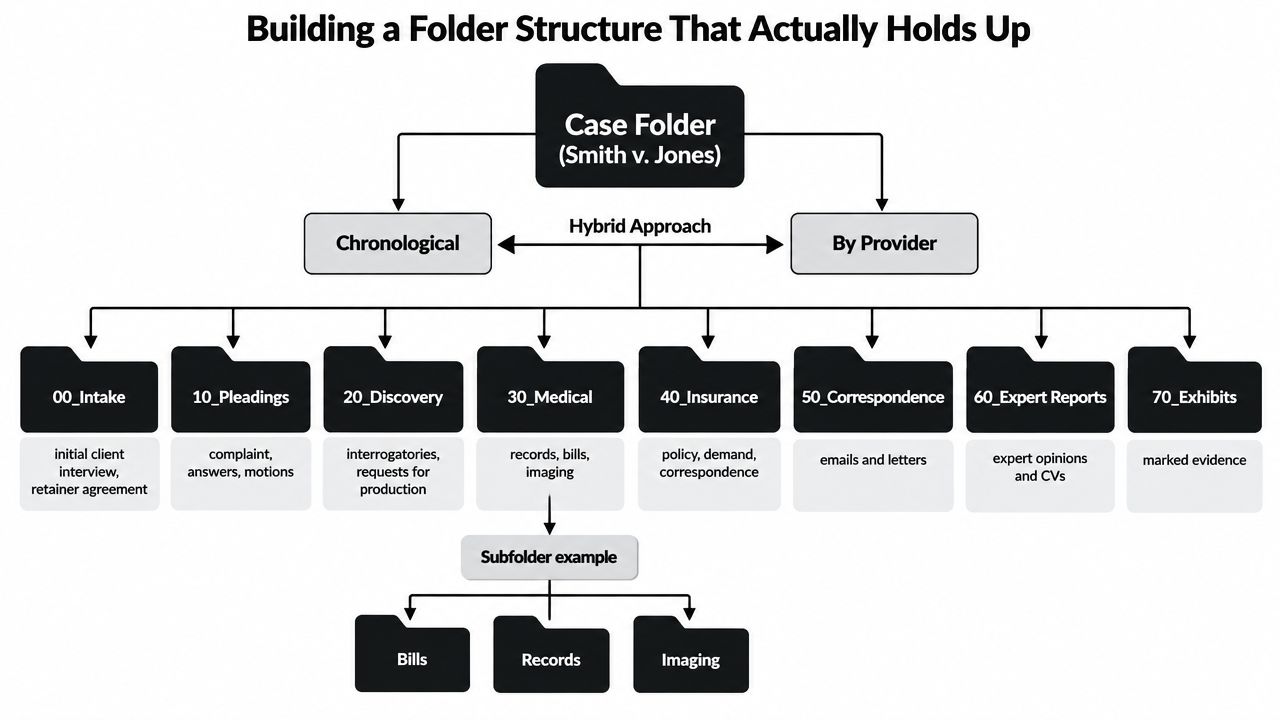
A folder structure should be predictable enough that a new paralegal can open a matter and find the same categories every time. I use numbered top-level folders because they create a stable order across matters and prevent a frequently accessed folder from being buried alphabetically.
Use a universal top-level map
A practical PI structure looks like this:
- 00_Intake: conflict results, intake forms, retainer agreements, identification records, and initial client communications.
- 10_Pleadings: complaints, answers, amended pleadings, motions, briefs, and court orders.
- 20_Discovery: discovery requests, responses, objections, productions, subpoenas, and related correspondence.
- 30_Medical: records, bills, imaging, authorizations, provider lists, and the master chronology.
- 40_Insurance: policies, coverage correspondence, claim materials, demands, releases, and lien information.
- 50_Correspondence: letters and emails that don't belong to a specific discovery, pleading, or insurance submatter.
- 60_Investigation: photographs, witness materials, scene evidence, incident reports, and investigator work product.
- 99_Closed: approved archival materials, closing documentation, and the destruction schedule.
Some firms use 60_Expert Reports, 70_Exhibits, or a separate Litigation Hold folder. That's sensible when the matter generates substantial expert or trial material. The exact labels matter less than consistency.
Make the medical folder provider-centered
Inside 30_Medical, create one folder per provider or facility, ordered by the first treatment date. For example:
30_Medical/01_City_Emergency_Department30_Medical/02_Riverside_Orthopedics30_Medical/03_Lakeside_Imaging30_Medical/04_Physical_Therapy_Group
Within each provider folder, use Records, Bills, and Imaging only when the volume justifies the split. Otherwise, separate files by document type in the master index and keep the provider folder simple. Over-foldering looks orderly but creates more places to search.
Pleadings and motions can share a litigation folder in a small matter, but split them when a motion has its own briefs, exhibits, orders, and hearing materials. Do the same with discovery requests and responses. A request for production and the responding production belong to the same discovery event, but they shouldn't be confused with an unrelated set of interrogatories.
Keep every storage location aligned
A litigation hold isn't just another correspondence folder. Give it a dedicated location containing the hold notice, custodian list, acknowledgment records, preservation instructions, and release documentation. If the firm uses a shared drive, case-management platform, or local working directory, the structure should mirror the approved matter tree exactly. A second unofficial tree invites version drift.
For teams handling large files, a clear guide to how to summarize Google Drive files can help with review workflows, but summaries should never become the authoritative record. Store the original, the extracted text, and the reviewer-approved chronology as separate, clearly labeled objects.
Naming Conventions and the Master Document Index
A folder can be well designed and still fail if filenames don't sort consistently. I prefer a date-first naming convention:
YYYYMMDD_DocType_Party_Description_v01
Examples include:
20240318_MRI_Lakeside_NewDiscHerniation_v01.pdf20240402_OfficeNote_Riverside_Orthopedics_FollowUp_v01.pdf20240515_Demand_Insurer_InitialPackage_v02.docx
Date first matters because the operating system, document-management platform, and many review tools will sort the files into a usable chronology without manual rearrangement. Use zero-padded month and day values, controlled abbreviations, and a version number for working documents.
Build an index that carries the facts
The master document index should be a spreadsheet or database with one row per document or logically unified record set. The path is useful, but it isn't the source of truth. A renamed file can break a saved reference, while a well-maintained index preserves the document's identity, provenance, and chronology connection.
| Field | Example |
|---|---|
| Matter ID | SMITH-2024-001 |
| Document ID | MED-000127 |
| Bates range | SMITH000845-SMITH000872 |
| Date of service | 2024-03-18 |
| Provider or source | Lakeside Imaging |
| Document type | MRI report |
| Author or custodian | Radiology department |
| Recipient | Treating orthopedic office |
| Confidentiality flag | PHI |
| Diagnosis or finding | New disc herniation |
| Treatment or event | Lumbar MRI |
| Source filename | 20240318_MRI_Lakeside_NewDiscHerniation_v01.pdf |
| Chronology link | CHRON-0042 |
| Gap status | None |
| Review status | Verified |
For a practical explanation of the underlying concept, document indexing explained is a useful reference. In a PI matter, indexing isn't just cataloging. It connects the document to the medical event, the evidentiary proposition, and the later draft that relies on it.
Control versions deliberately
Never overwrite an original production, signed record, or received provider file. Mark superseded drafts as superseded, move them into a controlled working subfolder, and keep the final version in the appropriate production or executed-documents location. Use v01, v02, and so on, rather than filenames such as final, final2, or really_final.
A consistent legal file naming convention prevents the small inconsistencies that become expensive once several people exchange records, drafts, and exhibits.
Building the Medical Chronology From the Records
The chronology should begin with collection, not composition. Pull every provider record, billing statement, imaging report, operative note, therapy note, and relevant claim document before deciding what belongs in the narrative. Then sort the entries by date of service or encounter date, not by the date a staff member scanned or downloaded the file.
Give each event a complete row
A useful chronology row captures:
- Date of service
- Provider and facility
- Body part or complaint
- Subjective complaints
- Objective findings
- Diagnosis code or plain-language diagnosis
- Treatment rendered
- Medication, referral, or recommendation
- Work status or restrictions
- Billing amount or charge information when relevant
- Source filename and document ID
- Gap or contradiction flag
Keep subjective complaints separate from objective findings. “Reports severe low-back pain” isn't the same type of fact as “MRI identifies a disc herniation.” Treatment recommendations also deserve their own field, because a recommendation for follow-up isn't proof that the follow-up occurred.
Mark unknowns directly with a [GAP] flag. Add a short explanation, such as [GAP] emergency department record requested, not received or [GAP] primary-care visit referenced in intake, provider not yet identified. A visible gap can be assigned and resolved. A silent gap can disappear into the file.
Compare manual review with assisted extraction
Manual review remains valuable for interpretation, but it's a poor substitute for structured capture. Industry reporting estimates that firms can lose up to 6 hours per week to document-management work, including about 2.3 hours searching for files and 2.0 hours recreating missing documents, with an estimated 9.8% productivity loss per lawyer per year (industry reporting on document-management loss). Those figures describe operational waste, not a guaranteed result for every firm, but they show why repetitive indexing deserves a controlled workflow.
AI can identify dates, provider names, diagnosis descriptions, and repeated records faster than a person working through an unstructured stack. It still can't decide whether two similarly worded findings describe progression, a historical condition, or a copied-forward note without human review. Use extraction to populate candidate rows, then have a qualified reviewer verify the chronology against the source document.
Before relying on the finished chronology, reconcile it with the master index. Check for duplicate encounters, records assigned to the wrong provider, dates that reflect report creation rather than treatment, and bills with no corresponding treatment note. The finished document should let a reviewer understand the treatment story without opening every PDF, while every material entry remains one click away from its support.
Using AI to Automate Indexing and Demand Drafts
AI works best after the firm has defined its taxonomy, naming rules, and chronology fields. Without those controls, an extraction tool can produce a polished but inconsistent summary that hides missing records and mixes drafts with source evidence.
A practical pipeline has four stages:
- Ingest: Upload provider records, bills, imaging reports, correspondence, and existing indexes into the matter workspace.
- Extract: Identify dates, providers, facilities, diagnoses, procedures, work restrictions, recommendations, and billing information.
- Review: Compare each proposed chronology row with the source record, correct errors, resolve duplicates, and mark gaps.
- Draft: Feed the approved chronology into a demand template covering liability, treatment, objective findings, damages, prognosis, and the requested resolution.
The same index should drive the demand package. That prevents a common failure mode, where a paralegal writes the demand from a summary document while the attorney relies on a different version of the medical records. A draft generated from approved chronology rows is easier to audit because each factual statement can be traced to a provider entry and source document.
The platform description for Ares says it extracts diagnoses, treatment dates, providers, and symptom timelines from uploaded case files, then produces organized medical summaries and demand drafts. That makes it one possible layer in a chronology-first workflow, alongside a document-management system and human review.
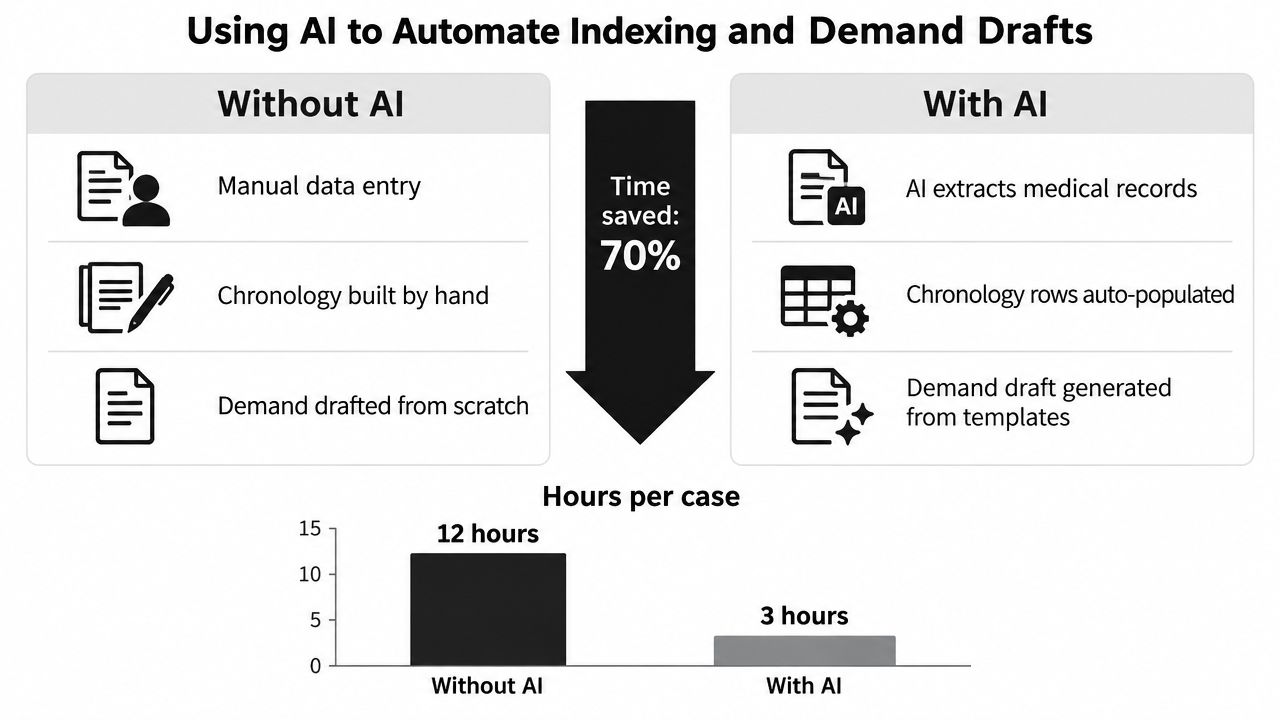
The supplied infographic presents a comparison of 12 hours without AI and 3 hours with AI, plus a claimed 70% time saved. Those figures are part of the visual asset, not a verified benchmark in the provided data, so treat them as illustrative rather than a promise. For a broader review workflow, AI legal document review provides relevant context.
AI output needs a human verification step. Models can misread dates, confuse providers, misinterpret diagnosis codes, omit handwritten notes, or treat a copied-forward symptom as a new development. Require the reviewer to approve every material chronology row before it enters a demand draft.
A short demonstration can help a team understand where automation fits in the process:
Use AI as a drafting accelerator, not as the authority for medical or legal conclusions. The approved chronology remains the spine.
Redaction, Privacy, and Access Control for PHI
A disorganized PI file creates privacy risk because records move through uncontrolled channels. Staff download documents to personal drives, forward attachments to broad email groups, and send an entire medical stack when only a few pages are relevant. The solution is a documented release process that applies to the file itself, not merely to the message carrying it.
Use a document-level redaction pass
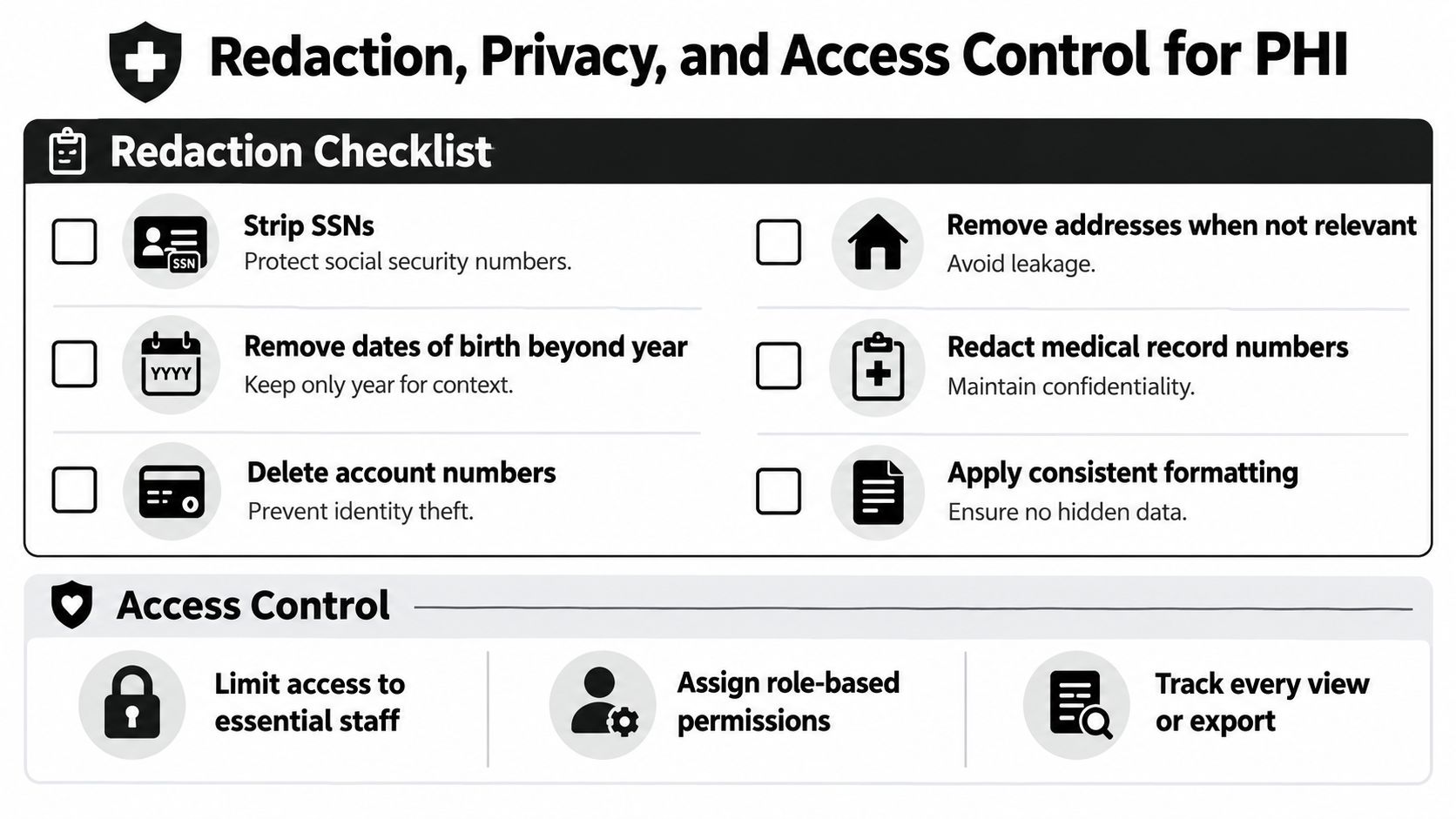
Before producing or sharing a record set, confirm that the PDF has been permanently redacted rather than covered with a visual box. Check the visible page, hidden text layer, metadata, attachments, comments, and OCR text.
- Remove direct identifiers: Strip Social Security numbers, medical record numbers, account numbers, and unnecessary addresses.
- Limit birth-date detail: Retain only the level of date information needed for the legal purpose.
- Review unrelated sensitive material: Separate or redact unrelated HIV, substance-use, mental-health, or other protected information where disclosure isn't relevant to the claimed injury.
- Check every page and attachment: A redaction applied to the email body does nothing to an unredacted attachment.
- Record the release: Log the recipient, date, document set, purpose, and reviewer.
Access should follow the minimum necessary principle. Attorneys may need full matter access, paralegals may need broad working access with restrictions around sealed or especially sensitive records, and support staff may need only pleadings, correspondence, or administrative materials. Configure those permissions in the case platform or shared drive instead of relying on email forwarding.
If a third-party PDF service will touch medical records, review its PDF tool privacy notice and confirm the firm's contractual and security requirements before uploading PHI. Any AI vendor processing protected health information should also be covered by the appropriate business associate arrangement where required.
Security rule: If you can't identify who accessed a record, who sent it, and which version they received, the disclosure process needs work.
Retention, Destruction, and Closing the File Cleanly
Closing a matter isn't dragging the folder into an archive. It's a controlled transition from active work to governed retention. The close date should trigger the retention clock, because the relevant question is usually when representation ended, not when the last PDF arrived.
The American Bar Association standard cited by the Association of Legal Administrators says lawyers should preserve client records for five years from the date representation ends (legal records-management guidance). Other bar associations set longer minimums, including six years or ten years beyond closing, so the firm must apply the governing jurisdiction and matter-specific rules rather than adopt one universal period.
The New York State Bar Association recommends a close-file protocol that includes sending a termination letter, confirming that orders or judgments have been filed, removing duplicates, calendaring destruction, and maintaining a perpetual inventory of destroyed files with dates. Those controls make the final file defensible because the firm can show what it retained, what it destroyed, when destruction became permissible, and who approved it.
Run a documented close-file review
Before moving a PI file to 99_Closed, confirm:
- Representation ended: Send and store the termination or closing letter.
- The case is procedurally complete: Verify that settlement documents, judgments, releases, and required filings are complete.
- Financial obligations are resolved: Confirm liens, client-trust or IOLTA entries, settlement distributions, and reporting obligations.
- The evidence record is preserved: Archive the approved chronology, master index, demand package, executed settlement documents, and material production sets.
- Working material is separated: Identify drafts, duplicates, temporary downloads, and superseded versions for approved disposition.
- Access is reviewed: Remove former staff and outside vendors, but don't revoke access before confirming that the archival copy remains available to authorized users.
- Destruction is recorded: Document the item, method, date, authorizer, and any exception.
A physical file may require secure shredding. A digital file may require a documented secure-wipe process or a controlled deletion under the platform's retention policy. Cloud storage introduces a separate issue: deleting a visible folder may not immediately remove backups, exports, or synchronized local copies. Ask the provider how retention, legal holds, backups, and account termination operate before promising complete deletion.
Match retention to the record type
The table below is a planning framework, not a substitute for jurisdiction-specific advice. “Typical retention” should be replaced with the period required by the applicable rule, engagement terms, insurer requirements, legal hold, or court order.
| Record Type | Typical Retention | Special Notes |
|---|---|---|
| Client matter file | Apply the governing jurisdiction's rule | Tie the schedule to the representation-close date |
| Medical records and PHI | Retain under the matter schedule and applicable privacy obligations | Preserve access controls, audit history, and authorized disposal records |
| Settlement and release documents | Retain with the closed matter | Confirm execution, distribution, liens, and reporting before destruction |
| Client-trust and IOLTA records | Apply financial and jurisdiction-specific requirements | Reconcile the trust file before closing |
| Litigation hold materials | Until the hold is formally released | Don't destroy responsive material while a hold or dispute remains active |
| Master chronology and index | Preserve as part of the archival case record | Keep source references so the timeline can be reconstructed |
| Drafts and duplicates | Destroy only after review and authorization | Preserve versions that explain a material negotiation or litigation decision |
A clean closed file should reproduce the medical timeline, demand narrative, settlement trail, and key evidentiary sources without requiring the firm to rebuild the matter from scattered inboxes. That is the practical payoff of organizing the case around chronology from the start.
Ares helps PI firms turn raw medical records into structured chronologies, summaries, and demand drafts, with key dates, providers, diagnoses, and treatment events organized for review. If your team is spending hours rebuilding medical timelines, visit Ares to see how the workflow can fit into your case-file system.