

A paralegal uploads a batch of medical records to an AI review tool, a partner forwards a witness interview through email, and a contractor keeps access to a closed matter because nobody remembered to remove it. Each action looks ordinary in isolation. Together, they create a privacy program the firm may not be able to explain, defend, or control.
For personal injury practices, how to ensure data privacy is no longer limited to protecting laptops and paper files. Medical records, photographs, billing records, correspondence, and settlement information now move through case-management platforms, cloud drives, transcription services, analytics tools, and AI model pipelines. The practical question is whether the firm knows where that information goes, who can access it, how long it stays there, and what happens when a vendor or employee makes a mistake.
Where Privacy Risk Actually Lives for Firms Handling Sensitive Client Data
A personal injury firm may collect a client's medical history during intake, store it in a case-management system, send it to a records vendor, discuss it by email, copy it into a demand workflow, and upload it to an AI tool for summarization. Each handoff creates a control point. The exposure may come from a stolen device, but it may also come from an unreviewed integration, shared folder, browser extension, or model that retains uploaded content under terms nobody examined.
For firms adopting AI, the harder question is often what happens after upload. PHI can move from a case platform into prompts, model logs, analytics pipelines, human review queues, backups, or product-improvement systems. If the firm cannot identify those destinations and apply approved restrictions, it cannot reliably explain how client information is being used.
Start with a data-flow inventory, not a policy rewrite. For each matter, record where information is collected, displayed, copied, transmitted, analyzed, backed up, and deleted. Include staff inboxes, shared drives, mobile devices, local downloads, document vendors, transcription services, client portals, and AI integrations. Capture the purpose of each transfer and the person responsible for reviewing it.
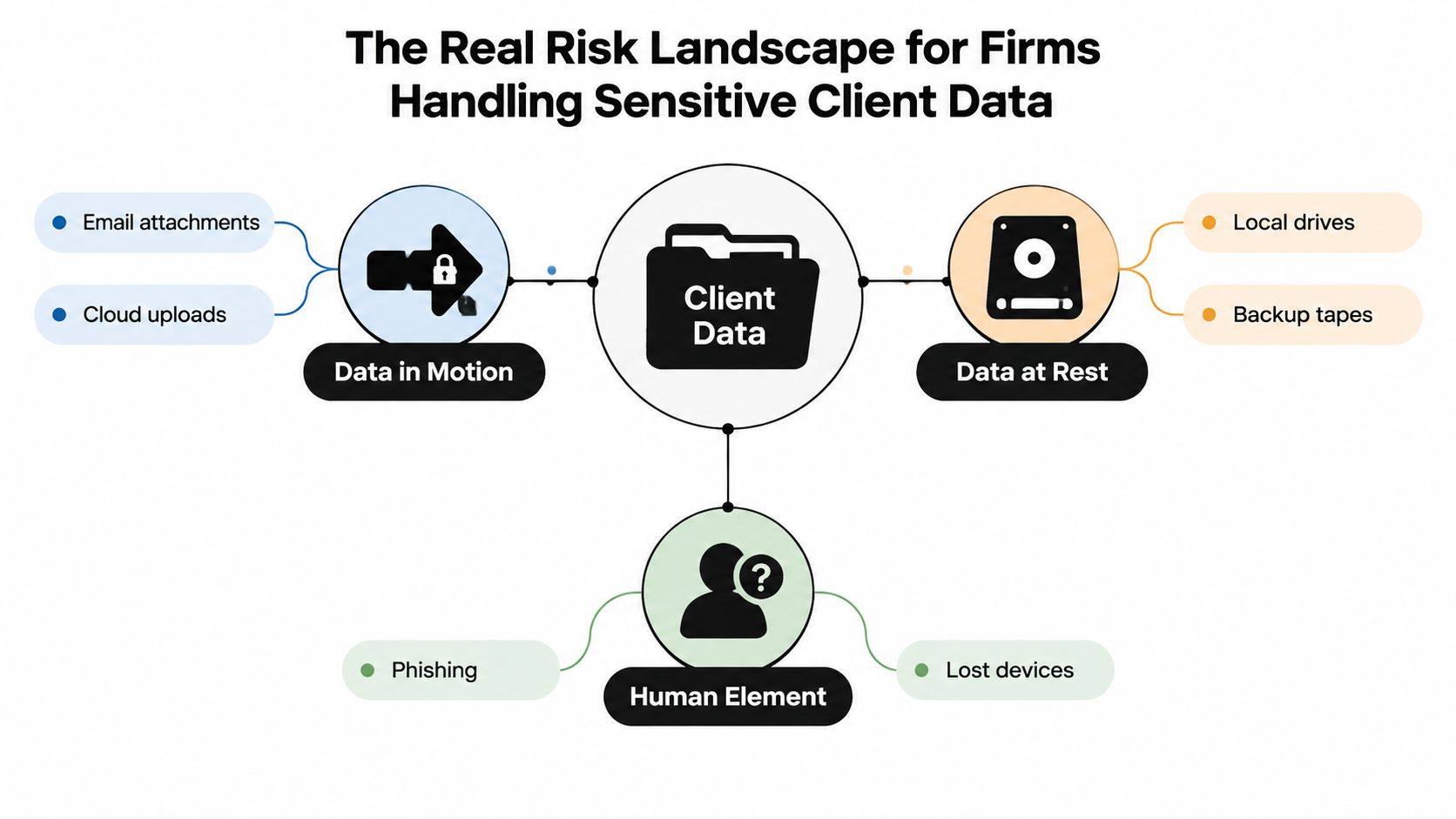
Map the failure modes before choosing controls
Classify records by sensitivity and jurisdiction, then document what can go wrong:
- Excessive access: A receptionist can open records unrelated to intake, or a contractor keeps administrator privileges after a project ends.
- Misdirected transmission: A medical file reaches the wrong recipient, or a staff member uses an ordinary email attachment because the secure portal is inconvenient.
- Weak authentication: A compromised password opens a case-management account containing PHI and PII.
- Uncontrolled copying: A full medical record appears in a task comment, chat thread, or analytics export.
- AI reuse: An AI provider retains prompts, permits human review, or uses firm data for product improvement without an approved purpose.
These failure modes point to specific controls. NIST guidance supports limiting collection to information relevant to a stated purpose, identifying that purpose during collection, and avoiding incompatible reuse or disclosure without consent or legal authority. For a firm, that means mapping each field to a business and legal purpose, removing fields that are not required, and setting a retention rule before information enters a system. See the NIST guidance on protecting personally identifiable information for the underlying control approach.
Assign ownership to every system
An inventory has value only when someone owns each entry. Record the system's purpose, data categories, users, retention rule, vendor, storage location, and contractual safeguards. Review high-risk workflows after a new tool, staff role, office location, client matter, or integration changes.
Practical rule: Treat every convenience feature as a data-transfer decision. A browser extension, meeting recorder, or generative AI assistant can move client information outside the firm's intended boundary.
Recent exposure data shows why disciplined collection and sharing matter. The Identity Theft Resource Center tracked 3,158 U.S. data compromises in 2024, compared with 3,202 in 2023, and recorded 1,728,519,397 victim notices in 2024, a 312% increase from 419 million notices in 2023. Its 2024 annual data breach report distinguishes incident count from exposure volume. A firm that sends unnecessary information into vendors, models, or analytics systems increases the consequences of every access failure.
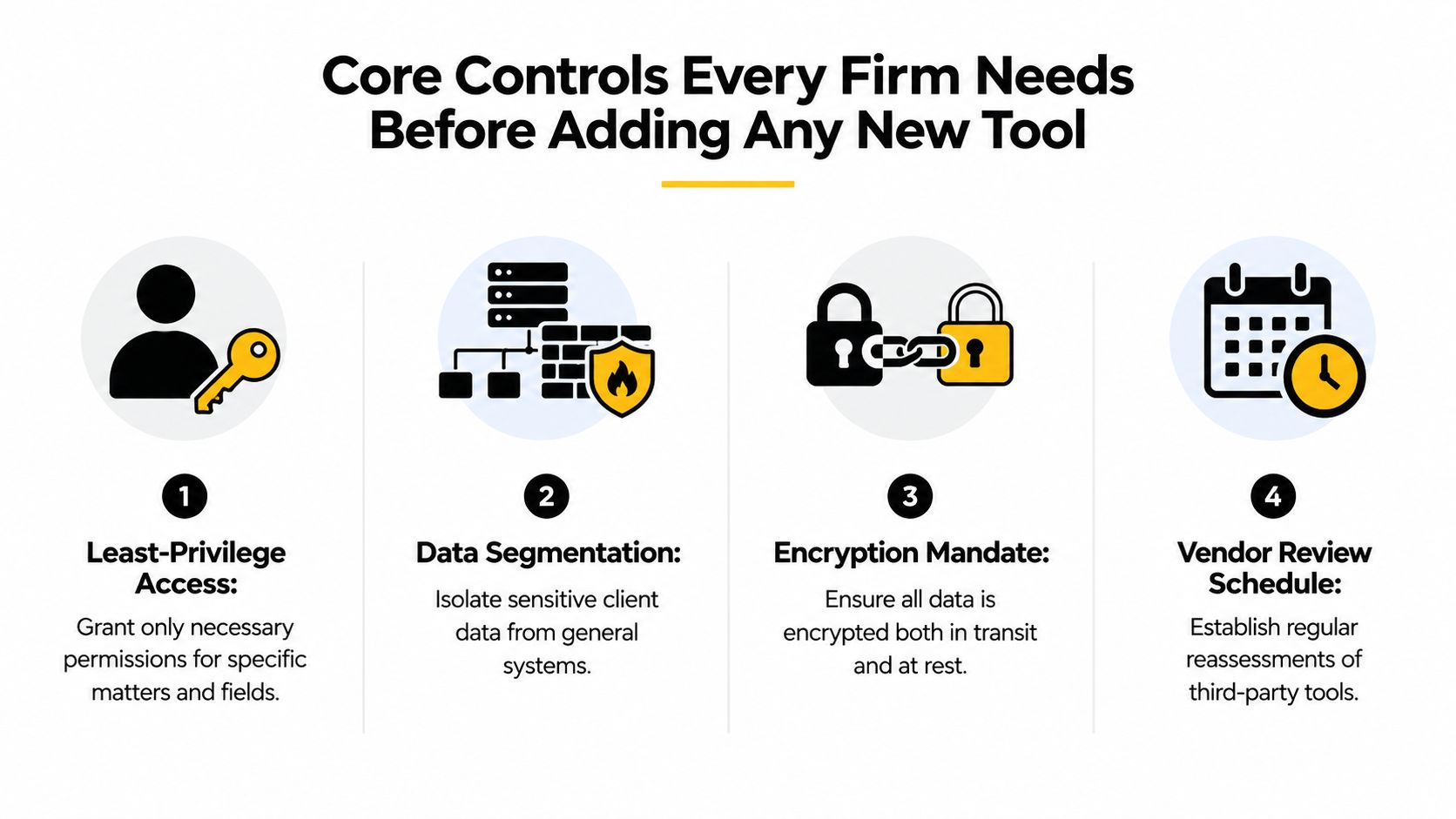
Core Controls Every Firm Needs Before Adding Any New Tool
Before reviewing another platform, make the firm's existing environment harder to misuse. Privacy controls fail when they depend on perfect judgment during a deadline. The strongest design gives staff a clear approved path and makes the risky alternative inconvenient or unavailable.
Restrict access by role and matter
Apply least-privilege access to matters, fields, and functions. A legal assistant may need documents for assigned cases, while an intake employee may need contact information and limited status data. Neither role automatically needs broad access to every medical record or administrative setting.
Require multifactor authentication for remote access, administrators, and systems containing PHI or PII. Review permissions when responsibilities change, and document exceptions rather than allowing permanent access because it once solved a temporary problem. Firms looking for a deeper implementation reference can use these data access controls for legal practices when defining role and permission requirements.
Protect information wherever it travels
Encryption should cover data in transit and at rest, but encryption alone won't correct excessive permissions or uncontrolled exports. Test whether the firm can restore encrypted backups, confirm that administrators can't casually bypass protections, and verify that mobile devices receive the same attention as office systems.
Standardize secure transfers through approved portals, named-user links, and managed devices. Avoid placing complete medical records in email, chat, or task comments when a controlled document location will work. NIST's privacy guidance also emphasizes documented, policy-aligned logging and transmission mechanisms that respect processing permissions and data minimization principles. Its privacy framework draft on data processing and logging provides useful context for turning those principles into operational requirements.
Minimize, retain, and delete deliberately
Collect what the representation requires, not everything that might someday be interesting. A general case file may need a treatment chronology and relevant diagnoses, but it may not need every unrelated detail from a client's complete medical history. Redact unnecessary information before sharing a record with a vendor or placing it into an AI workflow.
Define retention and secure-deletion schedules by matter type. Account for legal holds, statutory duties, backups, and vendor copies, because deleting the visible file doesn't necessarily remove every duplicate. Human error remains a major operational concern. IBM-linked reporting cited in the verified data estimates that human error represented roughly one quarter of breaches in some recent datasets, including a 26% estimate in 2025. That makes workflow design as important as employee awareness.
| Control | Evidence the firm should keep |
|---|---|
| Least privilege | Role matrix, approval records, access reviews, and offboarding evidence |
| Encryption | Configuration records, vendor statements, and backup restoration tests |
| Data minimization | Intake fields, redaction rules, approved transfer formats, and retention schedules |
| Exception management | Named owner, documented reason, expiration date, and review record |
Managing Vendor and AI Tool Risk With Practical Due Diligence
A polished interface says very little about whether a tool can safely process client information. Vendor review should answer a narrower question: what happens to the firm's data from upload through deletion?
Create a due-diligence record for every processor, including hosted case systems, e-signature platforms, managed service providers, transcription services, and AI products. Ask what each field contains, why the vendor needs it, where it's stored, who can access it, whether it's used for model training or product improvement, and how long it remains available.
Request evidence for the specific service being purchased. A report for a parent company or a different product doesn't automatically establish the security of the platform the firm will use. Review subprocessors, storage locations, breach-notification duties, deletion terms, business continuity, and the vendor's ability to change material service features.
| Review area | Evidence to require |
|---|---|
| Data use | Written description of collection, processing, secondary use, and model-training restrictions |
| Security | Relevant SOC 2 report, penetration-test summary, encryption details, and incident history |
| Subprocessors | Current list, locations, functions, and notice process for changes |
| Contract terms | Defined safeguards, notification duties, deletion assistance, audit rights, and return or destruction terms |
| AI behavior | Tenant isolation, retention settings, human-review terms, training controls, and output handling |
| Operational resilience | Backup, recovery, service continuity, and support escalation information |
The contract should name controls rather than promise general compliance with privacy law. For a practical review of contract terms, the DPA essentials for secure tools from Ciphar is a useful companion resource. Firms can also adapt a structured vendor security assessment to keep procurement evidence consistent.
For AI tools, disable training on firm data where possible, use limited retention, and prohibit secondary use unless the firm has expressly approved it. Start with synthetic or redacted records. A pilot should test not only summary quality, but also deletion behavior, access separation, export controls, logging, and administrator visibility. An unsigned upload button must never become an informal data-sharing channel.
Building an Incident Response Plan That Actually Works Under Pressure
A response plan should begin with the first uncomfortable message, such as “I clicked a suspicious link” or “the laptop with the case files is missing.” Staff need one reporting channel, a clear instruction not to investigate independently, and a response team that knows who makes decisions.
Assign four roles:
- Incident lead: Coordinates the response, records decisions, and controls the action list.
- Technical responder: Isolates accounts and devices, preserves evidence, and works with IT or a forensic provider.
- Legal and compliance contact: Evaluates HIPAA, state privacy, client-contract, insurer, and litigation obligations.
- Communications owner: Coordinates client, vendor, regulator, and internal messaging after the legal contact approves the content.
Use a time-based response sequence
The first hour is for reporting, triage, and containment. Disable compromised sessions, isolate a missing or affected device where possible, preserve relevant logs, and avoid wiping evidence. During the next operational window, determine which systems, matters, data categories, users, and vendors may be involved.
The 72-hour period should cover containment, evidence preservation, scope assessment, and notification decisions. That isn't a universal notification deadline for every incident. The legal and compliance contact must identify the rules that apply, including HIPAA requirements when PHI is involved, state-specific PII laws, contractual commitments, and insurance conditions.
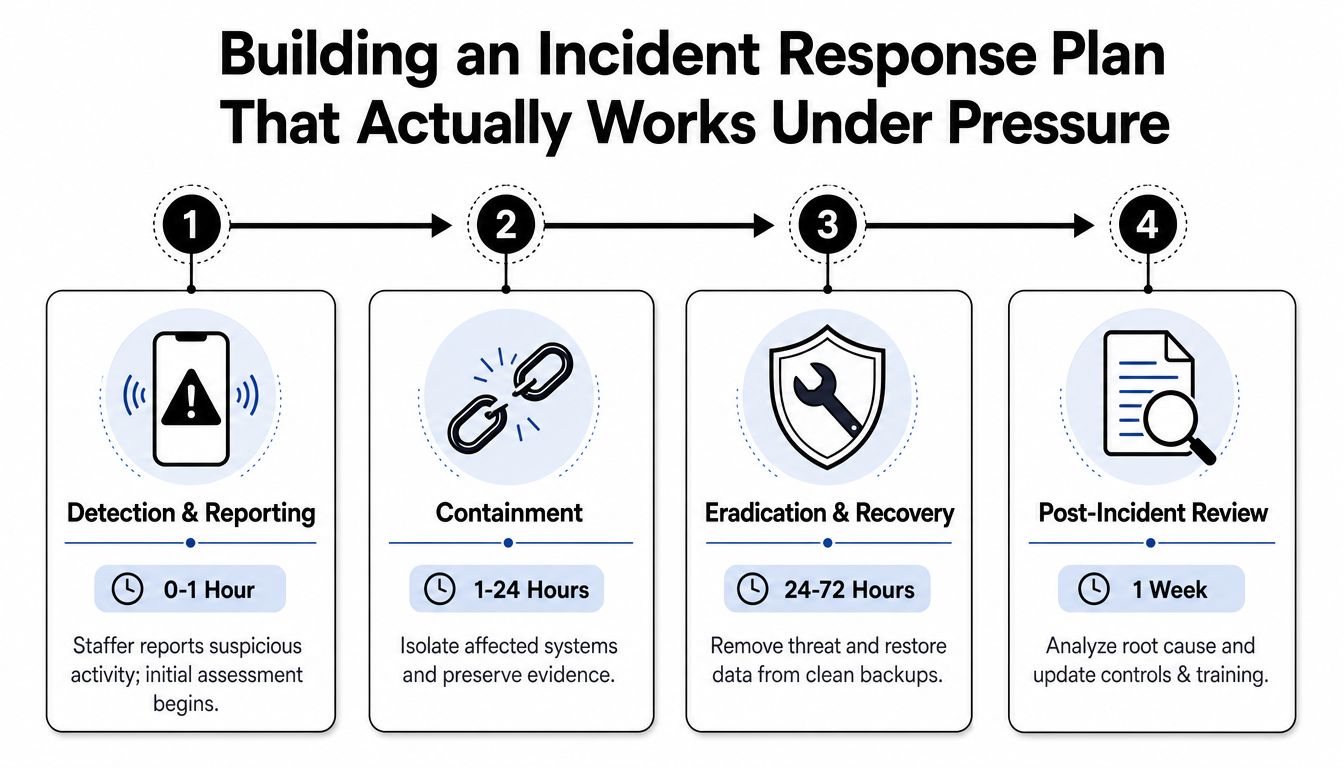
Prepare notification templates, an evidence checklist, vendor contacts, cyber-insurance instructions, and a decision log before an incident occurs. The packet should capture what happened, when it was discovered, systems affected, containment measures, data categories, people involved, legal analysis, communications, and remediation.
A plan that depends on finding the right person during a crisis isn't a plan.
Use the firm's audit-trail requirements to preserve a reliable record of access, changes, and response activity. Guidance on audit trail requirements for legal workflows can help define what the firm should capture and retain.
For firms evaluating meeting transcription, note-taking, or recording tools, Weeve's 2026 privacy-first AI note-taker roundup offers a useful comparison lens, particularly around retention, processing, and regional handling. The same questions belong in the incident plan because an AI provider may be part of the affected environment.
Turning Privacy Into an Ongoing Program With Audits and Training
A privacy policy describes intent. An operating program produces evidence. The difference appears when a partner asks who accessed a medical file, when a vendor changed its subprocessor list, or whether departing staff lost access.
Run a quarterly review that samples access logs, checks dormant accounts, verifies encryption settings, examines retention enforcement, and records vendor changes. Don't limit the review to whether a control exists. Test whether it worked in an ordinary matter with ordinary staff behavior.
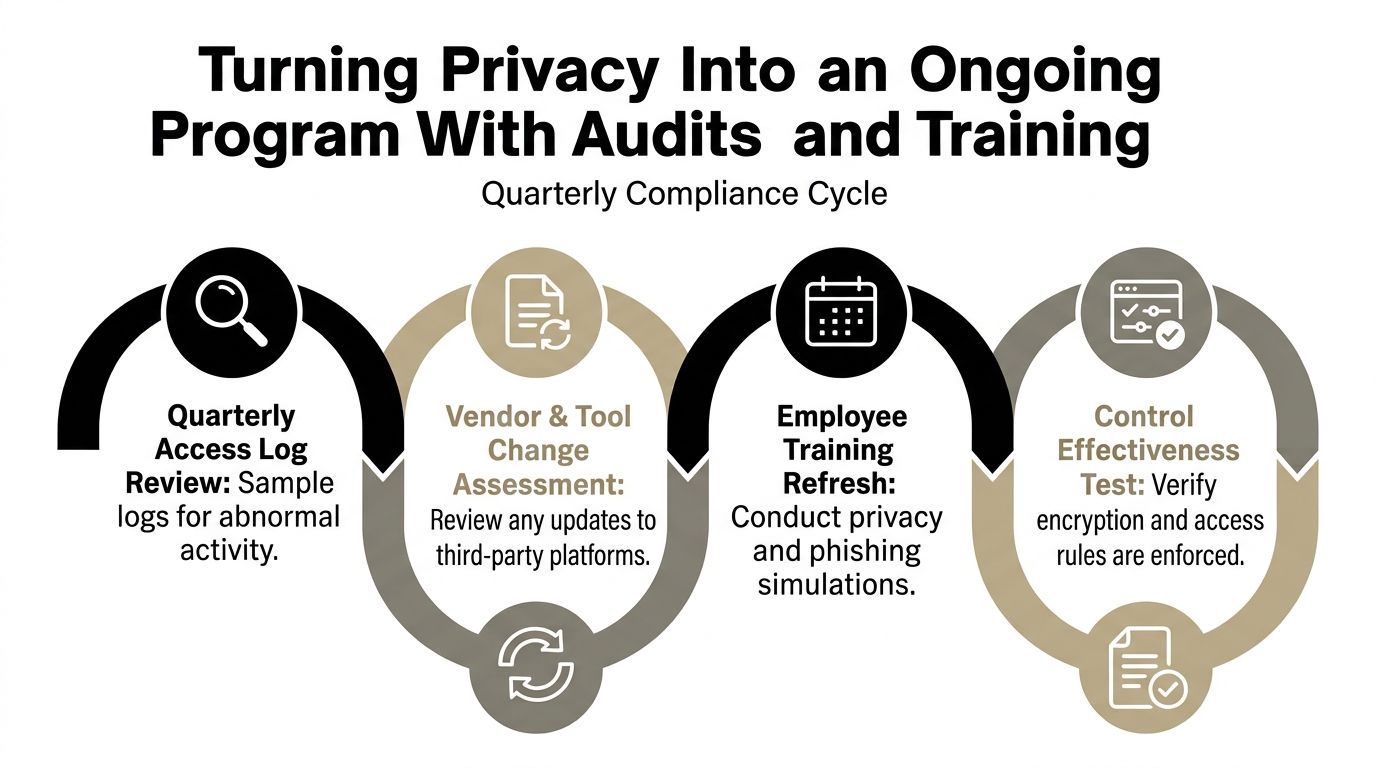
Turn review findings into assigned work
Each finding needs an owner, a due date, supporting evidence, and a risk decision. A finding that says “review access” is weak. A stronger record identifies the system, affected role, unnecessary permission, corrective action, and person responsible for confirming closure.
Run a tabletop exercise twice a year. Give paralegals, attorneys, intake personnel, IT contacts, and leadership a realistic scenario, such as a compromised mailbox or an AI vendor exposure. Ask who receives the report, who isolates access, who contacts the insurer, what evidence must be preserved, and who decides whether a client or regulator needs notice.
Training should match the job. Intake staff need practice recognizing sensitive information and using approved collection paths. Litigators need guidance on sharing records with experts, opposing counsel, and vendors. Case managers need clear rules for exports, transcription, AI uploads, and matter closure.
The evidence of privacy is operational behavior, not the existence of a signed policy.
Maintain signed attestations, access-review records, training completions, tabletop notes, vendor assessments, exception approvals, and audit logs. External privacy resources, such as the privacy practices published by MR2 Solutions, can provide comparison points when a firm refreshes its own public-facing commitments. The firm's internal evidence still needs to show how those commitments work in practice.
Privacy governance is also becoming harder to staff. ISACA's 2026 State of Privacy findings identify technical privacy expertise as the top skill gap at 54%, experience with different technologies at 52%, and technical privacy teams as understaffed for 47% of respondents. Lean firms should respond by assigning ownership clearly, standardizing repeatable reviews, and escalating specialist questions instead of pretending general awareness replaces technical judgment.
Common Pitfalls and Habits That Keep Your Privacy Posture Strong
The same weak defaults appear across many personal injury environments. A firm relies on a cloud vendor's default settings without verifying encryption at rest. Staff share a matter folder by open link rather than named users. A contractor keeps administrator access after the case closes. An AI transcription service receives a witness interview because it's marketed as free, even though the firm hasn't reviewed retention or secondary use.
Pair each failure with a durable habit:
- Unverified cloud settings: Require configuration evidence and test the controls instead of trusting the provider's marketing.
- Open folder links: Use default-deny sharing, named recipients, expiration dates, and an approval path for exceptions.
- Stale contractor access: Make offboarding as deliberate as onboarding, with a checklist covering accounts, tokens, devices, shared folders, and vendor portals.
- Unmanaged AI use: Keep an AI-tool registry that identifies every service receiving client data and blocks use without approved terms and a signed DPA.
- Overbroad permissions: Recertify access regularly and review it after role changes, matter closure, or staff departure.
- Retention drift: Connect matter closure to deletion or de-identification workflows, while preserving legal holds and required records.
The privacy posture erodes. A new integration bypasses the portal, a support log captures an entire medical narrative, or a vendor changes its processing terms without reaching the person who owns privacy. Build review triggers into workflow changes, procurement, onboarding, offboarding, and matter closure rather than waiting for an annual reminder.
Ares provides an AI-powered platform for personal injury firms that organizes medical records and supports demand-letter drafting, with stated encryption at rest and in transit, role-based access controls, and audit logs. Any firm evaluating it or another AI product should still apply the same due-diligence process described above, including purpose limitation, retention review, access testing, and contractual verification.
If your firm is moving medical-record review or demand drafting into an AI workflow, Ares can help structure those documents into case-ready insights while giving your team a defined platform to evaluate through its privacy process. Visit Ares to see how the workflow fits your matters, then request the security and data-handling details your firm needs before uploading client information.