
A medical-record packet arrives from three providers while a demand deadline is approaching. One set of records sits in an intake inbox, another is saved under an abbreviated client name, and a paralegal has started a chronology in a separate spreadsheet. The attorney needs to know what happened, when treatment began, whether the records support causation, and which gaps could weaken the claim. Instead, the team spends valuable time locating files and confirming which draft is current.
A PI firm needs more than digital storage. It needs a repeatable chain of custody, reliable search, controlled collaboration, secure handling of PHI, and document workflows that support case-value decisions. The best document management practices connect intake, medical analysis, demand drafting, retention, and defensible destruction into one operating system for the matter.
The 10 practices below, plus the required retention and audit discipline, are written for personal-injury workflows. Each recommendation includes a concrete setup step, a PI-specific example, a practical trade-off, and a checkpoint for verifying that the process works. Automation can accelerate review and routing, but it can't replace attorney judgment on causation, privilege, damages, or legal strategy. For firms evaluating broader automation, this guide for enterprise document automation provides useful context.
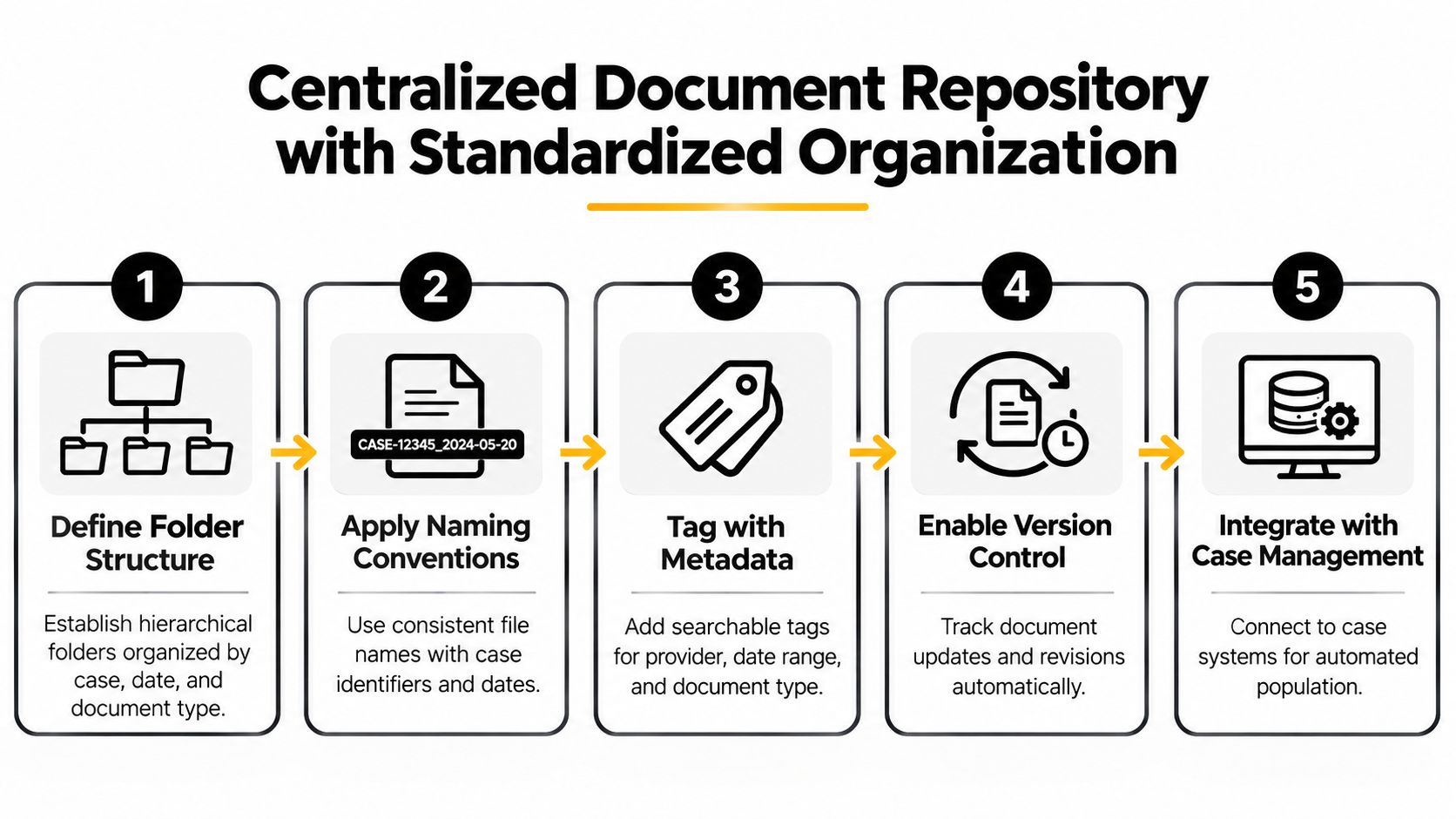
1. Centralized Document Repository with Standardized Organization
A case file needs one authoritative home from intake through retention. Medical records, imaging, bills, authorizations, correspondence, photographs, incident reports, discovery, expert materials, and demand drafts should not remain scattered across email, local desktops, personal drives, or unrelated cloud folders.
Define a matter structure that every team member can recognize immediately. A PI firm might use folders for intake, liability, medical records, damages, correspondence, discovery, experts, settlement, and work product, with metadata for the client, incident date, provider, document type, confidentiality level, and review status. Use filenames that state purpose, such as Smith_Medical_2026-03-14_EmergencyDepartment_Reviewed.pdf. Reject names such as final2, newest, or revised final, which obscure the current version.
Create the structure as a template, require fields at upload, and prohibit parallel matter folders without approval. A solo attorney may use Google Drive or OneDrive with disciplined permissions. A high-volume practice may choose a case-management platform that files intake documents by matter. For a broader guide to document management for small businesses, compare how different teams standardize file handling.
A practical medical-record filing model appears in this guide to organizing medical records. The trade-off is clear: detailed rules take time to design and can frustrate staff who prefer saving files anywhere. Loose filing is faster at first, but it makes case-value analysis and handoffs depend on individual memory.
Verification checkpoint: Select a recently opened matter and confirm that another trained team member can locate the latest medical records, demand draft, and signed authorization without asking the original filer.
Run recurring file-hygiene reviews. Correct duplicate uploads, inconsistent names, missing metadata, and documents saved outside the matter. Train new hires during onboarding, before workarounds become routine.
2. Automated Medical Records Extraction and Summarization
Medical review often determines whether a claim has a coherent injury story. The records may contain emergency treatment, primary-care notes, diagnostic imaging, specialist referrals, therapy notes, billing materials, and unrelated history. Manually reading every page remains necessary in difficult matters, but it shouldn't be the only way a firm finds dates, diagnoses, providers, treatment gaps, and symptom progression.
Set up a controlled extraction workflow. On upload, route records into a processing queue, identify the matter and document type, and generate a chronological summary for attorney or senior-paralegal review. Ares can extract key details from uploaded medical records and organize them into summaries and chronologies that support case analysis. Its medical records summarization workflow is best treated as a review aid, not as a final medical or legal conclusion.
A useful pilot starts with a limited group of matters representing different injury patterns and record quality. Define what the system must identify, such as treatment dates, providers, diagnoses, procedures, symptom descriptions, prior conditions, and apparent gaps. Then compare the output against the underlying records and record corrections by category.
The trade-off is speed versus interpretation. Automated extraction can surface facts quickly, but a summary may miss a negation, confuse a historical condition with a post-incident diagnosis, or flatten an important change in symptoms. Attorneys must verify every material point before it enters a demand, mediation statement, discovery response, or trial preparation file.
Practical rule: Use automation to decide where human attention should go first. Don't use it to decide what the law or medicine ultimately means.
Create injury-specific templates where they help consistency, but preserve a clear exception path for unusual records. The operating checkpoint is an attorney sign-off that links material summary statements back to source documents.
3. Document Metadata and Full-Text Indexing for Advanced Search
A folder can tell you where a document was placed. Metadata and full-text indexing tell you what the document contains and how it relates to the case. That distinction matters when a PI file contains thousands of pages and the attorney needs every reference to a surgery, prior complaint, emergency visit, or treating provider.
Define a small required metadata set before importing legacy files. Useful fields include matter number, client, incident date, source, provider, record date, document type, review status, privilege status, and access class. Keep controlled values consistent. If one person enters “ER,” another enters “emergency room,” and a third enters “ED,” saved searches won't behave reliably.
Index scanned PDFs and image-based records through OCR, then test the results against known terms. Search should work across document text, not only filenames. A saved search for all emergency-department records, for example, can combine document type, provider, date range, and the term describing the presenting complaint.
Search quality is a governance issue. If staff can't trust the index, they'll return to personal notes, inbox searches, and duplicate copies.
Give the team a short search guide with examples. Teach users to narrow by metadata before running broad full-text searches, and show them how to save recurring queries for trial preparation or demand review. A paralegal preparing a deposition can search for references to prior similar symptoms, while a case manager can locate every outstanding authorization by status.
The trade-off is structure versus flexibility. Too few fields produce weak retrieval. Too many mandatory fields create filing resistance and encourage inaccurate entries. Start with fields that directly support intake, medical analysis, discovery, and settlement work.
The verification checkpoint is a monthly retrieval test. Choose known documents and ask a staff member who didn't upload them to locate them using metadata and text search. Investigate every miss, because an absent result may indicate poor metadata, failed OCR, or an unsupported file type.
4. Workflow Automation for Intake, Triage, and Case Handoffs
A new document shouldn't disappear into an inbox because nobody owns the next step. Intake automation should move a record from receipt to classification, assignment, review, escalation, and completion with visible status at each point.
Map the workflow before selecting integrations. For a new medical packet, the sequence might be upload, matter matching, duplicate check, document classification, extraction, chronology review, missing-record flag, attorney escalation, and filing. For liability evidence, the route may instead lead to an investigator or litigation paralegal. The workflow should distinguish urgent deadlines from routine filing.
Assign one system as the source of truth for each data type. The case-management platform may own matter status and task assignments, while the document repository owns the original file and audit history. A medical-summary tool may produce a working chronology, but the attorney-approved version should return to the matter record with its review status clearly marked.
Tools such as Clio, Rocket Matter, LexisNexis integrations, Thomson Reuters systems, and Ares-connected workflows can reduce duplicate entry when configured carefully. The trade-off is convenience versus data conflict. An automatic field update is helpful only when the firm knows which value controls and how conflicting values are resolved.
Use a test matter before broad rollout. Upload sample records, trigger exceptions, change an assignment, and confirm that the correct users receive notifications. Document what happens when a file lacks a matter number, arrives encrypted, contains duplicate pages, or includes records belonging to another patient.
Operational test: Every automated handoff should have a named owner, a visible status, and an exception path.
Review unassigned documents at a set cadence. A workflow that routes most files correctly but leaves exceptions invisible still creates risk. The checkpoint is a report showing no unexplained intake backlog and a documented resolution for every exception.
5. Secure Intake and PHI Handling With Access Controls
Security begins before a record reaches the attorney. Medical records, health histories, wage information, photographs, and client communications should enter through controlled channels rather than personal email accounts or open file-sharing links.
Create an access matrix for each role. Attorneys may need broad matter access, while paralegals may need medical and damages folders but not attorney-only strategy notes. Clients should see only materials deliberately shared with them. Experts may receive a limited, time-bound collection, and vendors should never receive standing access to an entire case library when a controlled subset will do.
Configure role-based groups instead of granting permissions one person at a time. Require multi-factor authentication for privileged access, log downloads and external shares, and establish an immediate offboarding process. A permission review should confirm that former employees, reassigned staff, temporary contractors, and closed matters no longer have unnecessary access.
The UK's Information Commissioner's Office received more than 11,000 paper-based data-breach reports between 2020 and 2025, with 1,820 paperwork breaches reported in 2025 alone, as summarized by Security Brief's coverage of UK paper data breaches. Those figures concern paper handling, but the operating lesson applies to PI firms: storage, access restriction, retention, and training are risk controls, not clerical preferences.
For additional implementation detail, see data access controls for legal workflows. The trade-off is that tighter permissions can slow collaboration when access requests are handled manually. Use role templates, temporary access expiration, and clear escalation ownership to preserve security without making routine work unusable.
The checkpoint is an access review that tests both ordinary and exceptional paths. Confirm who can view a medical folder, who can share it externally, whether alerts fire for unusual downloads, and whether revoked access stops access.
6. Version Control and Document Change Tracking
A demand letter can change substantially as medical records arrive, liability evidence develops, and damages are recalculated. Without version control, a partner may review an outdated draft while a paralegal edits another copy. The resulting error may be obvious, or it may survive until after the document leaves the firm.
Use a collaborative drafting environment with visible version history. Microsoft 365, Google Docs, Box, ShareFile, and enterprise systems such as NetDocuments can preserve revisions and identify the user and time associated with a change. Configure the repository so staff edit the controlled document rather than downloading copies for offline revision.
Define status labels that mean something. “Draft” should indicate active work, “attorney review” should indicate a pending legal checkpoint, and “approved” should mean that the named reviewer authorized external use. A file shouldn't become “final” merely because someone typed that word into its name.
A complex demand may benefit from a separate change log that records material additions, deleted assertions, medical corrections, and damages updates. Lock or restrict editing after approval, and store the executed version with delivery evidence and supporting source records.
The trade-off is traceability versus clutter. Keeping every casual edit can make a matter noisy, while deleting historical revisions can impair reconstruction. Retain meaningful history and use clear lifecycle rules for temporary working files.
Before editing, verify the document status and open the latest controlled version.
For a PI-specific example, compare the attorney-approved chronology against the demand narrative before sending. Confirm that treatment dates, provider names, and claimed limitations match the cited records. The checkpoint is a version-history review documented for every externally delivered demand, settlement statement, or filed document.
7. Quality Assurance, Redaction, and Privilege Protection
Automation and collaboration increase the need for a deliberate human review gate. A document can be correctly filed and searchable yet still contain unnecessary PHI, an incorrect extracted fact, a privileged comment, or a statement that overstates the medical evidence.
Separate source records from work product. A raw provider record should remain identifiable and unaltered. A chronology, medical summary, damages analysis, and demand draft should show their status, author, reviewer, and relationship to the underlying sources. Don't let staff overwrite original records with corrected or redacted working copies.
Build a review protocol around the point of use. Before production, verify responsiveness, completeness, privilege, confidentiality, redactions, Bates treatment where applicable, and legibility. Before a demand leaves the firm, verify every material medical assertion, the damages figures, the causation narrative, and any statement about recovery or prognosis.
Use redaction tools that permanently remove content rather than drawing black boxes over visible text. Keep an unredacted source under restricted access, and record why a redaction was made. Privilege designations should be consistent, but borderline questions should move to attorney review rather than being resolved by a filing clerk under deadline pressure.
The trade-off is review time versus disclosure risk. A blanket review of every page may be impractical in high-volume matters, but a purely automated release process is unacceptable for sensitive or contested records. Apply risk-based review, with stronger gates for production sets, expert disclosures, and external sharing.
The checkpoint is a second-person approval for high-risk outputs. Record the reviewer, date, scope, unresolved questions, and final disposition. If an AI-generated summary supports a demand, preserve the source references and attorney corrections so the firm can explain how the final narrative was created.
8. Integration with Case Management and Practice Management Systems
A document repository shouldn't become another isolated island. The case-management system should show enough document context for a team member to act without retyping dates, parties, tasks, and status information from one application into another.
Begin with the fields that drive case decisions. Matter identification, incident date, client identity, provider, treatment date, damages category, task owner, and review status are usually more useful starting points than attempting to synchronize every field. Define which platform owns each value and whether updates flow one way or both ways.
APIs and single sign-on can connect document systems with Clio, Rocket Matter, LexisNexis platforms, Thomson Reuters tools, and other practice-management environments. Ares can support workflows in which extracted medical information and organized summaries are associated with the relevant case file. That connection is valuable only if the firm distinguishes machine-generated information from attorney-approved information.
The trade-off is less duplicate entry versus greater implementation complexity. An integration may save repetitive work, but a poorly mapped field can create silent errors across many matters. Test with realistic sample cases, including missing providers, duplicate parties, amended incident dates, and records that belong to the wrong matter.
Use a written data-flow map. It should identify the trigger, source field, destination field, transformation, user notification, error state, and owner. Don't rely on a vendor diagram that doesn't reflect the firm's actual naming conventions or approval rules.
The verification checkpoint is reconciliation. Compare a sample of matter records across connected systems and confirm that updates, permissions, timestamps, and review statuses agree. When they don't, stop the automated sync for that field until the conflict is understood.
9. Secure Cloud Storage With Redundancy and Disaster Recovery
Cloud storage improves access for attorneys, paralegals, investigators, and experts working from different locations, but convenience isn't a disaster-recovery plan. A firm must know how it will recover case documents after accidental deletion, account compromise, ransomware, provider interruption, or physical damage to local equipment.
Select a platform with encryption, backups, access logs, recovery controls, and contractual terms appropriate for PHI. Depending on the firm's environment, candidates may include Microsoft OneDrive for Business, AWS S3 with appropriate healthcare data arrangements, ShareFile, Box, or a dedicated backup service. Verify the provider's current compliance documentation and obtain the agreements required for the firm's use case. Don't assume that a product's general security statement answers the firm's specific obligations.
Define recovery priorities by case stage. An active trial matter may require rapid restoration of pleadings, exhibits, discovery, and expert files. A newly signed client file may prioritize intake documents and authorizations. Document the recovery owner, the location of backup credentials, the restoration sequence, and the communication plan.
The trade-off is resilience versus cost and administration. More redundancy and longer retention can improve recoverability, but they also increase storage, monitoring, and access-management demands. A retention schedule should determine what must be preserved, not a fear-based decision to keep every duplicate forever.
Test restoration rather than merely checking that backups completed. Restore a representative matter into a controlled environment, confirm file integrity and permissions, and record any missing metadata or version history. Review access logs for unusual activity and require multi-factor authentication for administrative accounts.
A backup that has never been restored is an assumption, not evidence of recoverability.
The checkpoint is a documented recovery test with assigned remediation tasks. Repeat it on a planned schedule and update procedures after system changes, vendor changes, or a security incident.
10. Client Portal Access for Collaboration and Transparency
Clients often send medical bills, provider notices, employment records, photographs, and questions through whatever channel feels easiest. A secure client portal gives the firm a controlled alternative to scattered email attachments and makes the boundaries of client access clearer.
Set up a matter-specific portal with limited permissions. The client might view approved case updates, upload missing records, complete an authorization request, and review documents selected by the firm. They shouldn't automatically see attorney notes, internal medical analysis, draft demands, expert strategy, or documents involving other parties.
Use identity verification before issuing access, then provide short instructions that explain upload naming, message expectations, and what the portal does not replace. The portal should support the firm's workflow, not become another unattended inbox. Assign an owner to review uploads, link them to the matter, classify them, and create any follow-up tasks.
The trade-off is transparency versus accidental disclosure. Clients benefit from visibility, but broad access can expose protected work product or create confusion when a draft changes. Publish only attorney-approved materials and use expiration or revocation controls for temporary sharing.
A portal can also reduce repetitive status questions when the firm posts meaningful updates. It should not promise real-time legal advice or substitute for direct communication about settlement decisions, litigation deadlines, or medical questions.
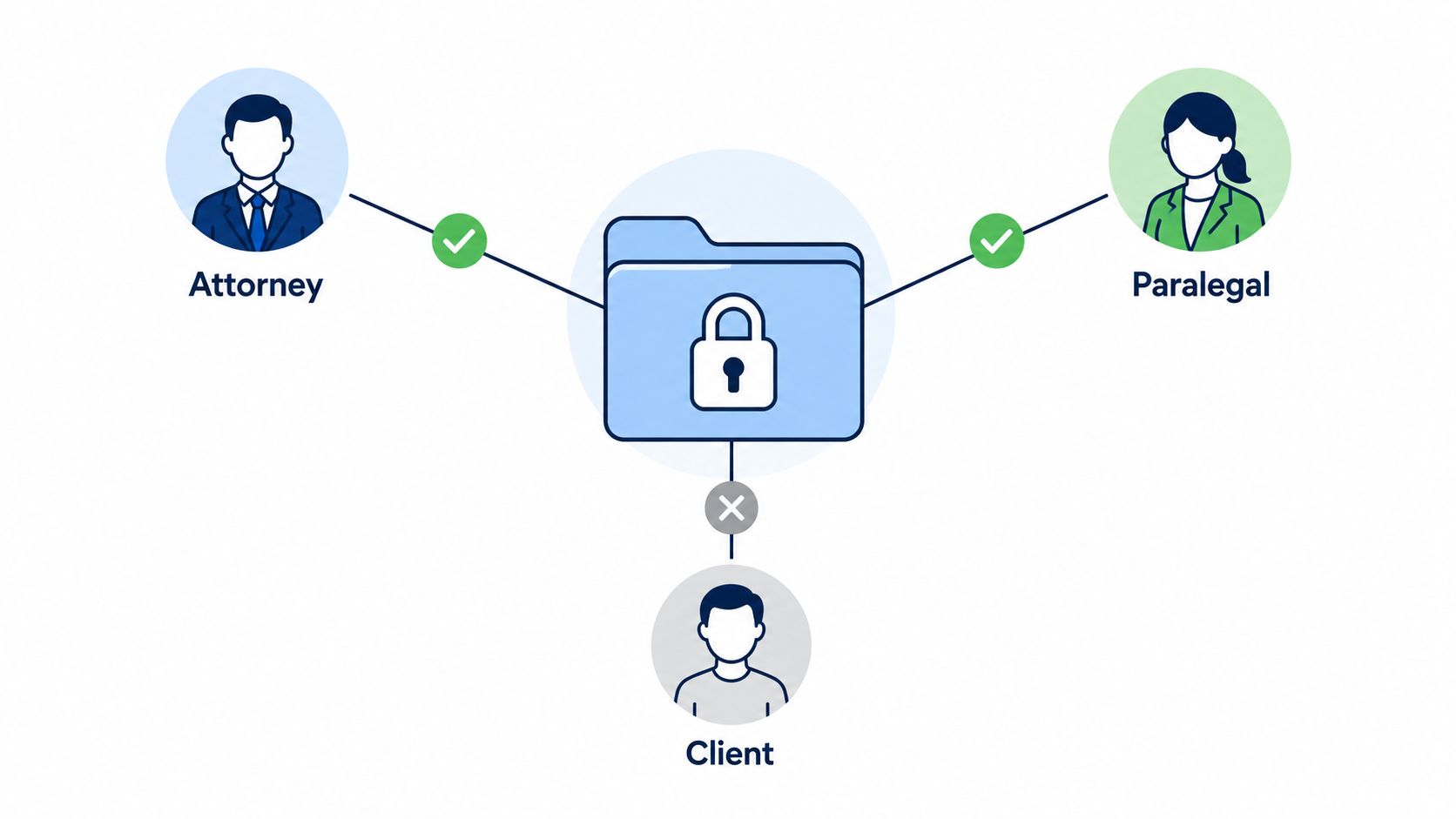
Show staff how the portal connects to intake and case management. A missing authorization uploaded by the client should become a classified document and, where appropriate, a task for review. The checkpoint is a test client account that verifies the client sees only the intended files and cannot access restricted folders.
11. Audits, Compliance Monitoring, and Document Retention and Destruction Policies
A policy that isn't audited is a preference. A retention rule that isn't executed is a statement of intent. PI firms need a process that proves documents were handled consistently from intake through final resolution and that destruction stopped when a litigation hold or other preservation duty applied.
Create an annual audit calendar with owners for repository structure, access rights, sharing activity, version control, privilege handling, backup recovery, retention schedules, and staff training. Audits should sample real matters, not only review written policies. Look for unassigned intake records, external links that remain active, missing metadata, duplicate files, unresolved review flags, and unauthorized storage locations.
The adoption gap is visible in information-governance data. Only 19% of organizations with information-governance policies regularly audited compliance, and 40% allocated no staff time for IG training, according to AIIM's information-governance findings. A PI firm shouldn't treat training as optional, especially when staff handle PHI, privileged communications, and litigation materials every day.
Define retention by matter type, document category, jurisdiction, client agreement, and legal obligation. When a matter reaches its approved disposition point, the system should identify eligible materials, check for holds, require authorization, and create a destruction record showing what was destroyed, when, by whom, and under which policy.
Preservation holds must override routine destruction. Identify affected matters, suspend automated deletion, notify relevant custodians, and document release decisions. Don't destroy a file because a settlement closed if a dispute, lien issue, audit, or related claim still requires preservation.
The trade-off is storage burden versus defensibility. Keeping everything indefinitely increases exposure and makes retrieval harder. Destroying too aggressively creates risk. The checkpoint is a completed audit with remediation deadlines, evidence of completion, and a re-audit of unresolved findings.
11-Point Document Management Best Practices Comparison
| Title | Implementation complexity | Resource requirements | Expected outcomes | Ideal use cases | Key advantages |
|---|---|---|---|---|---|
| Centralized Document Repository with Standardized Organization | Moderate, taxonomy and standards planning | Setup time, storage, training, possible automation tools | Faster retrieval, less duplication, consistent filing | Multi-case firms, onboarding, high-volume document flow | Predictable structure, audit trails, improved collaboration |
| Automated Medical Records Extraction and Summarization | High, AI selection, training, integration | Software licenses, validation reviews, pilot cases, IT support | Large reduction in manual review time, consistent chronological summaries | Personal injury, mass torts, heavy medical-record volumes | Time savings, reduced human error, scalable review capacity |
| Document Metadata and Full‑Text Indexing for Advanced Search | Moderate–High, indexing and schema design | Indexing compute, storage, search platform, user training | Rapid search, pattern discovery, foundation for analytics | Discovery-heavy litigation, trial prep, large archives | Powerful filtered search, saved queries, context snippets |
| Workflow Automation for Intake, Triage, and Case Handoffs | High, integrations and data mapping | IT/integration support, API access, configuration effort | Consistent routing, reduced manual entry, synchronized timelines | High-throughput intake, multi-team handoffs, firms with case systems | Fewer data errors, unified case view, measurable audit trails |
| Secure Intake and PHI Handling With Access Controls | Moderate, RBAC design and policy setup | Secure platform, admin time, MFA, training | Protected PHI, controlled sharing, HIPAA-aligned handling | Sensitive medical files, regulated practices, expert access needs | Granular permissions, audit logs, privilege segregation |
| Version Control and Document Change Tracking | Low–Moderate, enable/version policies and training | Storage for versions, system with history features | Full edit history, recoverability, clearer collaboration | Draft-heavy work, document approvals, regulatory compliance | Restore points, accountability, change visibility |
| Quality Assurance, Redaction, and Privilege Protection | Moderate–High, review gates and redaction workflows | Reviewer time, redaction tools, privilege logging processes | Fewer privilege waivers, sanitized productions, verified outputs | Document production, discovery responses, demand drafting | Defensible redactions, privilege logs, reduced disclosure risk |
| Integration with Case Management and Practice Management Systems | High, API, SSO and mapping work | IT expertise, integration budget, vendor cooperation | Synchronized records, reduced duplicate entry, accurate billing | Firms using multiple platforms, firms needing billing sync | Single source of truth, automated population, operational efficiency |
| Secure Cloud Storage With Redundancy and Disaster Recovery | Moderate, provider selection and migration planning | Cloud subscriptions, BAAs, migration effort, monitoring | Data resilience, scalable storage, faster disaster recovery | Firms needing offsite backups, scalability, ransomware protection | Redundancy, encryption, compliance certifications |
| Client Portal Access for Collaboration and Transparency | Moderate, portal setup and permission policies | Portal platform, onboarding resources, client support | Reduced status inquiries, improved client engagement, secure uploads | Client-facing practices, frequent status updates, remote intake | Better communication, self-service uploads, interaction audit trail |
| Audits, Compliance Monitoring, and Document Retention/Destruction Policies | Moderate–High, policy development and audit cadence | Compliance staff/time, monitoring tools, legal oversight | Identified compliance gaps, defensible retention, reduced legal risk | Regulated firms, large archives, firms subject to audits | Risk reduction, documented processes, storage cost control |
Make the Checklist Operational
Document management best practices become valuable when they survive a busy intake day, a staff transition, a contested demand, and a closing file. The firm shouldn't implement every setting at once. A phased rollout reduces disruption and reveals where the actual workflow differs from the written policy.
Start with the foundation. Define the repository, matter structure, naming rules, metadata fields, access classes, version statuses, retention schedule, and litigation-hold procedure. Assign an owner for each rule. A system without ownership will drift, even if the initial configuration looks disciplined.
Next, pilot the high-value workflow on a limited set of matters. Connect secure intake to classification, medical-record extraction, chronology review, search indexing, and case-management updates. Choose matters with different levels of record complexity and involve the people who file, review, edit, and approve documents. Record exceptions rather than hiding them. An exception often identifies a missing field, a confusing permission, or an approval step that needs redesign.
Ares can support the medical-review and demand-drafting portion of that workflow by ingesting case files, extracting dates, diagnoses, treatments, providers, and symptom chronology, and producing organized summaries for attorney review. The firm remains responsible for checking the source records, deciding whether a fact supports causation or damages, correcting errors, and approving any demand language.
The final phase formalizes quality assurance, redaction, privilege review, training, audits, and performance monitoring. Training should be role-specific. Intake staff need filing and escalation rules. Paralegals need search, version, and review procedures. Attorneys need verification, privilege, redaction, and approval controls. Administrators need access reviews, recovery testing, and retention enforcement.
Track operational indicators that reveal whether the system is helping:
- Retrieval time: Measure how long staff take to locate a requested record or approved draft.
- Unassigned intake documents: Review records that entered the firm but have no owner or next action.
- Duplicate uploads: Identify repeated files that create confusion and inflate storage.
- Review turnaround: Monitor the time from medical-record receipt to completed chronology review.
- QA corrections: Categorize errors found in summaries, demands, redactions, and metadata.
- Access exceptions: Record temporary permissions, unusual downloads, and failed access attempts.
- Portal adoption: Monitor whether clients use the portal for intended uploads and communications.
- Retention completion: Confirm that eligible files are reviewed, held when necessary, and destroyed with evidence.
Don't treat these indicators as a race to improve a dashboard. Use them to find friction and risk. A shorter retrieval time isn't useful if staff bypass permissions. Faster extraction isn't useful if attorneys stop checking source records. Fewer stored files aren't useful if the firm can't prove that destruction was authorized and defensible.
The strongest operating model combines centralized control with practical flexibility. Staff should have a fast path for ordinary work and a clear escalation path for unusual records, urgent deadlines, access requests, privilege questions, and preservation concerns. Automation should route, classify, extract, flag, and remind. Legal judgment should determine what the evidence means and what the firm can safely send, produce, retain, or destroy.
Review the system after major workflow changes, new vendors, staffing changes, security events, and shifts in case volume. Update the documentation standard, retrain affected users, and test the revised process on real matters. A document repository is only one component. The defensible system is the entire chain from first upload to final disposition.
Ares helps personal-injury firms turn uploaded medical records into organized summaries, chronologies, and demand-drafting support for attorney review. Use Ares to evaluate a controlled medical-review workflow that keeps extraction automated while leaving permissions, verification, privilege decisions, and retention responsibility with your firm.