

If your personal injury firm feels like it’s drowning in medical records, symptom timelines, and demand letter drafts, you’ve hit a familiar wall. This isn't just about being busy—it's a systemic bottleneck that caps your caseload and gums up the works on settlements. For a modern PI practice, document automation legal software isn’t a perk anymore; it's a strategic imperative that turns chaotic case files into structured, usable information.
Why Manual Document Workflows Are Unsustainable
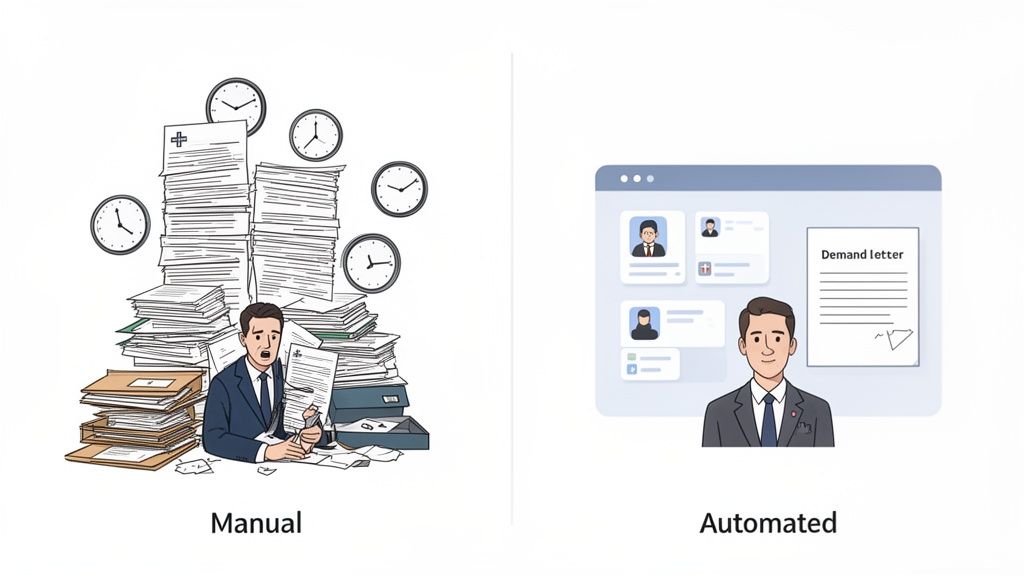
The old way of handling documents in a personal injury practice is simply breaking down. Paralegals and attorneys lose countless hours manually digging through mountains of medical records, trying to piece together treatment histories, and drafting every demand letter from the ground up. This isn't just slow—it’s a recipe for human error and creates massive drags on your firm's profitability.
Think about it: every minute your team spends on repetitive administrative tasks is a minute they aren't spending on case strategy, talking to clients, or negotiating a better settlement. This manual grind puts a hard ceiling on how many cases you can manage effectively, which directly throttles your firm's growth and revenue.
The True Cost of Inefficiency
The real price of sticking with manual processes goes far beyond wasted time. Inconsistent formatting in demand letters, a missed detail in a medical summary, or a delayed filing can seriously weaken your negotiating stance and, in some cases, even harm the outcome. Let's not forget the administrative overload, which is a major driver of burnout—a problem plaguing the entire legal field.
Does any of this sound familiar?
- Delayed Case Progression: Building a complete medical timeline from a dozen different providers can take weeks of manual work, pushing back the entire demand package process.
- Inconsistent Quality: When you don't have standardized templates and automated data entry, the quality of your documents can be all over the place, depending on who prepared them.
- Limited Scalability: Your firm’s capacity is chained to the number of hours your team can physically pour into paperwork. Scaling up means hiring more people, not working smarter.
The heart of the problem is that you have highly skilled legal professionals stuck doing low-level data entry instead of high-value legal work. It’s a profound misallocation of talent and resources—and it's exactly what automation is built to fix.
Let's look at how this plays out in a typical PI case. The contrast between a manual and an automated approach is stark, especially when you break it down by common tasks.
Manual vs Automated Document Workflows in PI Cases
| Task | Manual Approach (Per Case) | Automated Approach (Per Case) | Key Benefit |
|---|---|---|---|
| Medical Record Review | 10-20 hours of manual reading and summarizing | 1-2 hours for AI-powered review and data extraction | Frees up paralegal time for higher-value analysis |
| Medical Chronology | 5-8 hours of copy-pasting and organizing data | 30 minutes to auto-generate from extracted data | Dramatically reduces errors and ensures consistency |
| Demand Letter Draft | 3-5 hours of writing and inserting facts/figures | 15 minutes to generate a data-populated first draft | Faster turnaround and higher-quality starting point |
| QA & Proofreading | 2-3 hours of meticulous human review | 1 hour of reviewing an already structured document | Focus shifts from finding typos to verifying substance |
As you can see, the time savings are immediate and significant. Automation isn't about replacing people; it's about reallocating their expertise to where it matters most: strategy and advocacy.
The need for a better system is undeniable. Today's AI-powered tools are giving legal teams back a staggering amount of time. We're seeing personal injury firms reclaim up to 240 hours per lawyer per year by implementing sophisticated document automation. This shift completely removes the manual drafting and review bottlenecks, allowing firms to finally focus on what drives results. You can learn more about these legal tech benchmarks and see how other firms are making it happen.
Building a Foundation for Successful Automation

It’s tempting to jump straight into software demos when you hear the promise of automation. But from my experience, that's putting the cart way before the horse. A lasting transition to document automation legal technology starts with a hard look in the mirror at your firm's current workflows.
You can't fix the bottlenecks until you know exactly where they are. This initial audit is your roadmap. It's about meticulously tracking how documents flow through your firm right now—from the first client call to the final demand letter. The whole point is to find those repetitive, mind-numbing, and error-prone tasks that are practically begging to be automated.
Pinpointing Your Automation Opportunities
Your first move is to hunt down the high-volume, low-complexity work that’s eating up your team's day. For a personal injury practice, these are usually hiding in plain sight. We're talking about the daily grind that has your best paralegals stuck doing administrative tasks instead of high-value case work.
Grab a notepad and start a checklist. Here are the usual suspects:
- Medical Record Summarization: Seriously, how many hours are spent poring over hundreds of pages of records just to build a simple timeline? This is often the biggest time-sink.
- Initial Demand Letter Drafting: Is someone still typing out every demand letter from scratch, plugging in the same client details and case facts over and over?
- Client Intake Forms: Think about the manual data entry it takes to move information from a client's form into your case management software.
- Discovery Responses: What parts of answering interrogatories and RFPs involve looking up and re-typing the same information?
Once you’ve identified these tasks, put some numbers to them. If you discover that compiling a demand letter package consistently takes 10 hours per case, you’ve just established a powerful benchmark for improvement.
The most successful automation projects I've seen target a frequent, painful task and deliver a massive, undeniable time savings. This gives you an immediate win and builds the momentum you need to get everyone on board.
Setting Clear and Tangible Goals
With your pain points identified, it's time to set specific, measurable goals. Vague ambitions like "improve efficiency" won't cut it. You need concrete targets that clearly define what success will look like for your firm.
Think in terms of tangible business outcomes. Your goals should sound more like this:
- Cut demand letter prep time from 10 hours to less than 1 hour per case by the end of Q3.
- Boost caseload capacity per paralegal by 25% within six months—without hiring anyone new.
- Completely eliminate manual data entry errors in our medical chronologies.
Goals like these do more than just help you measure ROI down the line; they become your guide for choosing the right vendor. You'll walk into those demos knowing exactly what problems you need their software to solve. To truly build that foundation, it also helps to understand the tech involved. A key concept is Intelligent Document Processing (IDP), which is how modern tools can actually read and pull data from unstructured documents like a doctor's handwritten notes.
Securing Team Buy-In from the Start
This might be the most important piece of the puzzle: your people. Pushing new technology on a team without their input is a surefire way to meet resistance. The trick is to frame automation as a tool that empowers your staff, not replaces them.
You have to communicate that the goal is to get rid of the tedious work they hate so they can focus on what matters. No paralegal dreams of spending a full day creating a medical timeline. They'd much rather use that time to dig for that one piece of evidence that wins the case.
This is the essence of change management. By involving your team in the audit and showing them how automation directly addresses their biggest headaches, you turn them from skeptics into champions. We've written more about this in our guide to legal workflow automation designed to help get your team excited about the change.
Choosing the Right Document Automation Partner
Picking the right software for your personal injury firm is far more than a technical decision—it's about finding a genuine strategic partner. The platform you choose will weave itself into the fabric of your practice, directly impacting case efficiency, data security, and your team's sanity. This isn't about ticking boxes on a feature list; it's about finding a tool that fundamentally gets the chaos and complexity of personal injury litigation.
The market for document automation legal software is crowded, but a one-size-fits-all solution is a recipe for disaster in a PI practice. You need a partner whose technology speaks the language of medical records, diagnoses, and treatment timelines.
Prioritize PI-Specific AI and Functionality
Most document automation tools are built for the predictable world of corporate contracts or real estate forms. For a personal injury firm, that’s a non-starter. Your team is swimming in unstructured, specialized data—from a doctor's hurried handwritten notes to dense, multi-page imaging reports. The AI engine driving your software must be trained on this exact type of information.
When you're in a demo, you have to push past the slick presentation. Your focus should be on features that solve the real-world problems your paralegals and attorneys face every single day.
- Medical Jargon Acuity: How does the AI handle the alphabet soup of medical terms, abbreviations, and diagnoses? A system that gets confused between a "contusion" and a "concussion" is a liability, not an asset.
- Data Extraction Precision: The core value lies in its ability to pull specific, critical data points from medical records: dates of service, treatment types, provider names, billing codes. This is what builds the foundation of an automated medical summary.
- Intuitive Case File Management: Your team needs an interface designed for juggling dozens of complex cases. It has to be simple to upload documents from a dozen different providers and see them instantly organized into a single, clean case narrative.
Choosing a vendor is like hiring a specialist. You wouldn't ask a corporate lawyer to handle a catastrophic injury case, and you shouldn't ask a generalist AI to decipher an orthopedic surgeon's report.
Scrutinize HIPAA Compliance and Security
In a personal injury practice, handling Protected Health Information (PHI) is a constant, high-stakes game. When you introduce a tech vendor into that process, their security posture becomes your security posture. A vague promise of being "secure" is meaningless.
HIPAA compliance is the absolute, non-negotiable table stakes. You have to verify it, and that means doing more than asking a simple yes-or-no question.
A truly compliant partner will provide multiple layers of security:
- Business Associate Agreement (BAA): This is the big one. A BAA is a legal contract that obligates the vendor to protect PHI with the same rigor your firm does. If a vendor balks at signing a BAA, the conversation is over. Walk away.
- End-to-End Encryption: Your client's most sensitive information must be locked down tight, both while it's being uploaded (in transit) and while it's stored on their servers (at rest).
- Robust Access Controls: The software must let you set granular permissions. You need to control exactly who on your team can view or edit specific case files.
When you get to this part of the conversation, don't be shy. Dig into their security protocols. Our own guide on achieving HIPAA-compliant document management offers a detailed checklist you can use to grill potential vendors.
Ask the Tough Questions During Demos
The sales demo isn't just for them to show off; it's your chance to pressure-test the software with your firm’s reality. Generic, canned presentations are a waste of time. Show up prepared with specific, challenging questions that reflect the messy, imperfect documents you actually work with.
Here are a few pointed questions to get the ball rolling:
- "How does your platform handle scanned, low-quality, or handwritten physician notes?"
- "Can we see an example of how your AI extracts data from a multi-provider record that's hundreds of pages long?"
- "Show us how we can customize the output to match our firm’s specific demand letter structure and tone."
- "What's the workflow for correcting the AI if it misinterprets a piece of data?"
The answers you get—or don't get—to questions like these will tell you more about a platform's real-world capabilities than any marketing slick ever will.
The legal world's embrace of AI has accelerated for a reason: document automation is proven to slash manual work and lock down compliance, especially in a field as document-heavy as personal injury law. This isn't just a trend; it's a fundamental shift. PI firms that were once drowning in medical records are now using AI to automate their review and drafting. Discover more insights about these legal tech trends and see how the right platform turns a mountain of disorganized files into a structured, settlement-ready demand package in minutes. Your mission is to find a partner who not only delivers this technology but also understands the powerful strategic advantage it gives your practice.
A Phased Approach to Implementation
This is where the rubber meets the road. Going from a well-researched strategy to a full-blown rollout of document automation software can feel like a massive, disruptive undertaking. The secret to getting it right isn't a big bang launch; it’s starting small, proving the concept, and building momentum one win at a time.
Your journey shouldn’t start with a firm-wide mandate that sends everyone scrambling. Instead, begin with a carefully chosen pilot project. Think of it as your controlled experiment—a chance to work out the kinks and show real, tangible results before you even think about expanding. By keeping the initial scope tight, you minimize risk and create a powerful internal case study that does the selling for you.
Launching Your Pilot Project
The goal here is simple: prove that this new tool can solve a real, measurable headache for your team.
First, you’ll want to select a small, motivated group. I usually recommend one tech-savvy attorney and one or two paralegals who are genuinely curious about new technology. These folks will become your internal champions, the ones who can later tell their colleagues, "You have to see this."
Next, pick a few representative cases. You’re not looking for the unicorn case file; you want typical personal injury matters that involve the document-heavy tasks you're trying to fix, like slogging through medical records to draft a demand letter. The cases need to be complex enough to give the software a real workout, but not so unusual that the positive results seem like a fluke.
Your pilot phase needs clear, defined goals:
- Test the Workflow: Can the team actually upload documents, let the AI pull the data, and generate a first draft that’s genuinely useful?
- Refine Templates: How much tweaking does it take to get those AI-generated medical summaries and demand letters to match your firm’s specific style and standards?
- Measure Initial Impact: This is critical. You need to track the time spent on these pilot cases and compare it directly to the hours logged on similar cases handled the old-fashioned way.
A successful pilot project is your best marketing tool. When other teams see the pilot group finishing demand packages in a fraction of the time, adoption becomes a pull, not a push.
Before you can even launch a pilot, you have to choose a partner. The infographic below simplifies the evaluation process, hitting the key points you need to consider when vetting a legal AI vendor.
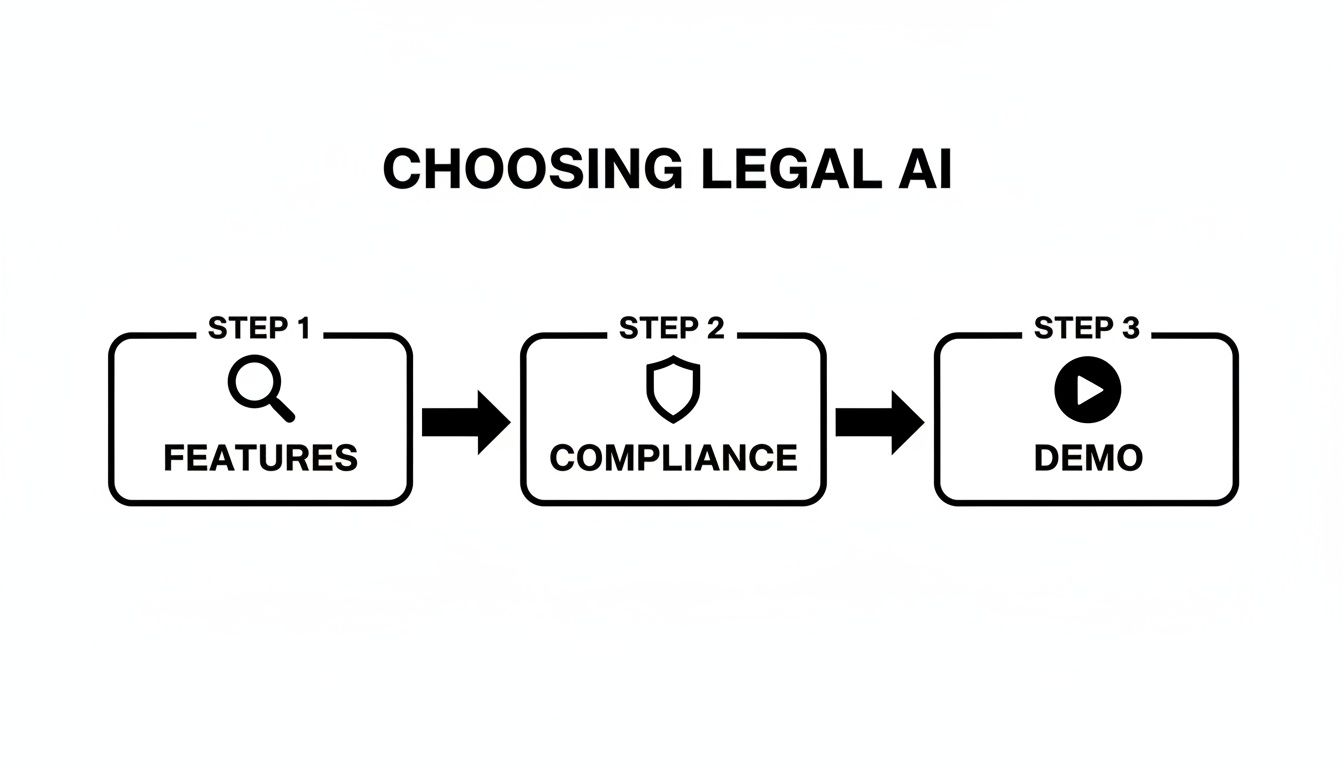
This highlights the essential checkpoints—features, compliance, and a live demo—that ensure the technology is the right fit for your firm’s unique needs before you commit any serious resources.
Configuring Your First Templates
With the pilot team in place, the focus shifts to the practical, hands-on work of configuration. This is where you teach the software to produce documents that look like they came from your firm, not a generic template. Most modern platforms make this surprisingly intuitive, often using a simple "what you see is what you get" (WYSIWYG) editor.
I always advise starting with your most frequently used, data-heavy document: the medical summary or chronology. Work with your pilot team to set up the output so it includes the exact fields you need—dates of service, provider names, diagnoses, treatment costs, you name it. The aim is to create a standardized, repeatable format that makes every medical history clean and easy to read.
From there, you can tackle the demand letter. The best automation tools let you build templates with dynamic fields that pull information directly from the case file. You'll map data points like the client’s name, accident details, and total medical specials to placeholders in your letter. Once it’s set up, every draft is populated with the correct information automatically.
Embracing the Human-in-the-Loop Model
One of the biggest misconceptions I hear is that document automation is here to replace legal professionals. That couldn't be further from the truth. The most successful firms I've worked with adopt a human-in-the-loop model.
This approach is all about collaboration. It uses technology for what it does best—processing massive amounts of data and handling the initial grunt work—while freeing up your talented team for strategic oversight.
Here’s what that partnership looks like in a PI firm:
- AI Does the Heavy Lifting: The software plows through hundreds of pages of medical records, extracts every key fact, and organizes it into a structured timeline. It then uses that data to generate a comprehensive first draft of the demand letter.
- Paralegals Provide Oversight and Nuance: Your paralegals review the AI-generated summaries. They aren't bogged down by manual data entry anymore. Instead, they’re in a quality control role, verifying accuracy, adding crucial context, and spotting subtle details the AI might have missed. Their expertise is amplified, not sidelined.
- Attorneys Apply Legal Strategy: By the time the file gets to the attorney, it’s clean, organized, and comes with a solid draft. Their time is now spent on high-value work: sharpening legal arguments, crafting a compelling narrative, and adding the strategic nuance that drives better settlements.
For plaintiff-side litigation, this model is a game-changer. The time saved on tasks like drafting demand letters and discovery responses is enormous. Automation technology doesn't replace attorney judgment; it gives it a running start, providing a critical edge for firms looking to scale their caseloads. Many high-volume firms find they can handle a greater number of matters without adding staff. You can explore more about AI-powered drafting best practices to see exactly how firms are putting this into practice. It’s a collaborative system that maximizes the value of both your technology and your people.
Measuring Success and Calculating Your ROI
After you’ve rolled out a new system, it’s tempting to just go by gut feeling. Your team might feel more efficient, and cases might seem to move faster. But to truly justify the investment in document automation legal technology, you need to get beyond anecdotes and look at the hard data.
Proving the value of automation isn’t about guesswork; it’s about having a clear framework for measuring success. This means defining the right key performance indicators (KPIs) before you start and tracking them consistently. Without metrics, you’re just hoping for a good return on investment (ROI). With them, you build an undeniable business case for your firm's growth.
Defining Your Key Performance Indicators
First things first, you need a baseline. You have to know where you started to see how far you’ve come. Your KPIs should be specific, measurable, and tied directly to the headaches you were trying to solve in the first place.
For a personal injury firm, the most powerful metrics almost always circle back to time and capacity. These aren't just numbers for a report; they represent the operational health of your entire practice.
Here are a few essential KPIs I always recommend tracking:
- Hours Saved Per Case: This is the most direct measure of new efficiency. Figure out the average time your team spent on medical record review and demand letter drafting the old way. Now, compare that to the time it takes with your new, AI-assisted workflow. The difference is pure gold.
- Increased Caseload Capacity: This one is huge. How many more cases can a single paralegal or attorney realistically manage now? If a paralegal who was swamped with 25 cases can now handle 35 without burning out, that’s a massive operational win.
- Demand Letter Turnaround Time: Start the clock from the moment you have all the medical records in hand and stop it when the demand package goes out the door. Shaving this down from weeks to just a few days dramatically speeds up your entire settlement timeline.
These data points paint a clear, quantitative picture of the software’s real-world impact. They take the fuzzy idea of "being more efficient" and turn it into concrete numbers that speak directly to your firm's bottom line.
A Simple Formula for Calculating ROI
Once you’re tracking your KPIs, calculating a basic ROI is surprisingly straightforward. The formula is all about weighing the cost of the software against the tangible value it generates. While a full-blown financial analysis can get complicated, a simple approach often gives you all the insight you need.
Here’s a practical formula to get you started:
ROI (%) = [ (Value of Reclaimed Hours + Additional Revenue from Increased Capacity) - Software Cost ] / Software Cost x 100
Let's walk through a real-world scenario. Imagine a paralegal earning $40/hour reclaims 10 hours per case. With a caseload of 10 cases per month, that’s 100 reclaimed hours, which translates to a value of $4,000.
Now, if that freed-up time allows the firm to take on just two extra cases a month, generating an additional $5,000 in fees, the total value created each month is $9,000.
If your software costs $1,500 per month, the math looks like this:
- Value: $9,000
- Cost: $1,500
- Net Gain: $7,500
- ROI: ($7,500 / $1,500) x 100 = 500%
That’s a powerful number to bring to any partner meeting. You can explore more about how different types of law firm automation software drive these gains in our related guide.
The Powerful Qualitative Benefits
Of course, not every benefit fits neatly into a spreadsheet. The qualitative returns from document automation are just as important—and they contribute to a healthier, more competitive firm in the long run.
The most overlooked ROI is the strategic advantage you gain. When your team has instant access to organized medical data and can spot treatment gaps in minutes, you walk into every negotiation with more confidence and leverage.
These "soft" benefits have a very real impact on your firm’s success. They include things like:
- Improved Team Morale: Taking the soul-crushing administrative grind of manual review off your team’s plate is a game-changer for morale. It reduces burnout and lets your skilled professionals focus on the high-value, strategic work they were actually hired to do.
- Enhanced Document Quality: Automation brings consistency. Every demand letter follows the same proven structure, and every medical summary is clear and comprehensive. This elevates your firm’s professional image with every document you send.
- Better Strategic Insights: AI-powered tools can surface patterns a human might easily miss during a manual review—like a critical gap in treatment or a conflicting diagnosis. This empowers your attorneys to build much stronger arguments and stay one step ahead of the defense.
Answering Your Document Automation Questions
Diving into any new technology brings up questions, and that's a good thing. It’s especially true when you're talking about systems that handle sensitive client data and touch long-standing firm workflows. When I talk with personal injury firms about automation, the same concerns around security, staffing, and the tech's actual capabilities almost always come up.
Let's tackle these common questions head-on so you can get the clarity you need.
Will Document Automation Replace My Paralegals?
Not a chance. In fact, it’s the exact opposite. The goal here is to elevate your team, not eliminate it.
This technology is designed to take the most tedious, mind-numbing work off your paralegals' plates—the manual sifting, the data entry, the hours spent trying to piece together a medical timeline from a stack of records. When you free them from that grind, they can finally focus on higher-value work.
Their role evolves. They become the supervisors of the system, verifying the accuracy of AI-generated summaries and spotting the subtle details that only a human can. They can spend more time collaborating with attorneys on case strategy. Automation turns them into hyper-efficient case managers, making them more valuable than ever.
Think of it this way: automation handles the what—extracting facts and dates—so your team can focus on the why and the how—building a winning argument.
How Secure Is My Clients' Sensitive Health Information?
This should be your first and most important question for any potential vendor. For a personal injury firm, HIPAA compliance is absolutely non-negotiable. This isn't just a checkbox; it’s a legal and ethical mandate backed by serious security measures.
A truly compliant platform will have robust safeguards built in to protect your clients' Protected Health Information (PHI). Look for these specifics:
- End-to-End Data Encryption: This means client data is unreadable from the moment you upload it, while it’s in transit, and while it's stored on their servers.
- Strict Access Controls: The software must let you decide precisely who in your firm can view, edit, or download case files. Information should always be on a need-to-know basis.
And here's the real litmus test: a legitimate vendor will readily sign a Business Associate Agreement (BAA). This is a binding legal contract that holds them to the same high data protection standards you follow. If a vendor hesitates or won't sign a BAA, walk away. It's a massive red flag.
How Much Training Is Required to Get My Team Onboard?
The days of needing weeks to learn a clunky piece of software are pretty much over. Modern automation tools are built to be intuitive, which drastically shortens the learning curve. In my experience, most teams can get comfortable with the core functions after just a few hours of focused training.
The most effective rollouts I've seen combine a short, vendor-led training session with immediate, hands-on practice. A one or two-hour session followed by a small pilot program with a handful of real cases is a great approach. It lets your team build confidence and see the benefits right away, which is the best training tool there is.
Can Automation Handle Complex Cases with Multiple Providers?
Yes, and frankly, this is where AI-powered automation truly shines. Trying to manually weave a coherent story from a dozen different medical providers is one of the biggest headaches in personal injury law.
The best tools are built for exactly this kind of complexity. They can ingest records from hospitals, specialists, physical therapists, and imaging centers, then automatically pull out and organize all the key data into a single, unified chronology. The software pieces together dates, diagnoses, and treatments across all the different documents, giving you a clear overview that makes it easy to spot treatment gaps or the full scope of an injury.
If you want to see how this works in practice, exploring some specific legal document automation use cases can be really eye-opening. This capability isn't just a time-saver; it's a huge strategic advantage in complex cases where the timeline is everything.
Ready to see how Ares can eliminate the bottlenecks in your personal injury practice? Our AI-powered platform automates medical record review and demand letter drafting, turning chaotic case files into clear, actionable insights in minutes. Settle faster and claim bigger. Start your journey with Ares today.