

Document management for a law firm is more than just digital storage—it’s a specialized system built to centralize, secure, and make sense of all your case information. Think about everything from medical records to client emails. Unlike a simple cloud drive, a proper document management system is designed to handle the sheer volume and complexity of legal files, turning what feels like chaos into a real strategic advantage. For personal injury practices, this means transforming a jumble of evidence into clear, actionable intelligence.
The Law Firm's Biggest Challenge and Greatest Opportunity

Every modern law firm is drowning in a tidal wave of information. If you're a personal injury attorney, you know it’s not just data—it’s a chaotic flood of medical records, deposition transcripts, expert reports, and an endless stream of emails. Relying on basic digital folders to manage this is like asking a brilliant detective to solve a case while they're literally buried under a mountain of disorganized, unlabeled evidence files.
This digital clutter is a major bottleneck. It slows down case preparation and dramatically increases the risk of missing a critical detail. A simple task, like finding one specific note in a client's thick medical history, can turn into an hours-long scavenger hunt. That inefficiency doesn't just waste billable hours; it directly impacts your firm's ability to build the strongest possible case and serve your clients well.
From Information Overload to Competitive Advantage
The amount of data we're talking about is staggering. Across the globe, law firms are seeing their unstructured data grow by more than 20% every year. This problem is especially acute in litigation-heavy fields where files expand with every new discovery document. This digital sprawl doesn't just drive up costs—it also creates massive security risks, making a better approach essential. You can find more insights on this trend in reports on the growing legal document management software market from sources like Cognitive Market Research.
But buried in this challenge lies a huge opportunity. Effective document management for law firms isn’t just an IT upgrade; it’s a core business strategy. It’s the framework you need to turn that mountain of evidence into a well-organized, searchable library.
Modern systems don’t just store your documents; they actively help you understand what's inside them. This evolution—from simple storage to intelligent analysis—is the key to unlocking new levels of efficiency and insight.
Instead of just holding your files, a dedicated platform can:
- Centralize every document so your team has easy, secure access from anywhere.
- Automate the organization of complex files, like sprawling medical records.
- Enable instant search capabilities, letting you find key facts in seconds, not hours.
AI-powered platforms like Ares are leading this charge, turning what used to be hundreds of hours of manual work into a clean, automated process. This guide will walk you through exactly how to harness that power.
Understanding Document Management for Modern Law Firms
Let's get past the textbook definitions. Think of a document management system as the central nervous system for your law firm’s most critical asset: its information.
Relying on a messy web of shared drives and local folders is like trying to navigate a new city with an old, folded paper map. It gives you a general idea of the layout, but finding a specific address is a slow, frustrating process. A modern document management platform is your firm's Waze or Google Maps. It doesn't just show you where information lives; it gives you the fastest, most direct route to the exact detail you need, right when you need it.
This is so much more than just cloud storage. It’s a strategic framework for running a better, more efficient practice. This system organizes everything—from client intake forms and medical records to motions and court filings—into a single, secure, and searchable hub. It’s the foundation for managing risk, ensuring compliance with standards like HIPAA, and ultimately, building stronger cases for your clients.
The Problem with Digital Filing Cabinets
The real purpose of a document management system is to bring order to the chaos. It takes a jumble of disorganized files and turns them into a structured, reliable asset for your entire firm. This is what separates a professional system from basic storage.
A few key capabilities make all the difference:
- A Single Source of Truth: Every single document related to a case lives in one place. Authorized team members can access it from anywhere, which completely eliminates the risk of someone working from an outdated copy saved on their desktop.
- Find Anything, Instantly: Forget just searching by filename. You can search the full text of every document—including scanned PDFs and images—to find specific names, phrases, or case numbers in seconds.
- Never Lose Your Work: Version control automatically tracks every change made to a document. This ensures your team is always working from the most current draft and gives you the power to look back at previous versions if you ever need to.
This structured approach is what makes information truly useful. For a deeper look at how these features fit into a bigger picture, it's worth exploring the full scope of legal practice management software for law firms.
The difference between these approaches is night and day.
Traditional Filing vs. Modern Document Management
| Feature | Traditional Filing (Digital & Physical Folders) | Modern Document Management System |
|---|---|---|
| Search | Relies on remembering folder names and filenames. No content search. | Full-text search across all documents, emails, and scans. |
| Access | Tied to a specific server or computer. Remote access is often clunky. | Secure, role-based access from any device, anywhere. |
| Version Control | Manual (e.g., "Contract_v3_final_FINAL.docx"). Prone to error. | Automatic, with a complete history of every change and author. |
| Security | Basic permissions. Vulnerable to data loss and unauthorized access. | Advanced encryption, audit trails, and granular user permissions. |
| Collaboration | One person at a time. Relies on emailing attachments back and forth. | Real-time co-authoring and secure document sharing with clients. |
Simply put, one is a passive storage container, while the other is an active system designed to make your firm smarter and more secure.
The Gap Between Need and Adoption
Despite the obvious advantages, many firms are still lagging. A major survey of over 1,200 legal professionals found that while firms say they value features like precedent repositories and standardized templates, actual adoption is shockingly low. Even these highly-desired tools were only used by about one in five people, pointing to a massive untapped opportunity for firms willing to commit. You can see the full breakdown of this adoption gap in the legal industry.
A true document management system for law firms isn't just a digital filing cabinet. It's a strategic tool that enforces consistency, enhances security, and provides a single source of truth for every case file.
The distinction is crucial. A filing cabinet is passive; it just holds whatever you put into it. A document management system is an active partner in your practice, helping you find, manage, and protect information with precision. Making that shift is one of the most important steps a modern firm can take to boost its efficiency and get better results for clients.
Essential Features for High-Performing Law Firms
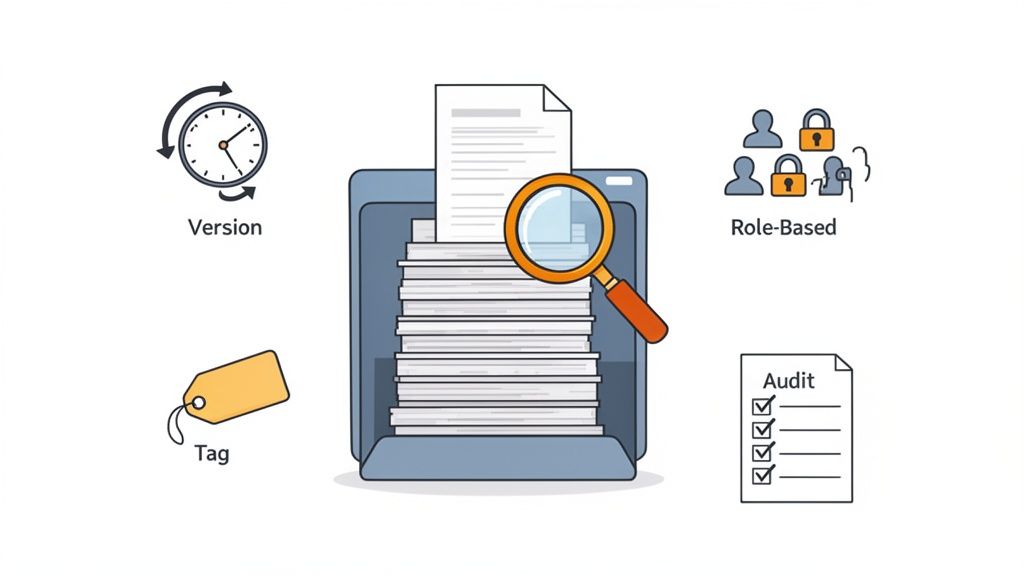
A document management system's real worth isn't about a flashy list of features. It’s about how those tools solve the day-to-day headaches personal injury firms constantly face. The right system does more than just organize your files; it fundamentally improves how you build cases, protect sensitive client data, and win.
Instead of just listing capabilities, let's look at them through the lens of a busy PI practice. This is where the abstract idea of document management for law firms becomes a real, tangible advantage that directly impacts your efficiency and your clients' success.
Advanced Search and Instant Information Retrieval
Picture this: a paralegal is sifting through a client's file containing 2,000+ pages of dense medical records from half a dozen providers. They recall seeing a brief, crucial mention of a symptom—"intermittent numbness"—that could be the key to proving the full extent of an injury. In a server full of folders, finding that one phrase could take hours of frustrating, manual scanning. You might not even find it at all.
This is where a powerful search function becomes a game-changer. A true document management system uses Optical Character Recognition (OCR) to make every single word in every scanned document—even handwritten notes—instantly searchable.
The paralegal can just type "intermittent numbness" into the search bar. Within seconds, the system points them to the exact page and sentence. This isn't just about saving time; it's about building a stronger case.
Bulletproof Version Control
Here's a nightmare scenario that’s all too common. A junior associate, working late to finalize a critical motion, accidentally opens an older draft saved on their desktop instead of the latest one from the shared drive. They pour hours into making detailed revisions, only for the team to discover the mistake right before the filing deadline.
This is the kind of preventable error that creates chaos and malpractice risk. Version control puts a stop to it.
- Automatic History: Every time someone saves a document, the system creates a new, numbered version. You get a complete, unchangeable history of every single revision, showing who made the change and exactly when they did it.
- Clear Current Draft: There's never any guesswork about which document is the "final" one. The system always defaults to the most current version, so your team isn't wasting time on outdated information.
This simple feature keeps everyone on the same page and gives you a defensible record of your work product from its first draft to the final filing.
Secure, Role-Based Access and HIPAA Compliance
As a personal injury firm, you're responsible for a mountain of Protected Health Information (PHI). A data breach isn't just an IT problem; it's a serious ethical violation and can lead to millions in HIPAA fines. A standard cloud drive just doesn't cut it, often offering only all-or-nothing access to entire case folders.
A legal-specific DMS gives you granular, role-based access controls. This lets you decide exactly who can view, edit, or share specific documents or entire folders.
- Paralegals might need access to all documents in their assigned cases.
- Intake Specialists should probably only see initial client intake forms.
- External Medical Experts can be given secure, temporary access to review only the specific records they need—and nothing else.
This kind of layered security is essential for maintaining HIPAA compliance and protecting sensitive client information. Properly managing these permissions is a core function of effective case management for law firms, preventing leaks and safeguarding your clients' privacy.
Detailed Audit Trails for Defensibility
Think of an audit trail as a digital security camera watching over your entire document library. It creates an unchangeable log of every single action taken on every file. It tells you who viewed a document, who downloaded it, who edited it, and the precise time it happened.
This is an incredibly powerful tool for accountability and security. If a question ever arises about how a particular document was handled, you have a time-stamped, factual record to give a definitive answer. This detailed tracking is crucial for defending your firm’s internal processes and proving data integrity. It turns document handling from a matter of trust into a matter of verifiable fact.
How AI is Changing the Game in Legal Document Review
While a solid document management system brings much-needed order to the chaos of case files, Artificial Intelligence (AI) takes things a step further. It represents a fundamental shift from just storing information to actually understanding it.
Think of it this way: AI is like having a team of hyper-focused paralegals who can read, comprehend, and organize thousands of pages of medical records in the time it takes to grab a cup of coffee. This isn't about replacing your team; it's about amplifying their expertise. AI acts as a powerful force multiplier, tackling the most tedious parts of document review with a speed and consistency no human could ever match. This frees up your attorneys and paralegals to do what they do best: build case strategy, connect with clients, and advocate in the courtroom.
Moving From Storage to Intelligence
A traditional document management system helps you find a specific file. An AI-powered system, on the other hand, helps you find a specific, crucial fact buried deep inside that file.
This is exactly what platforms like Ares were built for. Using AI specifically trained on personal injury documentation, these tools read through dense medical records and automatically pull out the most important information. This process turns a mountain of unstructured data—like a 500-page PDF—into structured, actionable intelligence.
Suddenly, instead of a wall of text, you have a clean, organized summary of:
- Diagnoses and Injuries: A straightforward list of every medical condition identified.
- Treatment Timelines: A chronological log of every appointment, procedure, and therapy session.
- Key Providers: A neat list of every doctor, specialist, and facility involved in the client’s care.
- Symptom Mentions: Every reference to pain, limitations, or ongoing issues, pinpointed across the entire record.
This intelligent extraction gives you a high-level overview of a case in minutes, not hours or days. That’s a massive strategic advantage. You can learn more about how technology is reshaping this process in our guide on the role of the document review attorney.
How AI Uncovers the Detail That Wins a Case
Let’s get practical. Imagine a complex personal injury case from a multi-car pile-up. Your client has seen a dozen specialists, generating thousands of pages of medical charts. A junior paralegal doing a manual review will naturally focus on the big-ticket items—the broken femur, the concussion. It’s understandable.
But an AI tool like Ares reads every single page with the same unwavering attention. In doing so, it flags a small note from a physical therapist six months after the accident, mentioning the client’s new complaint of "tingling in the hands." A human eye, skimming for major diagnoses, could easily miss that. But that single detail might be the first documented sign of a developing neurological condition directly tied to the crash.
By connecting that small detail to the larger case narrative, the AI has just uncovered a pivotal piece of evidence. That one finding could dramatically increase the client's settlement by establishing a more severe, long-term injury.
This is the real power of AI in document management for law firms. It’s not just about being faster; it’s about being more thorough and uncovering the facts that win cases.
This shift is already happening. A recent report from Standley Systems highlights that 54% of legal professionals are already using AI for tasks like drafting correspondence. For PI firms, applying this to document-heavy workflows means saving over 10 hours per case and building much stronger claims from the very beginning. The move from manual review to AI-assisted analysis is what separates good firms from great ones.
A Practical Roadmap to Implementation
Switching to a new document management system can feel like a massive undertaking, but it’s entirely manageable when you break it down into a clear, step-by-step process. This isn't just about installing software; it’s about making a fundamental upgrade to how your firm operates. A well-thought-out plan considers both the technology and the people who will be using it day in and day out.
The real work begins long before you sign any contracts. It starts with an honest look at where your firm stands today and a clear vision for where you want to be. This roadmap will guide you through that journey, from the first planning session to getting the entire firm on board.
Stage 1: Assess Your Firm’s Unique Needs
Before you can pick the right tool, you have to truly understand the problems you’re trying to solve. Every firm has its own specific bottlenecks and priorities. The best way to start is by asking very direct questions to figure out what really matters to your team.
For instance, is your single biggest headache the sheer amount of time it takes to review a mountain of medical records? Or is your top concern maintaining bulletproof HIPAA compliance and data security? Nailing down these core needs is the single most important step in this whole process.
To get this right, pull together a small, diverse team—think a managing partner, a senior attorney, a paralegal, and someone from your admin staff. This group can map out your current document lifecycle, from the moment a client walks in the door to when a case is closed, and pinpoint every single point of friction along the way.
Stage 2: Choose the Right Technology Partner
Once you have that clear list of needs, you can start looking at potential software partners. This is about so much more than just comparing feature lists. You're looking for a partner who genuinely gets the unique challenges of a personal injury practice.
Here’s what to focus on:
- Industry Specialization: Does the provider live and breathe the legal world, especially personal injury? A generic corporate DMS won't grasp the nuances of medical records, discovery, or lien negotiations.
- Integration Capabilities: How smoothly will the new system play with your existing case management software, email, and other essential tools? Seamless integration means your team isn't constantly jumping between different programs.
- Support and Training: What kind of backup do they offer? You want a partner who is committed to your team’s success with thorough training and responsive, helpful customer service.
- Security and Compliance: The platform absolutely must have enterprise-grade security and be fully HIPAA compliant. Ask for the nitty-gritty details on their encryption, access controls, and data protection policies.
Stage 3: Plan a Seamless Data Migration
Moving all your existing case files into a new system is often the part that feels the most intimidating. A successful migration all comes down to careful, meticulous planning. The key is to avoid the "big bang" approach where you try to move everything at once.
Instead, start small with a pilot program. Pick one or two tech-savvy team members and migrate just a handful of their active cases into the new system. This lets you test the process on a small scale, iron out any wrinkles, and—most importantly—demonstrate some early wins.
A successful pilot program is your best tool for building momentum. When other team members see a colleague save hours on a case using the new system, their resistance to change quickly turns into genuine curiosity and excitement.
After a successful pilot, you can map out a phased rollout for the rest of the firm. A smart approach is to migrate all new cases first, then work backward to import your other active cases, and finally, archive the older, closed files.
This is what a modern, AI-powered document review workflow looks like—a simple process of uploading, processing, and extracting key data.
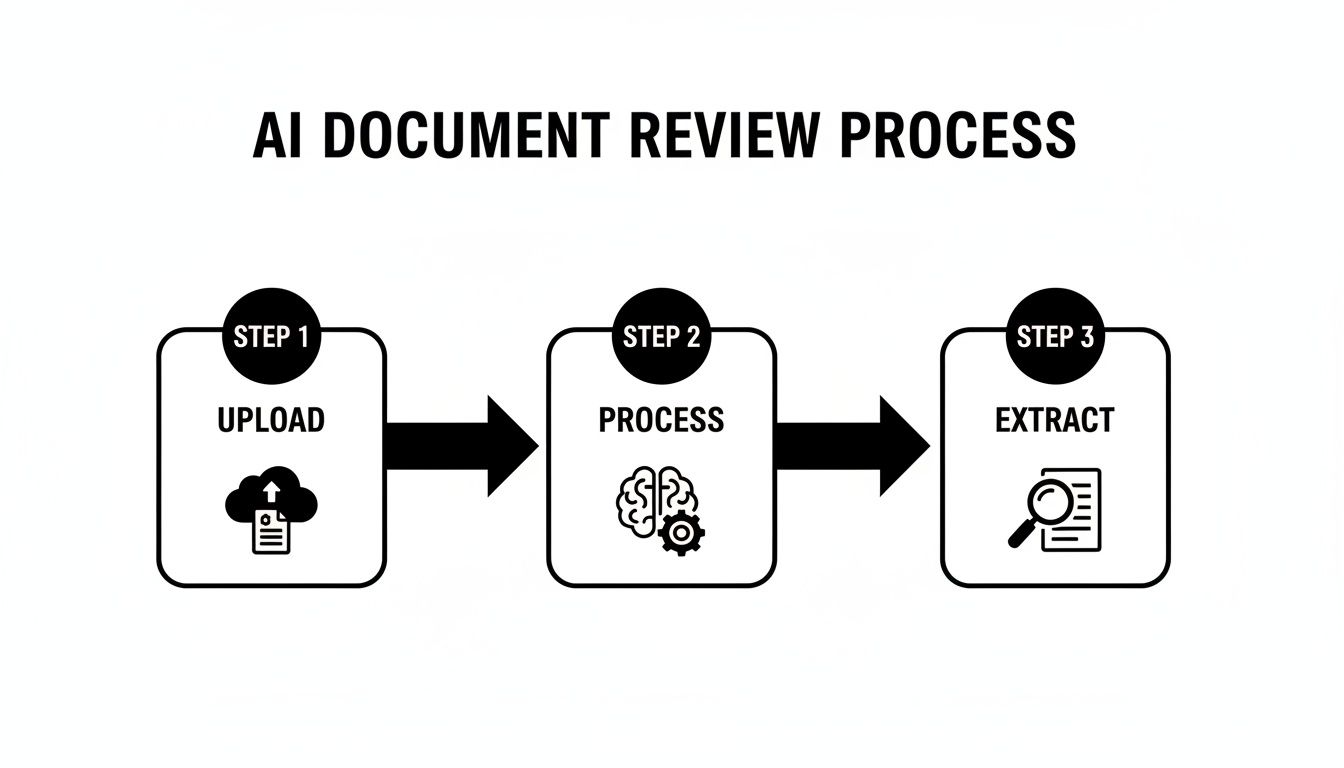
This visual shows how today’s systems simplify incredibly complex tasks, turning what used to be a multi-step manual slog into a streamlined, automated sequence.
Stage 4: Drive Adoption Through Effective Training
Even the most powerful software is worthless if your team doesn't know how—or doesn't want—to use it. Getting past that natural resistance to change is everything. Good training isn’t a single, one-hour webinar. It needs to be an ongoing effort that’s tailored to different people’s jobs.
- Role-Specific Sessions: Paralegals and attorneys need to learn different things. Customize your training sessions to focus on the features each role will use most often.
- Appoint Internal Champions: Find those enthusiastic users from your pilot program and make them your internal experts. They can answer questions from their peers and champion the new way of doing things.
- Focus on the "Why": Don't just show them how to click the buttons. Constantly remind them why the firm is making this change—to save time, eliminate errors, and ultimately build stronger cases for your clients.
At the end of the day, a successful rollout of document management for law firms is a change management challenge. By following a structured roadmap that puts your team's needs first and celebrates the small wins, you can ensure a smooth transition that will truly transform your practice for the better.
Measuring Success Through ROI and Security
Making the switch to a new document management system is a big move. How do you know it's actually working? Success isn't just a gut feeling; it’s measured in tangible results—both in your firm's profitability and in the strength of your data security. This is where a smart investment becomes a real competitive advantage.
The return on investment (ROI) is about so much more than just cutting costs. Sure, you’ll spend less on physical storage and printing, but the real wins are in how your firm operates. Think of it less as an expense and more as a catalyst for growth.
Calculating the True Return on Investment
A solid document management platform directly boosts your bottom line by optimizing your most valuable asset: your team's time. When you automate the tedious, manual work, your staff is free to focus on high-value activities that bring in revenue and secure better outcomes for clients.
Here are a few key performance indicators to keep an eye on:
- Increased Caseload Capacity: By automating processes like medical record review, firms often find they can manage more cases without burning out their team or hiring more staff.
- Faster Settlement Times: When you can pull up a key piece of evidence in seconds or generate a demand letter in a fraction of the time, you shrink the entire case lifecycle.
- Improved Team Morale: Let's be honest, no one enjoys hours of mind-numbing administrative tasks. Eliminating that drudgery reduces burnout and lets your skilled professionals do what they do best: practice law. Recent analysis shows AI can free up around four hours per lawyer per week, time that can be reinvested into the firm.
The most profound ROI comes from unlocking your team's full potential. It’s about converting administrative hours into strategic hours, which directly translates to better results for your clients and healthier profits for the firm.
Security and Compliance as a Core Asset
For any personal injury firm, you’re handling a mountain of sensitive client information. Strong security isn't just a nice-to-have feature; it's the bedrock of your practice. A breach involving Protected Health Information (PHI) can be catastrophic, leading to hefty fines and shattering your firm's reputation.
A dedicated document management system for law firms is engineered from the ground up with these stakes in mind. It provides security layers that basic cloud storage just can't compete with. For a closer look at what this entails, check out our guide on HIPAA compliant document management.
The key security pillars you can't compromise on include:
- End-to-End Encryption: Your data is scrambled and unreadable, both when it's sitting on a server (at rest) and when it's being sent over the internet (in transit).
- Granular Access Controls: You get to decide exactly who can see, edit, or share any given document. This ensures PHI is only accessible on a strict need-to-know basis.
- Comprehensive Audit Trails: Every single action—every view, edit, and download—is logged. This creates a permanent, unchangeable record for accountability and makes compliance checks straightforward.
Future-Proofing Your Firm
Choosing the right platform is also an investment in your firm’s future. Legal technology is always evolving, and a system built on a modern, flexible foundation will grow with you. This ensures your investment continues to deliver value for years, not just months. It's also critical to adhere to data disposal protocols like the NIST SP 800-88 data sanitization standard to ensure complete security when you retire old hardware.
Ultimately, the right document management system isn't an IT expense. It's a strategic investment in your firm’s growth, resilience, and ability to stay ahead of the competition.
Common Questions About Modernizing Your Firm's Document Management
Switching up a core system like document management naturally brings up some important questions. Let's tackle the ones we hear most often from legal professionals who are thinking about making this move.
How Long Does This Actually Take to Set Up?
There's no one-size-fits-all answer here; it really depends on the size of your firm and the state of your current files. For a smaller practice with well-organized data, you could be up and running in just a few weeks. A larger firm with mountains of historical records might be looking at a multi-month project.
The smartest way to approach it is with a phased rollout. Instead of a massive, firm-wide switch on day one, start with a single practice area or a small pilot group. This lets you iron out the kinks on a smaller scale and builds enthusiasm as everyone else sees the positive impact.
Is Storing Client Files in the Cloud Really Secure?
This is probably the most critical question, and the answer is a resounding yes—as long as you choose a platform built specifically for the legal industry. The security in a modern, legal-focused cloud system is light-years ahead of what most firms can achieve with an on-premise server.
Think of a top-tier document management system as more than just storage; it’s a digital vault. It’s designed with multiple, overlapping layers of defense to protect your clients' most confidential information.
Here are the non-negotiable security features you should expect:
- End-to-End Encryption: Your files are scrambled and unreadable both when they're sitting on the server and when they're being sent.
- Detailed Audit Trails: Every single action—every view, download, or edit—is tracked. You always know who did what and when.
- HIPAA Compliance: The platform is engineered to meet the stringent privacy and security rules for handling Protected Health Information (PHI), which is crucial for personal injury cases.
These aren't just nice-to-haves; they are fundamental to protecting your firm from data breaches and unauthorized access.
Will This System Work With the Software We Already Use?
Absolutely. In fact, it has to. The best document management platforms are built to be team players. They're designed to connect smoothly with the other critical tools you rely on every day, like your case management software, billing systems, and email clients like Outlook and Gmail.
This connection happens through something called an Application Programming Interface (API), which essentially acts as a secure translator between different software programs. The end result is that your team can manage documents without constantly jumping from one application to another, creating one central, seamless hub for every case.
What's the Biggest Mistake Firms Make When Adopting a New System?
Hands down, the biggest misstep is getting so focused on the technology that you forget about the people who have to use it every day. You can buy the most advanced platform in the world, but if your team isn't trained properly or doesn't see how it makes their lives easier, they simply won't use it effectively.
Success comes down to good change management. This means you have to invest in thorough, role-specific training and constantly communicate the benefits—like how it eliminates tedious work and helps them find what they need in seconds. When your team views the new system as a tool that helps them win, they'll be its biggest advocates.
Ready to see how AI can eliminate tedious document review and empower your team? Ares is the AI-powered platform built specifically for personal injury firms to claim bigger and settle faster.